
10 Best Web Browsers in 2026 for Speed, Privacy & AI
Compare the best web browsers for privacy, speed, AI, productivity, and daily browsing in 2026.

The best web browser in 2026 depends on what you need it to do. Chrome remains the safest choice for compatibility, Brave is one of the strongest privacy-first Chromium browsers, Safari works best across Apple devices, Edge fits Windows and Microsoft users, and Firefox remains the leading mainstream alternative to Chromium.
For users who research, write, compare sources, and work with AI inside the browser, Sigma is the strongest AI-focused option. It combines page-aware AI, Deep Research, local AI support, private browsing, and built-in productivity tools without requiring users to move constantly between browser tabs and separate chat apps.
Below, we compare 10 leading browsers by privacy, speed, AI capabilities, platform support, compatibility, and everyday use so you can choose the right one for your actual workflow.
Quick picker: choose the best browser by what you need
If you only want the answer, start here. The best browser is the one that fits the job you actually need it to do. A student doing research, a marketer living in AI tools, a gamer, a MacBook user, a privacy-focused user, and a developer testing sites do not need the same setup.
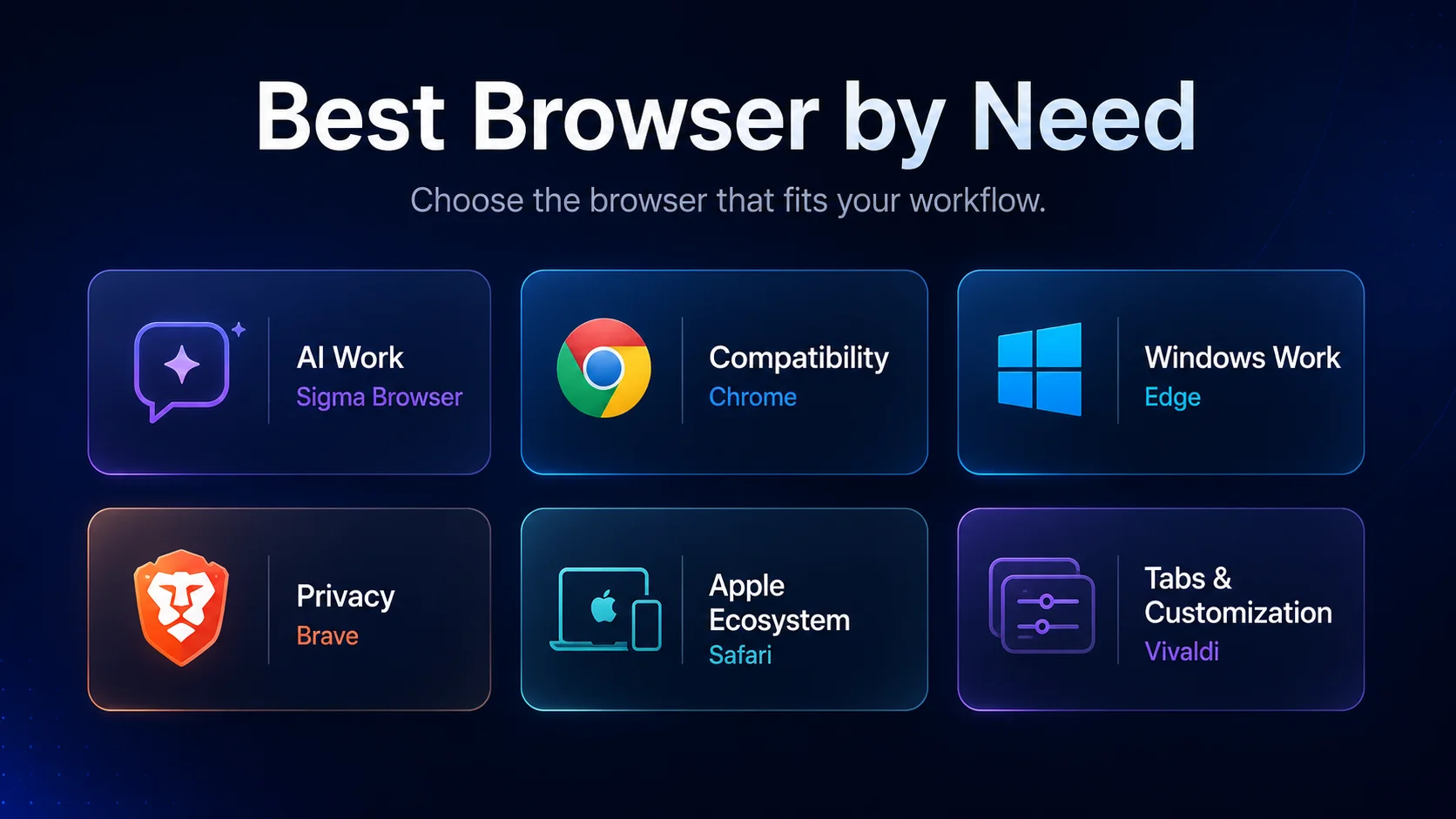
The 10 best web browsers in 2026
This ranking is built around real browsing jobs, not only market share. Chrome and Edge are huge because they are familiar and integrated into major ecosystems. That does not automatically make them the best answer for everyone. In 2026, browsers also compete on AI, private workflows, tab management, research, security, battery life, and whether they reduce or add friction to your workday.
1. Sigma Browser — best web browser for private AI work
Sigma Browser is the best web browser in 2026 if your browser is not just a place to open links. It is for people who research, write, compare sources, summarize pages, work with AI chat, switch between documents, and care about privacy while doing it. Sigma combines a modern browser with built-in AI tools such as AI Chat, Deep Research, page-aware help, an AI agent, local AI options, and private browsing controls.
The reason Sigma deserves the top spot is not that every casual user needs an AI browser. Someone who only checks email and watches YouTube may be perfectly fine with Chrome, Safari, Edge, or Brave. Sigma wins because the browser category is moving toward work surfaces: places where users do research, ask questions, analyze web pages, write outputs, and use AI without constantly copying content between tabs and tools.
That matters for privacy too. Many AI workflows happen in cloud chatbots, separate apps, or extensions that do not always make data handling obvious. Sigma’s strongest angle is that it treats private AI browsing as a core browser job, not an afterthought. Its official site describes Sigma as a free private AI browser with a built-in AI agent, local AI, ad blocker, and no tracking. If you want to understand the local AI side more deeply, read our guide to what local LLMs are and how on-device models change browser privacy.
Sigma is not the browser to choose if you only want the oldest, most familiar default. Chrome and Edge still have stronger habit and ecosystem gravity. But if you want the best web browser for modern AI-assisted work, private research, page summaries, and productivity inside the browser, Sigma has the clearest 2026 reason to win.
2. Google Chrome — best browser for compatibility and extensions
Google Chrome is still the safest answer when compatibility matters more than everything else. If a website, SaaS dashboard, school portal, bank, extension, or internal company tool is tested anywhere first, there is a good chance Chrome is part of that test. The Chrome Web Store also remains the default extension ecosystem for many users, and Google account sync makes the browser easy to use across desktop, Android, ChromeOS, and other devices.
Chrome has also become more relevant in the AI browser conversation. Google promotes Gemini in Chrome as AI assistance that can use the context of open tabs to answer questions, clarify information, and help with tasks. That makes Chrome more than a traditional browser with extensions, especially if you already live in Google Workspace, Gmail, Docs, Drive, YouTube, Android, and Gemini.
The problem is that Chrome is still not the best browser for every kind of user. Privacy-focused users may not want a browser so close to Google’s advertising and data ecosystem. People with heavy tab sessions may prefer browsers that are more opinionated about workspaces and organization. Users who want AI inside a more private browser may prefer Sigma, and users who want tracker blocking by default may prefer Brave or Firefox.
Chrome remains one of the best web browsers, but it is no longer the only obvious answer. If you are already thinking about switching, our Chrome alternatives guide compares the strongest options without pretending that every Chrome user has the same reason to leave.
3. Microsoft Edge — best browser for Windows and Microsoft users
Microsoft Edge is the best web browser for people who already live inside Windows, Microsoft 365, Outlook, OneDrive, Teams, Copilot, and Microsoft account sync. It is no longer just “the browser you use to download Chrome.” Edge is fast, modern, Chromium-based, and deeply integrated with Microsoft’s desktop and work ecosystem.
Edge also has a strong productivity and performance case. Microsoft’s Sleeping Tabs feature automatically puts inactive tabs to sleep to save memory, reduce CPU usage, and improve performance. For Windows laptops with many tabs open, that matters more than tiny benchmark differences. Edge also has security features, vertical tabs, collections, split screen, and Copilot integration, which make it a practical work browser for many PC users.
The downside is that Edge sometimes feels too eager to be helpful. The sidebar, shopping features, Copilot prompts, Microsoft service nudges, and default-browser behavior can annoy users who want a quieter browser. If you like Microsoft’s ecosystem, Edge is excellent. If you want less platform pressure, Brave, Firefox, Vivaldi, Sigma, or Chrome may feel calmer.
For a narrower desktop comparison, see our best browser for Windows 11 guide or our Microsoft Edge vs Chrome breakdown.
4. Brave — best privacy-first Chromium browser
Brave is the easiest recommendation for users who want Chrome-like compatibility with stronger privacy defaults. It is Chromium-based, so most websites and Chrome extensions work as expected, but its privacy posture is very different from Chrome. Brave Shields block trackers, cross-site cookies, phishing, fingerprinting, and more across pages.
Brave can also feel fast in everyday use because it blocks a lot of web clutter before it loads. That does not mean it wins every speed test on every device, but on ad-heavy websites the browser often feels cleaner and lighter. For users who mostly want to reduce tracking, ads, pop-ups, cookie chaos, and Google dependency without giving up Chromium compatibility, Brave is one of the best browsers to try first.
Brave also has Leo AI, but AI is not the main identity of the browser in the same way it is for Sigma, Dia, or Comet. Brave’s core value is private, practical, mainstream browsing. That is a good thing if you want privacy without an experimental interface. It is less ideal if you want your browser to become an AI work assistant.
If you are choosing specifically between private browsers, our Brave vs DuckDuckGo comparison and Brave vs Chrome guide go deeper.
5. Firefox — best non-Chromium browser
Firefox is the best web browser if you want a serious mainstream option outside Chromium. That matters. Chrome, Edge, Brave, Opera, Vivaldi, Sigma, and Comet are all Chromium-based. Firefox uses its own engine, making it the most practical browser for users who care about web diversity and do not want every browsing workflow to depend on the same underlying platform.
Firefox is also strong on privacy. Mozilla describes Total Cookie Protection as a privacy feature that works with Enhanced Tracking Protection to isolate cookies and related data across sites. Firefox’s Enhanced Tracking Protection blocks trackers that follow users around online to collect browsing data. For many people, Firefox is the cleanest mainstream alternative to the Chromium world.
The trade-off is compatibility perception. Most websites work well in Firefox, but some business tools, browser extensions, dashboards, or school systems may still be built and tested with Chromium assumptions. If you need maximum compatibility, Chrome or Edge is safer. If you want browser independence and strong privacy without using a niche tool, Firefox is still the obvious pick.
Our Firefox alternatives guide is useful if you like Firefox’s privacy angle but want a different workflow, while DuckDuckGo vs Firefox compares two simpler privacy-first choices.
6. Safari — best browser for Apple users
Safari is the best browser for users who are fully inside Apple’s ecosystem. Apple positions Safari around speed, privacy protections, customization, and battery efficiency on Apple devices. On a MacBook, that efficiency is not just a nice detail. A browser that uses less energy can change how long you can work away from a charger.
Safari also syncs smoothly across Mac, iPhone, and iPad. If your passwords, tabs, Reading List, iCloud Keychain, Apple Pay, FaceTime links, and device handoff already live inside Apple’s world, Safari feels natural. It is not trying to be the most customizable browser or the most AI-native browser. It is trying to be the browser that fits Apple hardware and services with the least friction.
The limitation is platform reach. Safari is not the best answer for Windows users, Android users, or people who depend heavily on Chrome extensions. Its extension ecosystem is also smaller than Chrome’s. But if you mostly browse on Apple devices and care about battery, privacy, and clean integration, Safari remains one of the best web browsers in 2026.
For a full platform-specific comparison, read our best browser for Mac guide.
7. Vivaldi — best browser for tabs and customization
Vivaldi is the best browser for users who want control. It is not trying to be the simplest browser. It is trying to be the browser you can shape around your workflow. Vivaldi’s Workspaces let users group tabs and Tab Stacks into distinct work areas, making it easier to switch between projects without staring at one chaotic tab strip.
This is especially useful for researchers, developers, students, marketers, analysts, and anyone who keeps many projects open at the same time. Vivaldi also offers panels, deep keyboard shortcuts, layout control, notes, tab tiling, and a level of customization that mainstream browsers usually avoid. If your browser problem is tab overload, Vivaldi deserves attention.
The downside is that Vivaldi can feel heavy or overwhelming if you only want a clean default. It is also not the strongest AI browser in this list. But as a productivity browser for people who want to control the interface, Vivaldi is one of the few mainstream options that takes power users seriously.
If you are comparing it to other privacy and productivity browsers, our Vivaldi vs Firefox and Vivaldi vs Brave guides are more focused.
8. Opera / Opera GX — best for built-in tools and gaming
Opera is the browser for users who like features built in from the start. It includes a sidebar, messaging shortcuts, media tools, ad blocking, VPN-style privacy features, and AI assistance. Instead of asking users to build a browser through extensions, Opera puts more tools inside the browser by default.
Opera GX is the clearer choice for gamers. It is designed around gaming-style controls and interface choices, including tools for limiting CPU, RAM, and network usage. That makes Opera GX different from Chrome, Edge, or Safari in a real way: it is not just a normal browser with a different skin. It tries to serve a specific user type.
The downside is that Opera can feel busy if you prefer minimal browsers. Some users want a clean page and nothing else. Opera is better for people who like convenience, sidebars, shortcuts, and built-in extras. If you want the browser to disappear, choose Chrome, Safari, Brave, or Firefox. If you want the browser to include more tools without extensions, Opera makes sense.
For more context, see our Opera vs Chrome and Brave vs Opera comparisons.
9. DuckDuckGo Browser — best simple private browser
DuckDuckGo Browser is a strong choice for users who want privacy without becoming browser hobbyists. It connects DuckDuckGo’s private search identity with a browser experience built around reducing tracking, simplifying controls, and keeping everyday browsing clean. It is not trying to be the most customizable browser or the most AI-heavy browser.
That simplicity is the point. Some users do not want to compare dozens of privacy settings, install extensions, or tune advanced options. They want a browser that makes private browsing feel normal. DuckDuckGo is especially useful for people who already use DuckDuckGo Search and want a matching browser on desktop or mobile.
The limitation is depth. Brave offers stronger Chromium-based privacy controls for power users. Firefox has a more mature browser ecosystem. Sigma is more useful if you want private AI browsing and research workflows. But for simple private browsing, DuckDuckGo Browser is a practical and approachable option.
If your main decision is private search and private browsing, read our DuckDuckGo vs Google guide next.
10. Perplexity Comet — best experimental AI assistant browser
Perplexity Comet is one of the most interesting AI browsers because it treats the browser as a personal assistant, not only a tab container. Perplexity describes Comet as an AI browser that can help automate tasks, research the web, organize email, and handle delegated work. That makes it relevant for users who want a browser to do more than show pages.
Comet is not the safest default browser for everyone. AI browsers that can read, summarize, and act on web content raise new questions about accuracy, privacy, permissions, and prompt injection. They can be useful, but they also need more user judgment than a normal browser. For that reason, Comet belongs in the “watch closely and test carefully” category rather than the “everyone should switch today” category.
Dia is another AI-native browser worth watching, especially for users following The Browser Company after Arc. We cover that shift in our Dia vs Arc Browser comparison. For the broader agentic category, read what an agentic browser is and why AI agents inside browsers create both productivity gains and security questions.
Best browsers for privacy and security
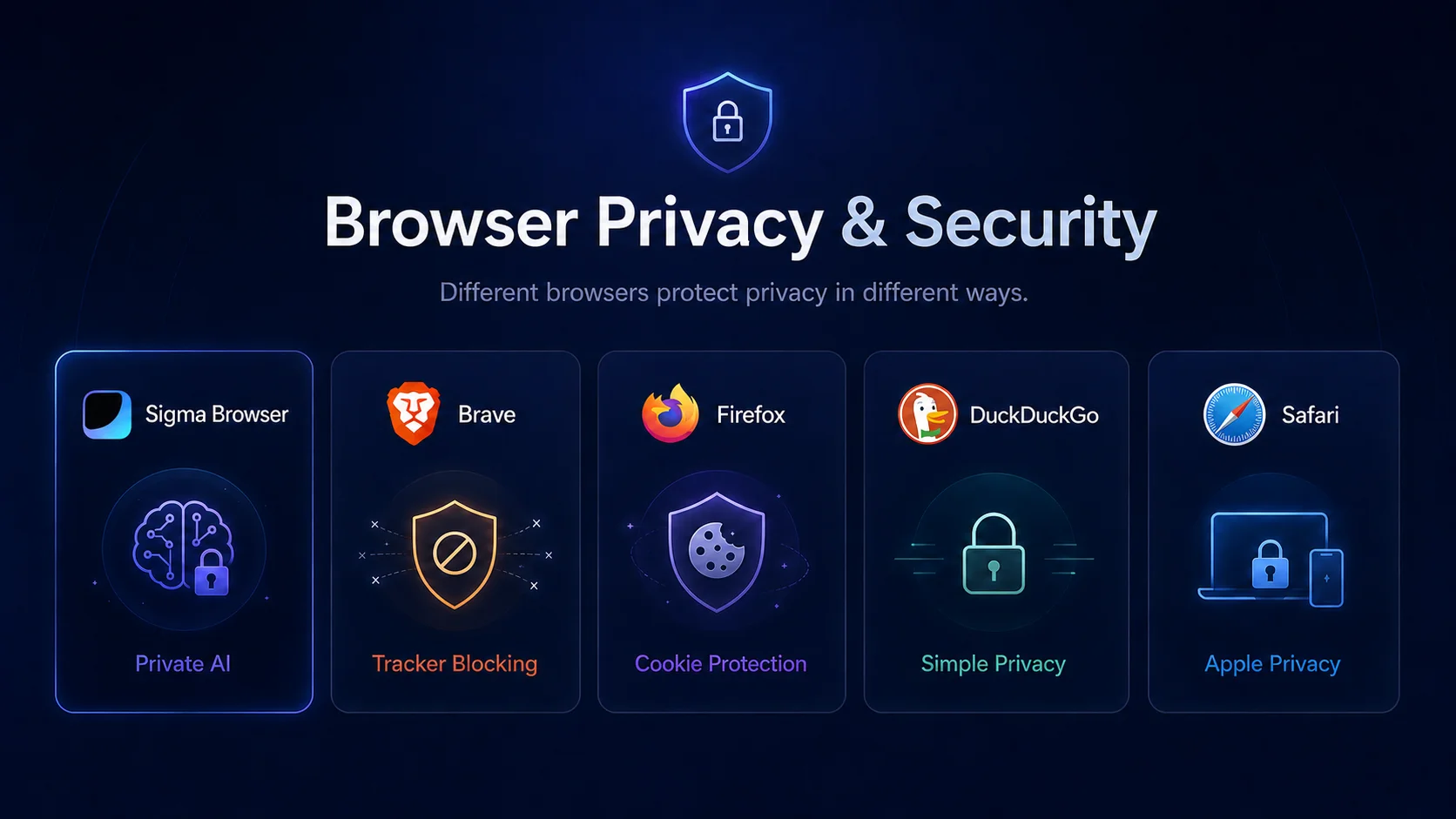
Privacy is one of the biggest reasons people search for the best browser. But “private browser” can mean very different things. It can mean blocking trackers, limiting fingerprinting, isolating cookies, avoiding Google or Microsoft ecosystems, running AI locally, or simply separating personal browsing from work accounts.
Brave is the best privacy-first Chromium browser because it blocks many tracking techniques by default without asking users to rebuild their whole setup. Firefox is the best privacy-conscious non-Chromium browser because it combines mainstream usability with protections such as Total Cookie Protection and Enhanced Tracking Protection. DuckDuckGo Browser is best for people who want privacy without settings homework. Safari is best for Apple users who want privacy and battery efficiency inside one ecosystem. Sigma is the best choice when privacy and AI workflows overlap.
One important rule: Incognito mode or private windows are not the same as real privacy. They usually stop local browsing history from being saved on your device, but they do not automatically hide you from websites, networks, employers, or trackers. For stronger privacy, you need browser-level protections, careful account separation, and realistic expectations about what each browser can and cannot do.
Fastest browsers: what speed actually means
Searches like “fastest web browser” are popular, but speed is easy to oversimplify. A browser can be fastest in a benchmark and still feel worse on your laptop after you install extensions, open twenty tabs, join a video call, load a dashboard, and keep a document editor running all day.
Chrome is fast and highly compatible, but it can feel heavy with many tabs and extensions. Edge is especially strong on Windows because Microsoft can optimize around its own operating system and features such as Sleeping Tabs. Safari is hard to beat on Apple hardware because Apple controls the browser, operating system, and chips. Brave can feel faster on ad-heavy sites because it blocks many trackers and ads before they load. Firefox is fast enough for most users and valuable because it keeps a non-Chromium engine in the mainstream market.
The practical answer is simple: do not choose a browser only from a benchmark. Choose based on your machine and your workload. If you are on Windows, Edge and Chromium-based browsers deserve attention. If you are on Mac, Safari is a serious battery-life pick. If you browse ad-heavy sites, Brave may feel faster. If your “speed” problem is actually research friction, Sigma may save more time than a browser that loads a page 100 milliseconds faster.
Best AI browsers in 2026
AI is the biggest change in the browser market. For years, browsers mostly competed on speed, tabs, extensions, and privacy. Now they also compete on whether they can understand pages, summarize content, answer questions, work across tabs, automate tasks, and help users turn scattered research into useful output.
The best AI browser depends on how much you want AI to shape the experience. Sigma is best if you want private AI workflows, page-aware help, Deep Research, and local AI options. Chrome is best if you want Gemini inside the Google ecosystem. Edge is best if you want Copilot inside Microsoft’s ecosystem. Brave is best if you want privacy-first browsing with a simpler AI assistant. Comet and Dia are worth watching if you want AI-native browsing experiments.
AI browser reality check
Useful AI in a browser is not just a chatbot button. A strong AI browser should understand page context, reduce tab switching, help compare sources, respect privacy, and make work faster without hiding how answers were created. That is why Sigma fits the “best AI browser for work” lane better than traditional browsers with a side-panel assistant.
There is also a safety side. AI agents that can act on websites need careful design because web pages can contain misleading, malicious, or confusing instructions. A browser assistant is useful when it helps you think and work faster. It becomes risky when it acts too confidently without transparency or user control. This is why privacy, permission design, and local processing matter more in AI browsers than in normal browsers. Our article on private AI agents explains that trade-off in more detail.
Best browsers for productivity and work
Productivity is where browser rankings often get lazy. They mention tabs, extensions, and maybe a sidebar, then move on. But for real work, productivity means something more specific: Can the browser keep research organized? Can it handle many tabs without turning into a mess? Can it help you summarize pages, compare sources, manage accounts, write drafts, or jump between tasks without constant copy-paste?
Sigma is the best productivity browser for AI-heavy work because it connects browsing, page context, research, writing, and private AI features. Vivaldi is the best productivity browser for users who want to manually control tabs, workspaces, panels, and layouts. Edge is best for Microsoft 365 users. Chrome is best for Google Workspace users and extension-heavy workflows. Safari is best for Apple users who want productivity through ecosystem simplicity rather than customization.
One practical setup is to use more than one browser. For example, you can use Sigma for AI research and writing, Brave or Firefox for private browsing, Chrome for compatibility testing, and Safari or Edge for platform-specific work. That may sound messy, but it is often cleaner than forcing one browser to handle every account, every workflow, and every privacy level.
Best browser for PC, Mac, iPhone, and Android
Platform matters. A browser that is excellent on a MacBook may not be the best browser for a Windows desktop. A browser that works beautifully on desktop may feel ordinary on mobile. The best web browser for PC usually means Windows compatibility, extension support, RAM behavior, and productivity tools. The best browser for Mac often means battery life, Apple ecosystem sync, and whether you need Chrome extensions. The best browser for mobile usually means speed, privacy, sync, and how well it fits your phone’s operating system.
- Best browser for Windows PC: Sigma for AI work, Edge for Microsoft integration, Chrome for compatibility, Brave for privacy, Vivaldi for tabs.
- Best browser for Mac: Safari for Apple efficiency, Sigma for AI workflows, Chrome for Google users, Firefox or Brave for privacy.
- Best browser for iPhone: Safari is the most natural default, while Brave, Firefox, and DuckDuckGo are good privacy alternatives.
- Best browser for Android: Chrome is the default compatibility pick, while Brave, Firefox, DuckDuckGo, and Sigma are worth comparing for privacy and AI needs.
If your search is platform-specific, a dedicated guide is usually better than a broad ranking. Read our Windows 11 browser guide for PCs, our Mac browser guide for Apple laptops, and our Android browser guide for mobile users.
Final verdict: the best browser depends on the job
The best web browser in 2026 is not the one with the biggest brand or the longest history. It is the one that fits your actual work. Choose Sigma Browser if you want private AI browsing, page-aware help, Deep Research, local AI options, and a browser that treats AI work as part of browsing. Choose Chrome if compatibility and Google sync matter most. Choose Edge if you use Windows and Microsoft 365 every day. Choose Brave if you want a private Chromium browser without giving up extension support. Choose Firefox if you want a serious non-Chromium browser. Choose Safari if you are inside Apple’s ecosystem. Choose Vivaldi if tabs are your real problem.
For most users, the smartest answer is not loyalty to one browser forever. It is matching the browser to the job. Use the browser that makes your daily work easier, protects the data you care about, and stays out of the way when you need speed. In 2026, that often means a traditional browser for compatibility, a privacy browser for sensitive browsing, and an AI browser like Sigma when the web becomes part of your research and work.
More articles
.webp)

Download Sigma Browser
Questions & Answers
reach out to us on X at @Sigma_Browser
Get Sigma on Android


