
What Is a Local LLM? Why Local AI Matters in 2026
A practical guide to local LLMs, on-device AI, hardware requirements, privacy, and how local language models work.

In recent years, local AI has become more important as users look for better privacy, more control, and less dependence on cloud-based AI tools. At a basic level, local AI refers to models that run directly on a user’s device or inside a controlled local environment instead of relying only on remote cloud infrastructure.
This shift did not happen suddenly. It grew from practical concerns: sensitive data, constant internet dependence, cloud AI costs, and the need to use AI in workflows where users do not want every prompt sent to an external service.
A local LLM is one of the most common examples of local AI. It can help with writing, summarization, document review, coding support, and question answering while processing supported tasks closer to the user’s own device.
Tools like Sigma Browser reflect this shift by bringing downloadable local models and Private Mode directly into the browser, making local AI more accessible for private, offline-friendly, and device-based workflows.
What Is a Local LLM?
A local LLM is a large language model that runs on your own hardware. That hardware might be a laptop, desktop computer, workstation, private server, or internal company machine.
Like cloud-based language models, local LLMs can generate text, answer questions, summarize documents, assist with writing, and help process language-based tasks. The key difference is not what the model can do, but where the work happens.
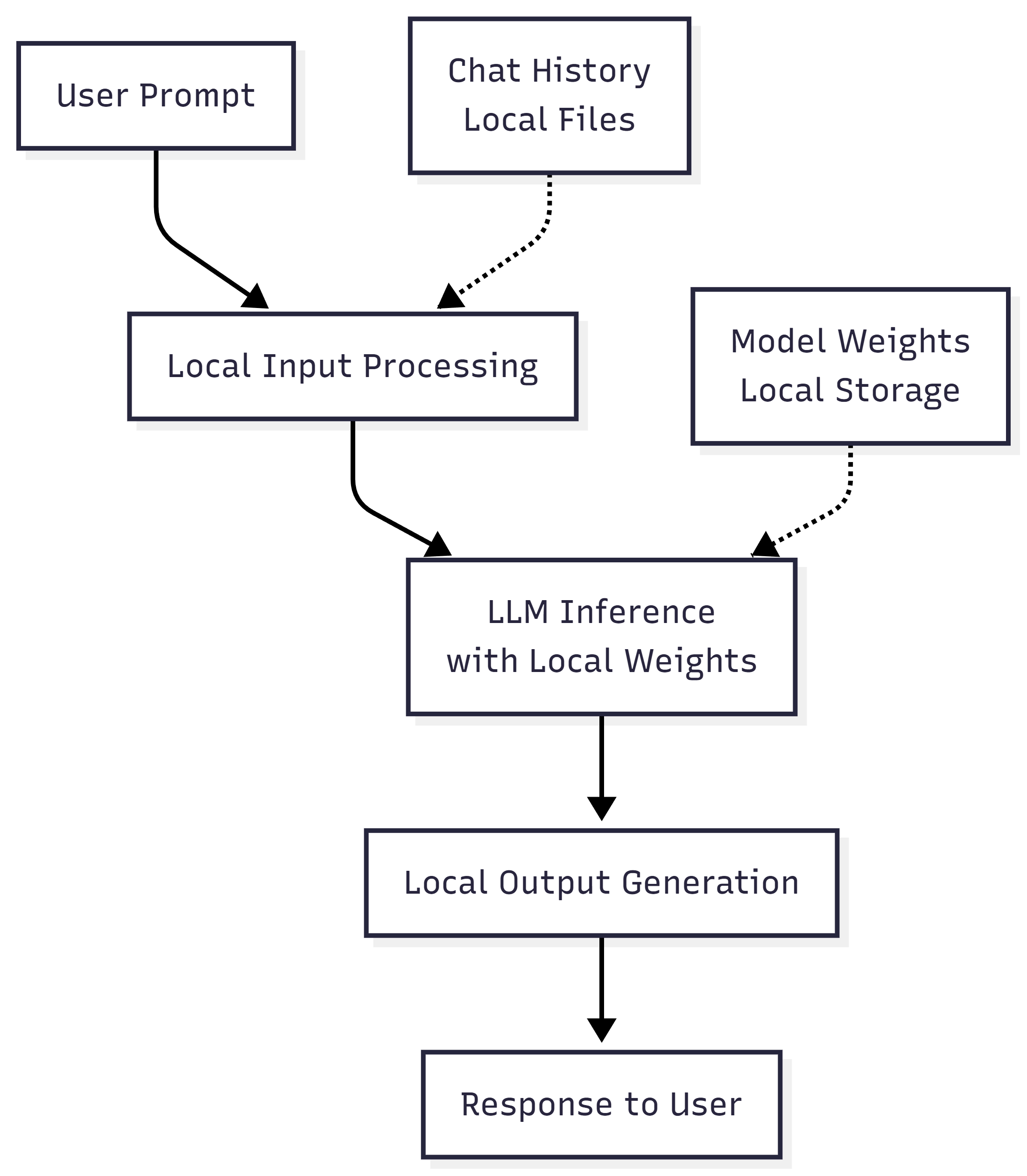
With a local LLM, inference happens locally. Inference is the process where the model takes your prompt and generates a response. In a cloud setup, that process happens on remote infrastructure. In a local setup, it happens on the device or environment where the model is installed.

How Does a Local LLM Work with User Data?
With cloud AI, prompts are usually sent to remote servers for processing. If a prompt includes private notes, business context, documents, or personal information, that data may become part of the request sent to an external AI service.
A local LLM works differently. For supported local tasks, the model processes prompts and generates responses on the user’s device or inside a controlled local environment. This can reduce data exposure because the prompt does not need to be sent to a cloud AI model for that local inference step.
This is especially useful for users who work with sensitive drafts, internal research, private documents, code, personal notes, or offline workflows. Local AI gives users more control over where processing happens and how much information leaves the device.
That does not mean local AI removes every privacy risk. Local files, browser settings, operating system permissions, extensions, backups, and connected tools still matter. The safer way to think about local LLM privacy is this: local processing can reduce external exposure, but users still need to understand their setup.
Why Run a Local LLM?
The idea of running language models locally is not new, but until recently it was largely impractical. Earlier generations of large models required substantial computational resources that were only available in data centers. Memory constraints, hardware costs, and software complexity made local execution inaccessible for most users.
Several developments changed this situation. Open-source LLM models became widely available, allowing experimentation outside closed cloud platforms. At the same time, optimization techniques such as quantization reduced the hardware requirements for inference. Consumer hardware also improved significantly, making it possible to run complex models on personal devices.
As a result, local LLMs transitioned from experimental setups to practical tools. What once required specialized infrastructure can now run on laptops and workstations, enabling new ways to use AI without relying on constant internet access or external processing.
Local LLM vs ChatGPT: Which Should You Use?
Choosing between a local LLM and ChatGPT or another cloud AI service is mostly a question of priorities. Both can handle writing, summarization, coding, brainstorming, and question answering, but they differ in where the model runs and how much setup and control the user has.
The same trade-offs apply when comparing a local LLM vs a cloud LLM more broadly.
A local LLM gives you direct control over the model and its environment. ChatGPT and similar cloud services prioritize convenience: the provider manages the models, infrastructure, updates, and most of the technical configuration.
For sensitive-data workflows, local models can be particularly useful. A developer reviewing proprietary source code, for example, may prefer to keep the entire prompt and codebase inside a company-controlled environment. The same applies to confidential documents, unpublished research, internal reports, or personal notes.
Local models are also useful when reliable internet access is not available. Once the model and runtime are installed, many basic inference tasks can continue without contacting an external AI service. Tools such as LM Studio explicitly support fully offline operation after model files have been downloaded.
Cloud AI is usually more convenient when ease of use matters more than infrastructure control. There is no model installation, local server configuration, or manual model management. Users can also access models that would be impractical to run on an ordinary laptop or desktop because the computational work happens on remote infrastructure.
Model quality is another practical consideration. A well-chosen local model can perform very well for focused tasks, but running the largest and most capable open models locally can require substantial resources. Cloud services remove that hardware limitation and can therefore be a better fit when consistently high capability is more important than keeping inference on the device.
Cost depends on how the AI is used. If you already own suitable hardware and perform a large amount of inference, local processing can avoid ongoing per-request API costs. For occasional use, however, paying for a cloud service may be simpler and cheaper than buying or upgrading hardware specifically for local AI.
In practice, the choice does not have to be permanent. A user might run a local LLM for confidential documents and offline work while using ChatGPT or another cloud model for tasks where convenience, access to larger models, or cloud-connected features matter more. The better option is the one that matches the workflow rather than the one that wins every comparison.
What Hardware Do You Need to Run a Local LLM?
Running local large language models in 2026 requires an understanding of your hardware, because all computation happens on your own machine. Unlike cloud AI, performance, speed, and model size are limited by what your computer can handle.
Below are the four main hardware components that matter when running local LLMs, explained in practical terms.
Graphics Processing Unit (GPU)
The GPU is the most important component for running local AI models. It is responsible for performing the mathematical operations required for text generation. While CPUs can run small models, GPUs are significantly faster and are required for larger models.
VRAM refers to video memory on the GPU. It determines how large a model your system can load.
B stands for billions of parameters. More parameters generally mean a more capable model, but they also require more VRAM.
Practical guidance
- Smaller local models can run on more modest hardware, especially when optimized or quantized.
- A GPU can make generation much faster, but it is not always required for basic local AI tasks.
- More VRAM allows larger models to run more smoothly.
- Larger models and longer context windows usually need stronger GPUs and more memory.
Why this matters
If your GPU does not have enough VRAM for a selected model, the model may run slowly, fall back to system memory, or fail to load depending on the setup. For everyday users, the best approach is to start with a model that fits your device instead of chasing the largest model available.
How to check your GPU and VRAM
System Memory (RAM)
System RAM acts as your computer's general workspace. While VRAM houses the actual model, system RAM manages active data processing, background caching, and seamless multitasking during AI inference.
If you run out of RAM, the system may slow down dramatically or fail to run the model properly.
Practical guidance
- 8–16 GB RAM may be enough for lightweight local AI workflows, depending on the model and app.
- 16–32 GB RAM is more comfortable for everyday local LLM use.
- Larger models, longer context, multitasking, and developer workflows may need more memory.
- Enterprise or multi-user local AI deployments usually require much stronger hardware.
Why this matters
Even if your GPU is strong, insufficient RAM can bottleneck performance or cause crashes.
How to check your RAM
Processor Requirements
The CPU coordinates tasks, manages data flow, and supports parts of inference that are not handled by the GPU. While the CPU is not the primary bottleneck, modern instruction support and multiple cores improve overall stability and responsiveness.
Practical guidance
- A modern multi-core CPU improves stability and responsiveness.
- CPU-only inference is possible for some smaller models, but it is usually slower than GPU-assisted inference.
- Newer CPUs generally handle local AI workloads better, especially when multitasking.
- Enterprise deployments may require server-grade processors depending on scale.
Why this matters
A weak CPU can slow down loading, preprocessing, and multitasking, even with a strong GPU.
How to check your CPU
Storage Configuration
Local models are large files. Storage speed directly affects how quickly models load and how responsive the system feels.
NVMe SSDs are significantly faster than traditional HDDs or SATA SSDs and are strongly recommended.
Practical guidance
- SSD storage is strongly recommended because model files can be large.
- NVMe SSDs help models load faster, but they are not mandatory for every local AI workflow.
- Storage needs depend on how many models you keep and how large they are.
- Users who test many models may need more storage than users who keep one lightweight setup.
Why this matters
Slow storage can increase startup times and make switching between models less responsive. Faster storage helps, but the exact requirement depends on the model and workflow.
How to check your storage
Examples of Local LLM Model Families
Most local LLM setups require users to choose a model, install separate software, check hardware limits, and configure the environment manually. That can be intimidating for people who want the privacy benefits of local AI without building a technical stack from scratch.
Sigma Browser simplifies this process by providing a catalog of downloadable local models inside Private Mode. Users can review approximate RAM requirements, download a suitable model, and activate it directly in the browser. At the time of writing, the catalog includes options from families such as Qwen, Gemma, GLM, and Nemotron, although availability may change with product updates.
Once a model is activated, it can support private writing, summarization, document review, content analysis, and other supported local AI workflows. Performance still depends on the user’s device, available memory, model size, and task complexity.
Sigma also connects local models with browser-based agents. In Sigma AI Agent, users can choose OpenClaw or Hermes and select a local model in Private Mode instead of relying only on a cloud provider. This brings local model selection, browsing, and supported agent workflows into the same environment.
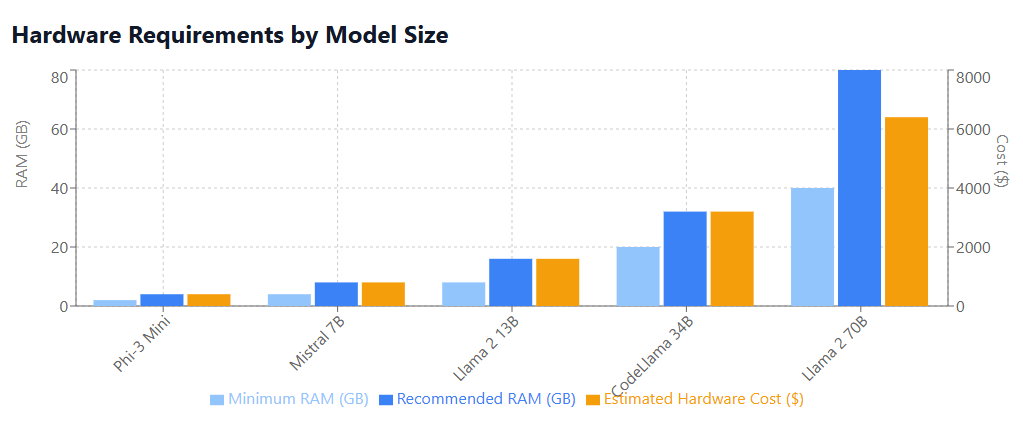
The hardware requirements for some of the LLM families are shown here:
Best Local LLM Models by Use Case
There is no single best local LLM model, and model family alone is usually not enough to make a good choice. Families such as Qwen, Gemma, DeepSeek, Phi, Mistral, and Granite include different sizes, variants, and specializations, so two models from the same family can suit very different workloads.
A better approach is to choose the type of model your task requires first, then compare suitable local LLM models within that category.
Match the model variant to the task
For coding, for example, it makes more sense to compare coding-oriented variants than to decide that one entire model family is "for coding." Qwen provides dedicated Qwen3-Coder models alongside its general Qwen models.
The same applies to reasoning. DeepSeek released smaller models distilled from DeepSeek-R1, while Microsoft offers Phi variants specifically designed for compact reasoning workloads. These are more relevant comparisons for a reasoning task than simply comparing the names DeepSeek and Phi as complete families.
Choose a size your computer can run well
Parameter count remains one of the most practical filters. Current families often provide multiple sizes: Gemma and Granite, for example, both offer several model sizes rather than one fixed model.
Smaller variants generally require fewer resources and respond faster, while larger models can offer more capability at the cost of memory and speed. Quantization can reduce memory requirements further.
For that reason, the best model is not necessarily the largest one your computer can technically load. A smaller model that responds quickly and reliably may be more useful for everyday local work.
When comparing local AI models, start with the task, then check model variant, size, context length, quantization, and any required features such as tool calling. Finally, test two or three suitable models with your own prompts. That gives a more useful answer than trying to rank entire model families from best to worst.
How to Run a Local LLM: The Most Common Options
If you want to run an LLM locally, the basic process is similar regardless of the software you choose: install or open a local runtime, choose a model that fits your device, download it, load it, and start sending prompts.
How to run a local LLM in 5 steps
- Choose a local runtime. A graphical app or browser-integrated option is usually easiest for beginners, while CLI tools and developer frameworks provide more control.
- Choose a compatible model. Look for an instruction-tuned model intended for chat or the specific task you need. Model size and quantization affect whether it can run comfortably on your system.
- Download the model. Most local AI tools provide a model catalog, command, or repository integration for downloading compatible weights.
- Load or start the model. This makes the model available for inference on your computer.
- Send a test prompt. You can then chat through the interface, use the terminal, or connect your own application through a local API.
The exact commands vary by runtime, but this is the basic workflow behind most methods used to run a local LLM.
The easiest option: a graphical interface
Desktop applications remove much of the manual setup. In LM Studio, for example, users can find and download a model, load it into memory, and start a chat through the application interface.
Sigma Browser takes a similar approach inside the browser. Its Private Mode includes a catalog of downloadable local models, shows approximate RAM requirements, and lets users download a suitable model and activate it directly in the browser.
This approach suits users who want to run LLMs locally without configuring a command-line environment or separate local server.
Run a model from the command line
Developers often prefer a CLI-based runtime such as Ollama because it is easy to script and integrate with other tools.
After Ollama is installed, a model can be launched directly from the terminal. For example:
Ollama then provides an interactive chat with the selected model. It also exposes a local API for applications that need to send prompts programmatically.
This method requires more comfort with the terminal but makes it easier to automate model startup, switch between models, or connect local inference to development workflows.
Run a local LLM through an API or application
If the model needs to power another application, the next step is usually to expose it through a local server rather than interact with it manually.
LM Studio, for example, can serve downloaded models on localhost through REST and OpenAI-compatible APIs, while Ollama provides its own local API. Developers can then connect a script, editor, local agent, document workflow, or other application to the model.
Direct Python integration offers even more control when inference is part of custom software, research, or a larger processing pipeline. For ordinary local chat, however, a graphical tool or CLI runtime is generally simpler.
The important point is that you do not need to build the entire inference environment yourself to run a local LLM. Start with the simplest runtime that supports your workflow, then move to APIs or developer frameworks only when you need additional control.
What Are Local LLMs Used For? Practical Use Cases
Local LLM use cases range from simple personal assistants to development tools and internal company systems. The clearest way to understand what local LLMs are used for is to look at the work people can actually move onto their own machines.
Work with a proprietary codebase
A developer can ask a local model to:
- explain unfamiliar functions;
- generate or update tests;
- suggest refactoring;
- debug errors;
- review changes before a commit;
- generate documentation from existing code.
This is particularly useful when source files are proprietary and should remain inside the development environment.
Analyze confidential documents
Local models can help users work directly with contracts, reports, research, meeting notes, financial documents, or unpublished drafts.
Typical tasks include comparing two documents, extracting clauses or figures, creating summaries, identifying differences, and answering questions about a collection of files.
For larger collections, a local LLM can be combined with retrieval, allowing the application to find relevant passages before asking the model to answer a question.
Search internal company knowledge
A company can connect a local model to internal policies, technical documentation, product manuals, support materials, or project knowledge.
Employees can then ask questions such as:
- “What is the process for approving this request?”
- “Which runbook covers this error?”
- “Summarize the changes between these two internal specifications.”
The model does not need to contain that company knowledge in its original training data; the relevant information can be supplied from the organization's own files or retrieval system when the question is asked.
Use AI during everyday private or offline work
Local models can also handle routine tasks such as rewriting text, summarizing pages, reviewing documents, brainstorming, or extracting information without requiring a cloud model for every request.
Sigma Browser provides one example of this workflow. In Private Mode, supported local models can be downloaded and activated directly in the browser and used for tasks such as writing, summarization, document review, and content analysis.
This can also be useful when internet access is unavailable or intentionally disabled.
Build local agents and automations
Another increasingly practical answer to what you can do with a local LLM is use it as the decision-making component of an automated workflow.
A local model might classify files, summarize incoming information, extract structured data, decide which approved tool to call, or coordinate several processing steps. Sigma can also use selected local models in supported AI Agent workflows.
The rest of the workflow still matters: if an agent calls web services, cloud storage, or external APIs, those parts are no longer fully local. But for workflows built around local files, applications, and models, local LLMs can provide a practical foundation for automation without making cloud inference the default.
Local AI: The Architectural Choice
Rather than treating local models as a separate technical setup, some modern tools integrate them directly into everyday applications. Sigma Browser applies this approach by letting users download and activate local models inside Private Mode, where supported prompts can be processed on the user’s device.
This can make local AI useful for everyday writing, summarization, document analysis, and other private workflows without requiring users to manage a completely separate model environment. Web search, Deep Research, connected services, and other online features may still require internet access or external processing, so users should always check which mode and provider are active.
More articles


Download Sigma Browser
Questions & Answers
reach out to us on X at @Sigma_Browser
Get Sigma on Android


