
Dia vs Arc Browser in 2026: AI, Workspaces & Switching
Compare Dia vs Arc Browser for AI features, workspaces, tabs, and switching in 2026.

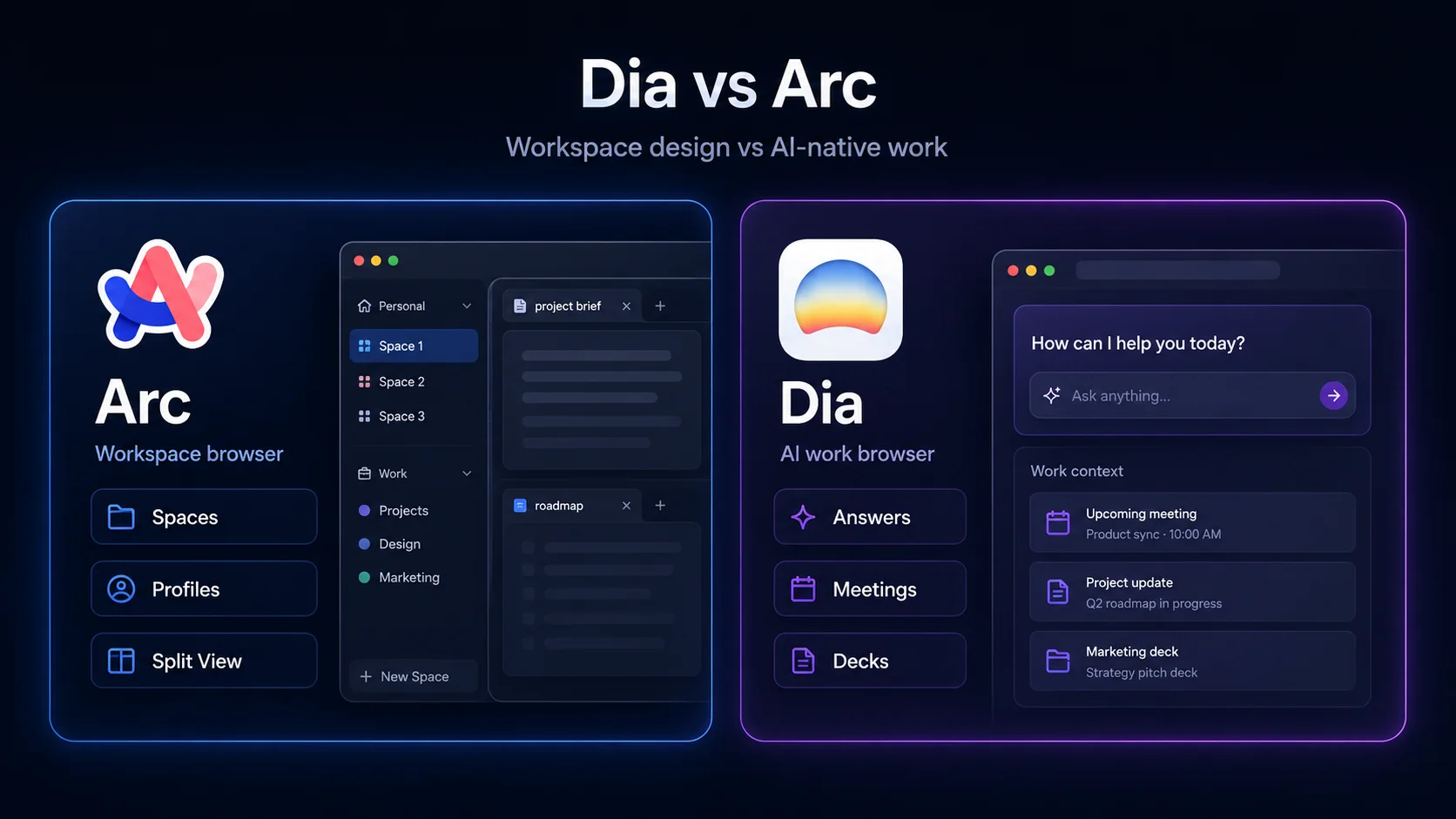
Dia vs Arc is not a normal browser comparison. It is not like comparing Chrome with Firefox or Brave with Opera. Dia and Arc come from the same company, but they represent two different browser eras. Arc tried to make the browser calmer and more organized with Spaces, Profiles, Split View, and a sidebar-first workflow. Dia is The Browser Company’s newer AI-native direction, built around work context, answers, meetings, decks, and browser assistance that understands more of what you are doing.
The short version is this: Dia is the better choice if you want the future-facing AI browser from The Browser Company. Arc is still the better choice if what you love is the original Arc workflow: organized spaces, separate profiles, split tabs, and a browser that feels more like a designed workspace than a regular Chrome clone. Arc is not dead in the strict sense, but it is no longer the company’s main new-feature product. That matters if you are deciding where to build your everyday browser workflow in 2026.
There is also a third question hiding underneath the Dia vs Arc browser debate: are you really trying to stay inside The Browser Company ecosystem, or are you looking for a better AI browser altogether? That is why the Arc vs Dia question should not be treated as a normal feature checklist. If the real reason you are leaving Arc is private AI browsing, page-aware research, Deep Research, or local AI, then Sigma Browser belongs in the comparison too. Dia is the natural Arc successor. Sigma is the stronger switch if privacy-first AI workflows matter more than staying with Arc’s original maker.
Dia vs Arc is really about The Browser Company’s pivot
The best way to understand Dia vs Arc is to stop treating them as two equal products fighting for the same job. Arc was The Browser Company’s first major browser idea: make the browser less chaotic by rethinking tabs, profiles, spaces, split views, and the way people organize online work. Dia is the company’s AI pivot: instead of asking users to organize everything manually, it tries to bring context, answers, and work outputs closer to the browser itself.
That shift changes the whole comparison. Arc asks, “How can the browser make your internet calmer?” Dia asks, “How can the browser understand what you are working on and help you move faster?” The first question is about interface design. The second is about AI assistance. If you came to Arc because Chrome felt messy, Arc still has a real case. If you came to Arc because you wanted the next version of browsing, Dia is now the more relevant product to watch.
The official Arc site now points users toward Dia as “the next evolution of Arc,” while also warning that Arc receives Chromium updates only and suggesting Dia for active security patches and enterprise-grade protection. Arc’s Windows release notes still show regular Chromium, security, and stability updates, so calling Arc completely dead would be too dramatic. But calling Arc the future of The Browser Company would also be wrong. Arc’s official site, Arc’s 2026 release notes, and The Verge’s reporting on Arc’s feature-development pause tell a more precise story: Arc still works, but Dia is where the product story has moved.
Dia vs Arc browser at a glance
The easiest way to compare Dia and Arc is not to ask which browser has more features. The better question is which product matches the way you want to work. For people searching Dia browser vs Arc browser, the real split is AI-native work versus classic workspace design. Dia is the newer AI-native browser. Arc is the more established workspace browser. Both are Chromium-based, both come from The Browser Company, and both appeal to people who are bored with normal browser tabs. Their strengths are just no longer the same.
Is Arc dead, or just in maintenance mode?
This is the question many Arc users are actually asking. Arc is not dead in the strict sense. You can still download it, use it, and receive Chromium, security, and stability updates. Arc for Windows release notes show 2026 updates that move Arc to newer Chromium versions and deliver security fixes. The official Arc site still offers downloads for Windows and Mac.
But Arc is no longer the product The Browser Company is actively pushing as its big new browser idea. The official Arc page now leads with Dia as the next evolution of Arc and says Arc receives Chromium updates only. The Verge also reported in 2025 that The Browser Company stopped developing new Arc features while focusing on Dia, while emphasizing that Arc would not simply disappear. That makes “dead” the wrong word, but “maintenance mode” the right idea for how users should think about Arc in 2026.
Practical answer: do not panic-delete Arc if your setup works. But if you are choosing a browser to invest in for the next few years, Dia is the future-facing Browser Company product, not Arc.
What Dia does differently
Dia is not just Arc with a chatbot taped to the sidebar. It is designed around a different idea: the browser should understand more of your work context and turn it into useful output. Dia’s official site describes features such as Morning Brief, answers across GSuite, Slack, tabs, and other work context, Decks that turn scattered context into slides, Live Work that pulls active work from tools like GitHub and Notion into the tab bar, and Better Meetings that opens the right agenda, notes, and docs before calls. Dia’s work page also describes Dia as a modern AI-native browser for teams.
That makes Dia feel less like a tab organizer and more like an AI work layer inside the browser. It is trying to answer questions, produce artifacts, prepare context, and make recurring work less manual. For people who already use AI tools while browsing, that is the main reason Dia is more interesting than Arc. It is not only a place to open websites; it is trying to become the place where web context turns into work.
The trade-off is that Dia may not feel like “classic Arc.” If your favorite part of Arc was the opinionated interface, the sidebar, Spaces, Profiles, Split View, and the emotional feeling that the browser itself had been redesigned, Dia may feel less magical at first. It is more directly focused on AI work than on recreating the exact Arc workflow.
What Arc still does better
Arc still has a case because Arc solved a real problem: tabs were a mess. Spaces helped separate work, personal life, hobbies, and projects. Profiles made it easier to keep logins and histories apart. Split View made side-by-side browsing feel built in rather than patched together with windows. For people who live in browser tabs all day, Arc’s interface still feels calmer than a normal row of tabs across the top of a Chrome window.
That is why some Arc users do not want Dia to “replace” Arc. They do not want another AI layer. They want the browser design that made Arc feel personal. If your current Arc setup is stable, organized, and comfortable, switching only because Dia is newer may create more friction than value. New product direction does not automatically beat a workflow you already trust.
Arc Max also gives Arc some AI features, including 5-second previews, ChatGPT in the command bar, tidy tab titles, tidy downloads, instant links, and tidy tabs. But Arc Max is described as a bundle of AI-powered features that enhance Arc, not the foundation of the product. That is the key difference: Arc has AI features; Dia is built around AI as the main direction. Arc Max’s official docs make that distinction clear.
AI features: Dia is built around AI, Arc Max adds AI on top
Dia wins the AI category because AI is not a side feature there. Dia’s product story is about reading between tabs, pulling context from work tools, preparing meetings, creating decks, and helping users turn scattered browser activity into usable output. That is a stronger fit for people searching for an AI browser, especially if their daily work includes research, writing, planning, meetings, or switching between many web apps.
Arc Max is useful, but it is narrower. It can preview pages, rename tabs and downloads, add ChatGPT access to the command bar, and organize Today Tabs. Those features can save time, especially if you already like Arc. But they do not turn Arc into the same kind of AI-native work browser as Dia. Arc Max helps Arc do more. Dia is trying to make AI the reason to use the browser.
This is also where AI browser comparisons become important. Dia is one answer to the AI browser wave. Perplexity Comet is another. Sigma Browser is another. Chrome and Edge are adding AI too. The real question is no longer “Does the browser have AI?” Most serious browsers will. The better question is whether the AI is a small shortcut, a work assistant, a research layer, or a private workflow system.
Should Arc users switch to Dia?
For Arc users, the honest answer is not “switch immediately.” It depends on why you liked Arc in the first place. If Arc was your favorite browser because it made tabs manageable, Dia may not replace that feeling one-for-one. If Arc was your favorite browser because it felt like the future of browsing, Dia is now the product more likely to carry that future forward.
Dia vs Arc on Windows and Mac
Platform support matters more in this comparison than it usually does. Arc is already available for Windows and macOS. Dia is stronger as the future-facing product, but the official Dia Windows page says “Dia on Windows” and “coming to Windows,” with a signup list. That means Windows users should be careful before treating Dia as a full Arc replacement today. If you are on Windows and need a browser right now, Arc is more practical than Dia inside The Browser Company ecosystem.
On Mac, the Dia vs Arc decision is more about workflow. Dia makes more sense if you want AI-first work features. Arc makes more sense if you already have a mature setup and do not want to rebuild how you organize tabs, accounts, and projects. The switch is less about speed and more about whether your browser should be a workspace or an assistant.
If you are comparing this with a broader PC browser search, our guide to the best browser for Windows 11 explains where Arc, Dia, Sigma, Chrome, Edge, Brave, and other browsers fit in the larger Windows browser landscape. For broader Chromium choices, the best Chromium-based browsers guide is the better next read.
Dia Browser vs Chrome, ChatGPT, and Sigma Browser
Search data around Dia shows that people are not only comparing Dia with Arc. They are also comparing Dia with Chrome, ChatGPT, and other AI browsers, which is why Dia browser vs Chrome and Dia browser vs ChatGPT deserve short answers inside the same article. That makes sense because Dia is not only a Browser Company story. It is part of a wider shift where the browser is becoming an AI workspace, not just a place to load pages.
Chrome is still the safest pick if you want the familiar default browser experience, maximum extension compatibility, and fewer surprises. ChatGPT is still better if you mainly want a standalone AI tool for writing, reasoning, coding, or brainstorming outside the browser. Dia becomes more interesting when you want AI to sit inside the browser workflow itself.
Sigma Browser is the third option to take seriously if the real reason you are leaving Arc is not “I want Dia specifically,” but “I want a browser that helps me research, summarize, write, and work with pages privately.” Sigma combines AI Chat, Deep Research, page-aware workflows, local AI, and private browsing in a Chromium-based browser. If you are a marketer, researcher, student, writer, or founder who spends the day turning webpages into decisions, Deep Research and Sigma AI Chat may be more relevant than the Dia vs Arc debate itself.
What Reddit gets right about Dia vs Arc

The Reddit discussions around Dia vs Arc are useful because they are less polished than product pages. Users are not only asking which browser has more AI features. They are asking whether they should trust the pivot. Arc built a loyal audience because it felt personal, designed, and different from Chrome. Dia asks some of those same users to move toward an AI-first product that may not preserve every part of the Arc feeling.
Reddit also gets one practical thing right: switching browsers is annoying even when the new product is better. Browser workflows are sticky. Pinned tabs, profiles, logins, shortcuts, muscle memory, extensions, and project organization all add friction. That is why the best answer for many Arc users is to test Dia alongside Arc before moving everything. If Dia actually saves time in research, meetings, writing, or planning, the switch makes sense. If it only feels newer, Arc may still be the better daily browser for you.
This is also why the “Arc is dead” framing is too simple. People do not only care whether an app receives updates. They care whether the browser they use all day still has a future they believe in. Dia is the stronger future bet. Arc is the stronger existing workflow for people who already love it.
Should you switch to Sigma instead?
It is worth asking because Dia and Arc both come with a specific assumption: you want to stay near The Browser Company’s idea of the browser. That may be true. If you loved Arc and want to see what its maker is building next, Dia is the obvious first stop. But if you are less loyal to the company and more interested in what an AI browser can actually do for your work, Sigma Browser may be the better comparison.
Sigma makes the most sense if you want the browser to support private AI research, page-aware writing, local AI, Deep Research, and AI workflows that stay close to the page you are reading. Arc was about making browsing calmer. Dia is about making work more AI-native. Sigma is about making AI browsing more private and useful for research-heavy workflows. Those are different promises, and the best choice depends on what problem you are actually trying to solve.
For many Arc users, the decision tree is simple. Switch to Dia if you want the next Browser Company product. Stay with Arc if you want the original workspace browser and do not need the AI pivot. Try Sigma if you want an AI browser built around private research, local AI, and page-aware workflows instead of a direct Arc successor. Our guides to AI browsers and agentic browsers explain that broader category in more detail.
Final verdict: Dia is the future, Arc is still the better Arc
Choose Dia if you want the browser The Browser Company is actively building around AI, work context, meetings, answers, decks, and assistant-style workflows. Dia is the better AI browser in the Dia vs Arc comparison because AI is not an extra layer there; it is the point of the product. It is also the safer long-term bet if you want to stay with The Browser Company and follow where its browser ideas are going next.
Stay with Arc if what you loved was never really AI. Arc still makes sense if you want Spaces, Profiles, Split View, and a calmer workspace browser that organizes your online life better than a traditional tab strip. Arc is not dead, but it is no longer where The Browser Company is putting its biggest product energy. That means you can keep using it, but you should not expect it to become the next big AI browser.
Try Sigma if the real goal is not Dia specifically, but a better AI browsing workflow. Dia is the future-facing Arc successor. Arc is the old favorite. Sigma is the private AI browser to compare if you care more about AI research, local AI, Deep Research, and page-aware work than about staying inside The Browser Company’s product line.
More articles

.webp)
.webp)

Download Sigma Browser
Questions & Answers
reach out to us on X at @Sigma_Browser
Get Sigma on Android


