
Best Browser for Windows 11 in 2026: Fast, Private & AI-Ready Picks
Compare the best browsers for Windows 11 for speed, privacy, AI, and daily PC use.

The best browser for Windows 11 is not automatically the one Microsoft preinstalls, the one your old laptop already has, or the one your coworkers keep telling you to use. In 2026, a Windows browser has to do more than open websites. It has to handle heavy tabs, Google Docs, Microsoft 365, video calls, AI search, extensions, passwords, school portals, dashboards, shopping, gaming, and the hundred tiny browser tasks that quietly eat your day.
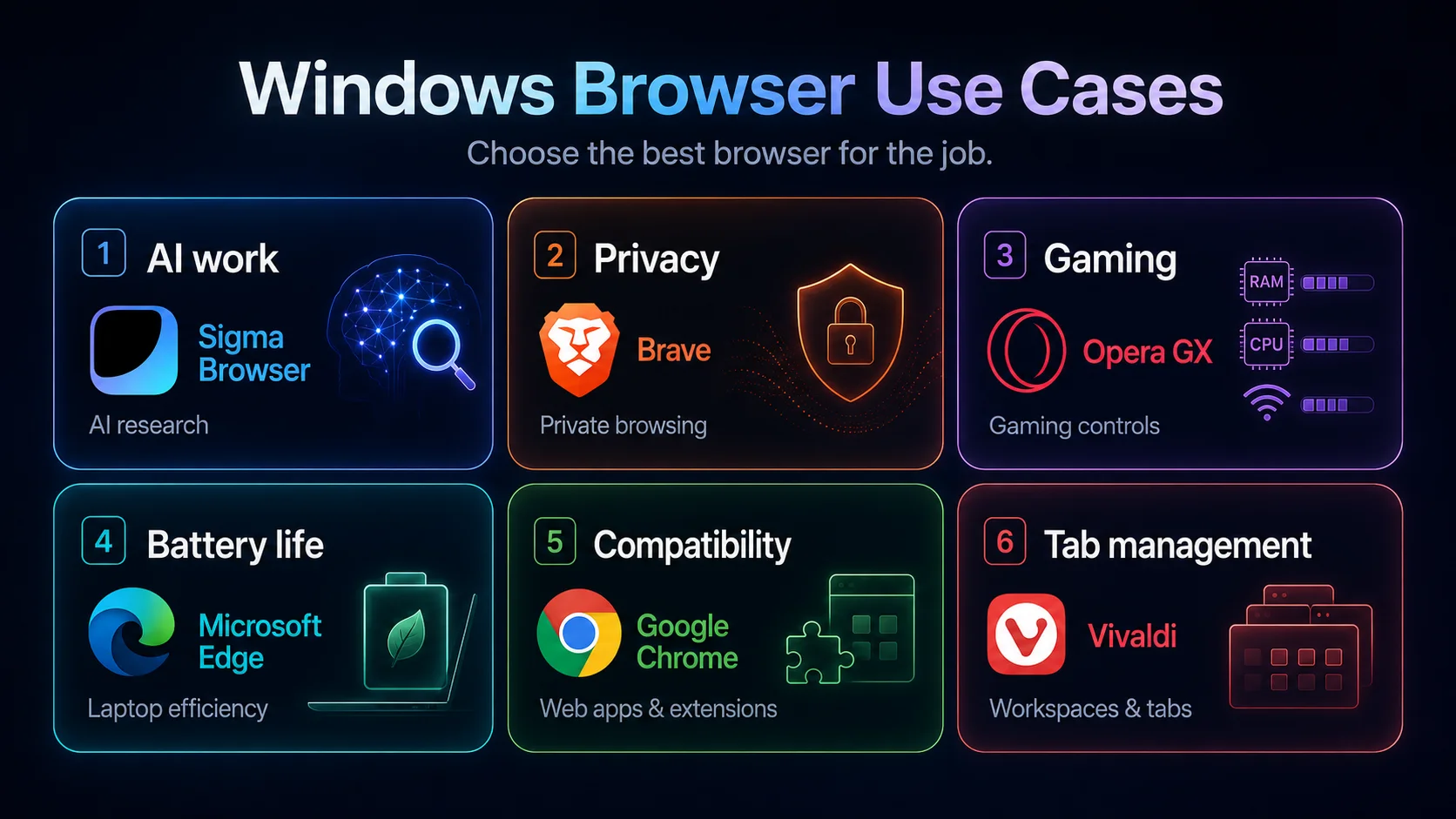
That is why this ranking is built around real Windows use cases instead of a generic “best browser” list. Sigma Browser is the strongest pick if your browser is part of your AI research, writing, marketing, studying, or page-aware work. Microsoft Edge is still the smoothest built-in Windows 11 option. Chrome is the safest compatibility pick. Brave is the best privacy-first Chromium browser. Firefox is the best non-Chromium escape hatch. Vivaldi is built for people with too many tabs. Opera GX is the obvious gaming browser. DuckDuckGo is the simplest privacy browser for users who do not want to tune settings. Comet is the experimental AI assistant browser to watch.
This guide compares the best browsers for Windows 11 by speed, privacy, AI features, battery life, RAM behavior, gaming controls, extensions, and daily PC use. It also covers the common search questions behind this topic: the fastest browser for Windows 11, the best web browser for PC, the best web browser for Windows 11, the best browser for a Windows 11 laptop, the best browser for Windows 11 gaming, the best private browser for Windows 11, and whether Edge is actually better than Chrome on Microsoft’s own operating system.
Quick picks: the best Windows 11 browser by need
If you only want the answer, start here. The best browser for Windows 11 depends less on benchmark screenshots and more on what your PC is actually for. A research laptop, a gaming desktop, a work-issued Windows machine, and a privacy-focused personal computer do not need the same browser.
What matters most in a Windows 11 browser?
A Windows 11 browser has a different job than a Mac browser, a phone browser, or a generic “web browser” in a listicle. Windows users often care about default-app friction, battery life on laptops, RAM usage with many tabs, Microsoft account integration, gaming performance, business apps, extensions, privacy, and now AI features. A good Windows browser should not only be fast in an empty benchmark. It should stay usable after you open twenty tabs, a spreadsheet, YouTube, Slack, Gmail, a PDF, a dashboard, and an AI assistant.
The most important decision is what kind of trade-off you accept. Edge fits Windows 11 well, but some users find it too Microsoft-heavy. Chrome is familiar and compatible, but privacy-focused users may not want more of Google’s ecosystem. Brave is cleaner and more private, but it does not try to be a Windows-native productivity hub. Firefox is independent from Chromium, but some web apps still feel more tuned for Chromium browsers. Sigma, Comet, and other AI browsers are pushing the category forward, but they make the most sense when AI is part of your daily browsing work.
For broader platform context, you can also compare this Windows guide with our best browser for Mac guide. If you specifically want Chromium-based options, our guide to the best Chromium-based browsers goes deeper into Brave, Vivaldi, Chrome, Edge, Opera, Sigma, Comet, and other Chromium browsers.
The 9 best browsers for Windows 11 in 2026
The ranking below is not a purity contest. It is a practical Windows 11 ranking. Sigma comes first because the modern Windows browser is increasingly becoming an AI work surface, not just a search box with tabs. Edge ranks high because Windows integration matters. Chrome still deserves a top spot because compatibility matters. Privacy, non-Chromium browsing, gaming controls, and experimental AI assistants each get their own lane.
1. Sigma Browser — best Windows 11 browser for private AI workflows
Sigma Browser is the best browser for Windows 11 if your browser is already part of your thinking, writing, research, marketing, school, or AI workflow. It keeps the practical benefits people expect from a modern desktop browser, then adds AI directly into the browsing experience through AI Chat, Deep Research, page-aware help, and local AI options. That matters because Windows users often work across many tabs, sources, documents, dashboards, and tools at the same time. A browser that can understand page context is more useful than a browser that simply gives you a blank search bar.
The reason Sigma belongs at the top is not that every Windows user needs an AI browser. A person who only checks email and watches YouTube may be fine with Edge or Chrome. Sigma is strongest for people whose browser is a workspace: students comparing sources, marketers researching competitors, writers summarizing pages, founders reviewing documents, and SEO teams switching between search results, content drafts, analytics, and AI tools. Instead of bouncing between a browser tab, a chatbot, a research tool, and a notes app, Sigma brings more of that work into the browser itself.
The honest trade-off is maturity and habit. Chrome and Edge are more familiar to most Windows users, and Brave is a cleaner privacy-first pick if you do not care about AI workflows. But if the question is the best Windows 11 browser for modern AI-assisted browsing, Sigma has the clearest reason to win: it is built around private AI work, not just traditional web navigation with an assistant bolted onto the side. To see the AI category around it, read our guide to the best browsers with AI features and our explainer on Deep Research.
2. Microsoft Edge — best built-in Windows 11 browser
Microsoft Edge is the most obvious Windows 11 browser because it is already there. It is deeply tied into Microsoft’s operating system, Microsoft account sync, Copilot, security features, and Windows performance settings. Microsoft also promotes Edge performance features such as Sleeping Tabs, which put inactive tabs to sleep to free up resources, and Edge security features such as Microsoft Defender SmartScreen for malicious sites and phishing protection.
Edge makes sense if your PC life already runs through Microsoft 365, OneDrive, Outlook, Teams, Bing, and Copilot. It is especially strong for work-issued Windows laptops where admins, security policies, and Microsoft accounts are already part of the setup. Edge also deserves credit for becoming more than “the browser you use to download Chrome.” It is fast, capable, secure, and genuinely convenient for many Windows users.
The downside is that Edge can feel busy. Some users dislike the amount of Microsoft promotion, sidebar features, shopping tools, Copilot prompts, and default-browser nudges. If you want the browser to fade into the background, Edge may feel too present. If you like Microsoft’s ecosystem, though, Edge is the easiest Windows 11 browser to recommend.
3. Google Chrome — best for compatibility and extensions
Google Chrome remains the safest answer for compatibility. If a web app works somewhere, it probably works in Chrome. The Chrome Web Store is still the default extension ecosystem for many users, and Google account sync makes it easy to move bookmarks, passwords, history, and tabs across Windows, Android, ChromeOS, and other devices.
Chrome is also no longer separate from the AI browser conversation. Google now promotes Gemini in Chrome as AI assistance inside the browser, including help with pages, information, and tasks from an open tab. That gives Chrome a stronger AI story than it had a few years ago, especially for users already paying for or using Google’s AI ecosystem. Chrome also includes performance tools such as Memory Saver and Energy Saver, which matter on Windows laptops with many tabs.
The trade-off is privacy and ecosystem lock-in. Chrome is a great Windows 11 browser if you live in Gmail, Google Docs, Google Drive, YouTube, Android, and Chrome extensions. It is less attractive if you want to reduce your Google dependency, avoid personalized data loops, or use a browser with stronger privacy defaults. For users thinking about switching away, our Chrome alternatives guide is the better next read.
4. Brave — best private browser for Windows 11
Brave is the best private Chromium browser for Windows 11. The simple pitch still works: Chrome-like compatibility with stronger default blocking. Brave Shields block trackers, cross-site cookie tracking, fingerprinting, and other tracking techniques by default. For Windows users who want Chrome extension support without feeling tied to Google’s data ecosystem, Brave is one of the easiest switches.
Brave can also feel fast because it blocks a lot of page noise before it loads. That does not mean Brave wins every speed test on every PC, but it often feels lighter on ad-heavy sites because fewer trackers, pop-ups, and ad scripts compete for attention. For people who hate the modern web’s clutter, Brave makes the internet feel a little less loud.
The only reason Brave is not first in this list is that this article also compares AI workflows, Windows integration, and PC-specific use cases. Brave is the cleaner privacy browser. Sigma is the stronger AI workflow browser. Edge is the better Windows-native browser. Chrome is safer for broad compatibility. If privacy is your main priority, though, Brave should be near the top of your list. For a deeper privacy comparison, see our guides to Brave vs Opera and Vivaldi vs Brave.
5. Firefox — best non-Chromium browser for Windows
Firefox is the best Windows 11 browser if you want to avoid Chromium. That alone makes it important. Most mainstream browsers now sit on Chromium, including Chrome, Edge, Brave, Opera, Vivaldi, Sigma, and Comet. Firefox uses its own browser engine, which makes it the most practical choice for users who care about web diversity, open web competition, and not putting every browser workflow on Chromium.
Firefox is also strong on privacy. Mozilla describes Total Cookie Protection as a built-in privacy protection that keeps cookies separated by site, and Enhanced Tracking Protection blocks trackers that follow you around online. In daily use, Firefox feels like the grown-up independent browser: familiar, customizable, private enough for most users, and less tied to Google or Microsoft than the two biggest desktop browsers.
The downside is compatibility perception. Most websites work well in Firefox, but some business tools, school portals, dashboards, or browser extensions may still be built with Chromium assumptions. If you need maximum compatibility, Chrome or Edge is safer. If you want a serious non-Chromium browser for Windows 11, Firefox is the obvious pick. Our Firefox alternatives guide can help if you want the same privacy angle with a different workflow.
6. Vivaldi — best for customization and heavy tabs
Vivaldi is the browser for people who do not want a browser out of the box. They want a browser they can rebuild. Its strength is not raw simplicity. Its strength is control: Workspaces, tab organization, panels, keyboard shortcuts, layout customization, notes, and other power-user features. Vivaldi’s Workspaces let users group tabs into separate work areas, which makes it useful for Windows users who live with dozens of tabs open.
On Windows 11, Vivaldi is especially good for researchers, developers, multitaskers, students, and anyone who keeps projects separated by tab groups. It is also a strong choice if your main browser problem is not privacy or AI, but tab chaos. Chrome can group tabs. Edge has vertical tabs and sleeping tabs. But Vivaldi is the browser that feels most openly built for people who want to control the interface.
Vivaldi is not the best casual browser. It can feel like too much if you only want a clean, fast default. It is also not the strongest AI browser in this list. But if your Windows PC has become a tab jungle, Vivaldi is one of the few browsers that treats tab management as a core feature instead of a side setting.
7. Opera / Opera GX — best for built-in tools and gaming
Opera is a good Windows 11 browser if you like built-in tools. It has a sidebar, built-in ad blocker, free VPN-style browsing, Flow, messaging shortcuts, and Opera AI. Instead of asking you to build a browser through extensions, Opera tries to include more from the start. That makes it useful for people who want convenience and do not mind a busier interface.
Opera GX is the more interesting Windows pick for gamers. Opera’s GX Control includes RAM, CPU, and network limiters, which makes Opera GX the clearest answer for users searching for the best browser for gaming on Windows 11. It will not magically make a slow PC fast, but it does give gamers browser controls that Chrome, Edge, Firefox, and Brave do not offer in the same way.
The trade-off is clutter and privacy philosophy. Opera and Opera GX are feature-rich, not minimalist. They make sense if you like sidebars, media tools, messaging apps, gaming visuals, and built-in utilities. They make less sense if you want the cleanest private browser. For more on that split, read our Opera vs Chrome comparison.
8. DuckDuckGo Browser — best simple private browser for Windows
DuckDuckGo Browser for Windows is the best pick if you want a simple privacy browser without becoming the kind of person who spends Saturday tuning browser flags. DuckDuckGo offers a Windows browsing app with online privacy protection by default, and its broader app page describes private search, tracker blocking, and browser protections across Windows, Mac, iOS, and Android.
DuckDuckGo is not the power-user choice. It does not beat Firefox for extension depth, Vivaldi for customization, Chrome for compatibility, Edge for Windows integration, or Sigma for AI workflows. Its value is simplicity. It is the browser you recommend to someone who does not want a technical privacy setup but does want fewer trackers, private search, and a cleaner browsing experience.
That makes DuckDuckGo a smart addition to this Windows 11 list. Many “best browser for PC” guides skip it because it is not as feature-heavy as Chrome or Edge. But for users who want privacy without homework, DuckDuckGo is useful. If you are comparing search privacy too, our DuckDuckGo vs Google guide explains the search side of that choice.
9. Perplexity Comet — best experimental AI assistant browser
Perplexity Comet belongs on this list because AI browsers are now part of the Windows 11 browser conversation. Comet is positioned as an AI browser and personal assistant that can help research the web, organize email, and work through tasks. It is also available as a desktop browser for Windows, which makes it more relevant here than AI browsers that are still not clearly ready for Windows users.
Comet is not the safest recommendation for everyone. It is newer, more experimental, and more dependent on whether you actually want an assistant inside the browser. It is also not as familiar as Chrome, as integrated as Edge, as private by default as Brave, or as workflow-focused for private AI browsing as Sigma. But it is one of the browsers that shows where the category is going: browsers that do not just display pages, but help act on them.
Choose Comet if you want to test an AI assistant browser on Windows and you are comfortable with a newer product. Choose Sigma if you want AI workflows with a stronger private-browser angle. Choose Edge or Chrome if you want AI features inside a mainstream browser you already understand. For a broader AI-browser view, compare Comet with our Comet Browser alternatives guide.
Performance on Windows 11: speed, RAM, and battery life
The fastest browser for Windows 11 is not a fixed answer. Browser speed changes with your processor, RAM, GPU, extensions, antivirus, tab count, display settings, and the websites you use. A browser that feels fast with five tabs can feel completely different with fifty. A clean browser can become heavy after you add extensions, password managers, writing tools, shopping extensions, ad blockers, and tab managers.
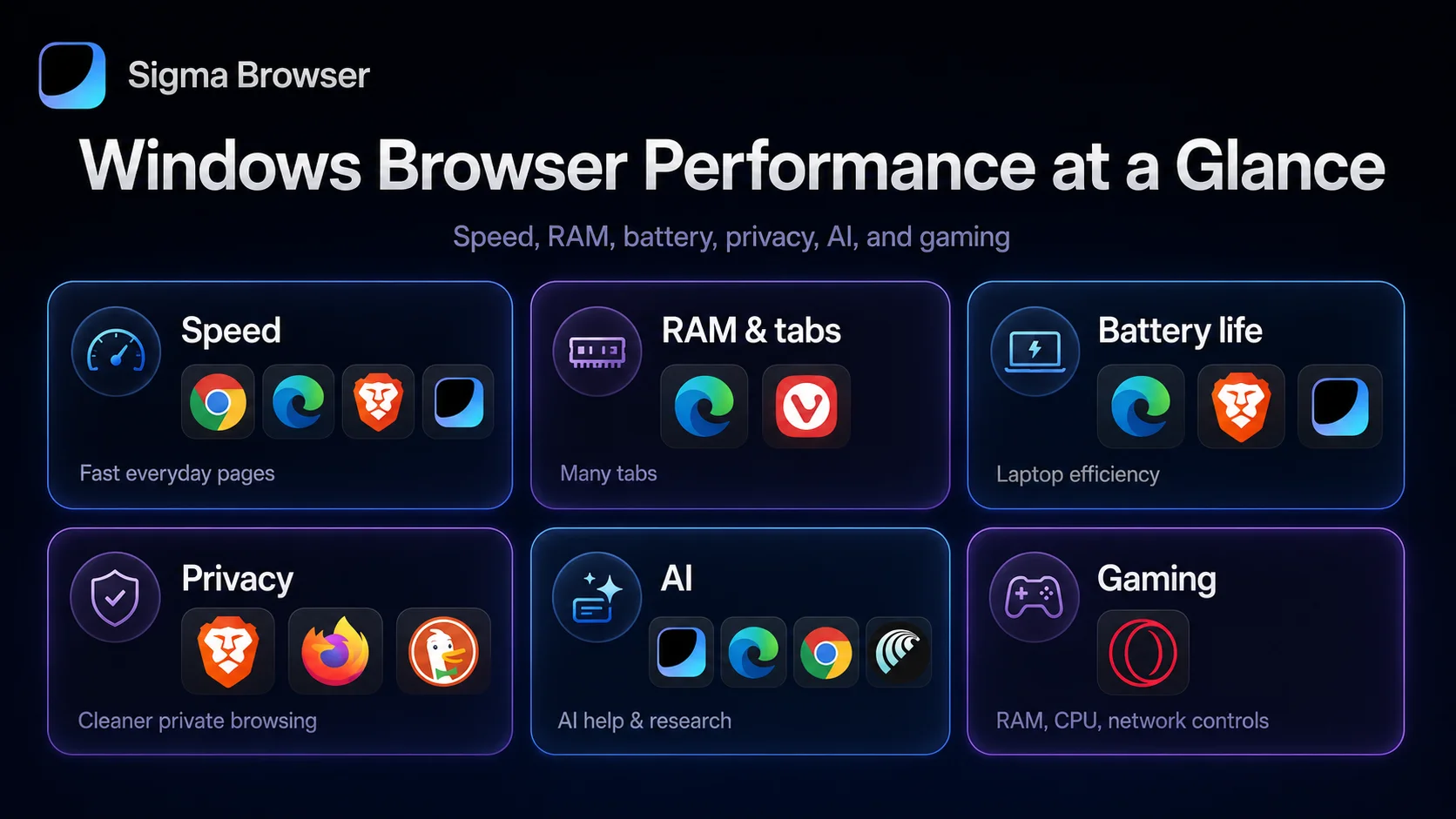
For most Windows users, performance comes down to three practical questions: does the browser load pages quickly, does it manage many tabs without making the whole PC feel stuck, and does it avoid draining a laptop battery in the background? Edge has strong Windows integration and performance features such as Sleeping Tabs. Chrome has broad optimization and Memory Saver/Energy Saver features. Brave and Sigma can feel cleaner on ad-heavy pages because blocking reduces page clutter. Vivaldi is better for organizing many tabs, while Opera GX is the best if you specifically want manual resource limiters.
The big warning: do not choose a browser only because one benchmark says it is fastest. If your Windows 11 laptop is slow, the browser may not be the only problem. Too many startup apps, browser extensions, background sync tools, video tabs, antivirus scans, and low RAM can matter more than the browser name.
Privacy and security: the safest Windows browser depends on the threat
The best private browser for Windows 11 is not one single answer either. Brave is the strongest mainstream privacy-first Chromium pick. Firefox is the best non-Chromium privacy browser. DuckDuckGo is best for people who want privacy with very little setup. Sigma is the better choice if the privacy question includes AI, page context, research, and local/private AI workflows. Edge has strong Microsoft security features, but it is not trying to be the most privacy-minimal browser.
If privacy is your main reason to switch, do not stop at the browser. Turn off extensions you do not trust, audit your default search engine, review sync settings, use a password manager, update Windows, and avoid logging into every site with the same account. A private browser helps, but your browser habits still matter.
AI browsers on Windows 11: useful feature or hype?
AI is the biggest reason this Windows 11 browser ranking looks different from older “best web browser for PC” guides. A few years ago, the main fight was Chrome vs Edge vs Firefox vs Brave. In 2026, the question is whether the browser should help you understand pages, summarize sources, write, compare tabs, search with AI, automate small tasks, or keep AI processing more private.
Sigma is the strongest pick if AI is part of your browser workflow rather than a side feature. Edge is the best fit if you want Copilot inside Microsoft’s Windows ecosystem. Chrome is better if you want Gemini in the familiar Google browser. Comet is for people who want an AI assistant browser. Opera has built-in AI features for users who like browser toolkits. Brave has Leo for privacy-minded AI assistance. The important thing is not “which browser has AI?” Most now do. The better question is what kind of AI you want, and what data you are comfortable giving it.
For sensitive research, client work, business documents, school notes, finance pages, and private browsing, AI privacy matters more than novelty. An AI assistant that reads pages can be useful, but it also raises questions about page content, prompts, history, credentials, and task context. If those questions matter to you, do not pick an AI browser only because the demo looks cool. Pick one that matches your privacy and workflow needs. Our agentic browser guide explains the difference between simple AI features and browsers that can actually work through tasks.
What Reddit gets right about Windows browsers
Reddit threads about the best browser for Windows 11 usually get one thing right: there is no one perfect browser. People recommend the browser that solved their own annoyance. Someone tired of Microsoft nudges recommends Brave. Someone who lives in Microsoft 365 recommends Edge. Someone who hates Chromium recommends Firefox. Someone drowning in tabs recommends Vivaldi. Someone gaming with videos and downloads in the background recommends Opera GX.
That is why this guide does not crown Edge, Chrome, or Brave as the only correct answer. Windows 11 users are not all the same. A work laptop with corporate policies is different from a gaming desktop. A privacy-focused student has different needs than a marketer using AI research all day. A person who needs every extension to work has different needs than a person who only wants private search and a clean interface.
The Reddit-style answer is often the most honest one: choose the browser that removes the friction you feel every day. If your friction is research, writing, and AI context, choose Sigma. If it is Windows integration, choose Edge. If it is compatibility, choose Chrome. If it is tracking, choose Brave or Firefox. If it is gaming controls, choose Opera GX. If it is simple privacy, choose DuckDuckGo.
What about Dia, Arc, Safari, and Tor?
Dia and Arc deserve a quick mention, but they do not belong in the main Windows 11 ranking right now. Arc was influential, especially for workspace-style browsing, but The Browser Company now frames Dia as the next evolution of Arc, while Arc is more of a maintained product than the clearest 2026 Windows recommendation. Dia is interesting as an AI-first work browser, but it should be treated as a watchlist browser for Windows users until its Windows story is more straightforward for everyday readers.
Safari is not a Windows 11 browser, so it does not belong here. It matters in a Mac browser guide, not a Windows guide. Tor Browser is important for anonymity and high-privacy use cases, but it is not the best everyday Windows 11 browser for speed, extensions, AI, web apps, or normal PC work. If your priority is anonymity rather than daily browsing, Tor belongs in a different article.
That is the editorial line for this list: include browsers that a normal Windows 11 user can realistically install and use as a daily browser or serious secondary browser. Keep experimental, unavailable, or highly specialized browsers out of the main ranking unless they solve a clear Windows use case.
Final verdict: which Windows 11 browser should you install?
Choose Sigma Browser if your browser is part of your AI research, writing, studying, marketing, or page-aware workflow. It is the most relevant Windows 11 pick for users who want the browser to help with sources, context, AI Chat, Deep Research, and private AI work instead of only opening websites.
Choose Microsoft Edge if you want the smoothest built-in Windows 11 browser. It is the easiest choice for Microsoft 365, Copilot, Windows sync, security tools, and performance features. Choose Chrome if you want the most familiar browser with the safest compatibility story, the Chrome Web Store, Google account sync, and Gemini in Chrome.
Choose Brave if privacy is the main reason you are switching. Choose Firefox if you want a serious non-Chromium browser. Choose Vivaldi if your real problem is tab chaos. Choose Opera GX if gaming controls matter. Choose DuckDuckGo Browser if you want simple privacy without tuning settings. Choose Comet if you want to test an AI assistant browser and do not mind being on the experimental edge.
The best browser for Windows 11 is not one universal app. It is the browser that removes the biggest friction from how you actually use your PC.
More articles
.webp)
.webp)

Download Sigma Browser
Questions & Answers
reach out to us on X at @Sigma_Browser
Get Sigma on Android


