
What Is an Agentic Browser? 7 Best Agentic Browsers in 2026
Learn what agentic browsers are and compare the best options for AI agents and web tasks.

An agentic browser is not just a browser with a chatbot in the sidebar. In practice, the term describes a web browser where an AI agent can understand pages, reason over your goal, and take browser actions such as clicking, typing, summarizing, comparing sources, filling forms, and helping complete multi-step web tasks. A normal browser waits for you to do everything manually. An AI browser can answer questions about what you see. An agentic browser goes further: it can help act inside the web.
That is why the agentic browser category is getting so much attention in 2026. Perplexity has Comet, OpenAI has ChatGPT Atlas, Opera has Opera Neon, and newer browsers such as Fellou, Dia, BrowserOS, and Sigma are pushing different versions of the same idea. Some focus on AI search. Some focus on browser agents. Some focus on work context. Some focus on privacy and local AI.
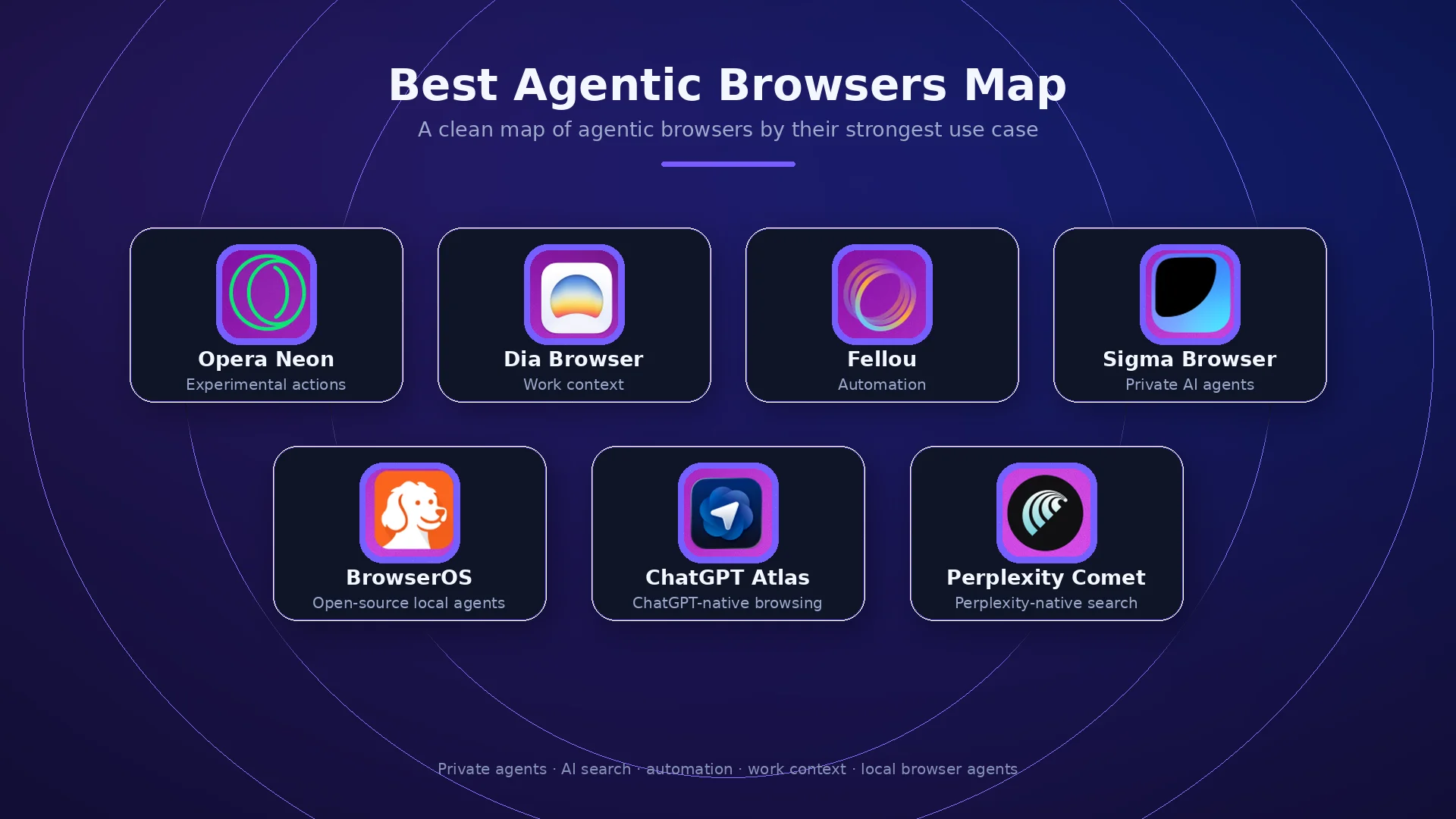
The best agentic browser depends on what you want the agent to do. Sigma Browser is one of the strongest options if you want private AI research, page-aware workflows, local AI, and browser agents inside the browsing experience. Comet is the best fit for Perplexity-native search and assistant tasks. ChatGPT Atlas is the best fit for people who want ChatGPT in the browser. Fellou and Opera Neon are stronger for action-first automation. Dia is better for work context across tabs and apps. BrowserOS is the most interesting open-source option for local browser agents. Chrome with Gemini, Brave Leo, and Edge Copilot are useful AI-assisted browsers, but they are not the clearest fully agentic browsers yet.
What is an agentic browser?
An agentic browser is a web browser with an AI agent that can understand a page, reason about a user’s goal, and perform browser actions with some level of autonomy. Instead of only answering questions, it can navigate pages, click buttons, fill forms, compare information, summarize tabs, draft replies, extract data, and help finish tasks across multiple websites.
DigitalOcean defines agentic browsers as browsers that use AI agents to autonomously navigate websites and complete tasks such as booking flights, filling forms, and making purchases. That is the key difference. A chatbot gives an answer. A browser agent can interact with the web interface where the task actually happens.
The word “agentic” matters because the AI is not only generating text. The agent can plan steps, inspect page content, choose actions, and sometimes execute those actions on the user’s behalf. In practice, this may mean asking the browser to compare hotel options, fill out a form, gather sources for research, summarize open tabs, find a product, draft an email, or move through a web workflow while showing what it is doing.
Agentic browser vs AI browser vs traditional browser
The easiest way to understand agentic browsers is to compare three layers. A traditional browser gives you tabs, pages, extensions, bookmarks, and manual navigation. An AI browser adds an assistant that can explain, summarize, search, write, or answer questions about what you see. An agentic browser adds the ability to plan and act inside the browsing session.
The categories can overlap. A browser may start as AI-assisted and later become more agentic. Chrome with Gemini, for example, is moving toward deeper AI help, but it is not as clearly agentic as tools built around browser agents from the start. Brave Leo is useful for private AI help, but it is better described as an AI browser assistant than a full browser agent.
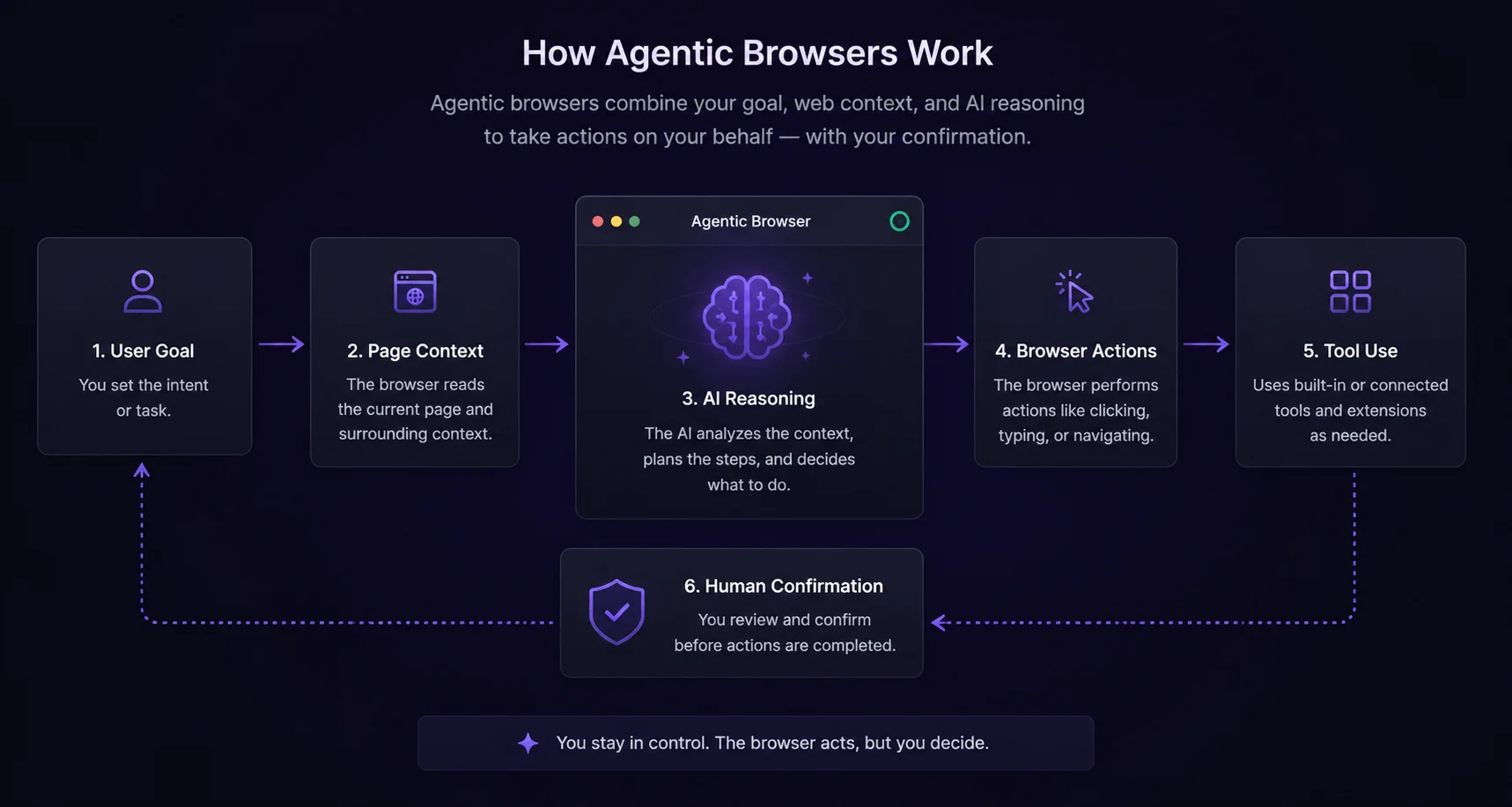
How do agentic browsers work?
An agentic browser usually combines several systems. First, the browser gives the AI access to page context: text, links, forms, tabs, screenshots, or selected content. Then the AI model interprets the user’s goal and plans steps. After that, the browser agent may use tools to click, type, navigate, search, extract information, compare pages, or ask for confirmation before sensitive actions.
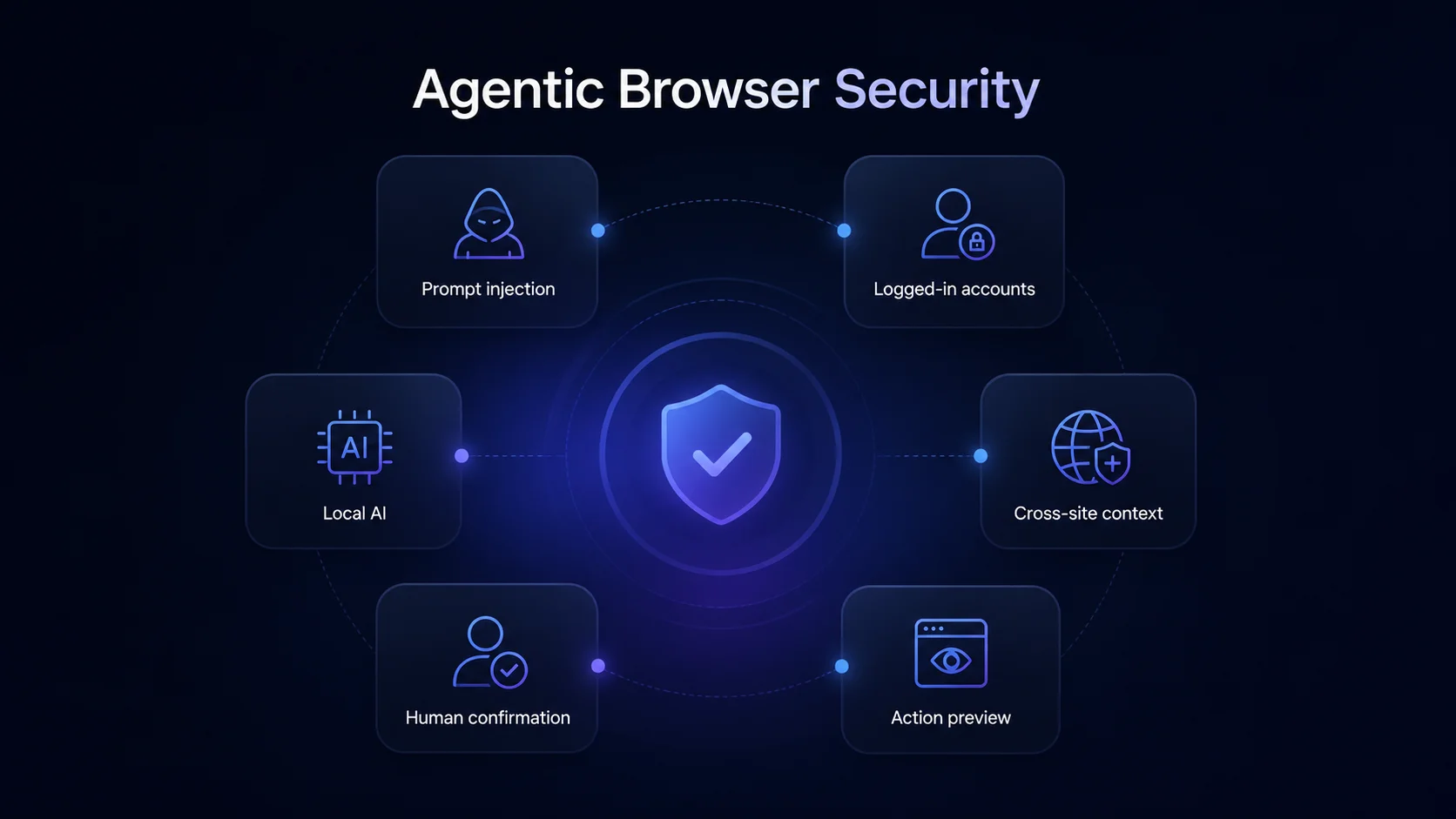
The more powerful the agent is, the more careful the browser needs to be. A browser that only summarizes a page has limited risk. A browser that can act inside logged-in accounts has a larger risk surface. That is why the best agentic browsers are not only judged by how much they can do, but also by how clearly they show actions, ask for confirmation, separate trusted user intent from untrusted page content, and protect private data.
Most agentic browsers in 2026 sit somewhere between assistant and automation tool. Some can complete simple browsing tasks reliably. Others are better at research, reports, tab summaries, shopping comparisons, or form assistance. Real-world reliability still depends on the website, the model, the task, permissions, and how much supervision the user gives.
Why agentic browsers matter in 2026
Agentic browsers matter because the browser is where many digital tasks already happen. Research, shopping, email, forms, bookings, dashboards, docs, calendars, admin panels, and SaaS apps all live in the browser. If AI can understand and act inside that environment, the browser becomes more than a window to the web. The browser becomes a work surface for AI agents.
The category also matters because it is moving fast. Perplexity Comet, ChatGPT Atlas, Opera Neon, Fellou, BrowserOS, Dia, and Sigma all approach the same shift from different directions. Snowplow has described the rise of agentic browsing as a measurable traffic shift driven by AI browsers such as Perplexity Comet and ChatGPT Atlas. For SEO, product, research, and security teams, that means browser agents are no longer a weird side topic. They are becoming part of how people search, compare, and complete tasks.
At the same time, agentic browsing creates a security conversation that ordinary browser comparisons do not have. A browser agent can operate with user privileges across authenticated websites. That makes prompt injection, hidden page instructions, cross-origin data flows, and account access more serious than they are in a simple chatbot.
Best agentic browsers in 2026 at a glance
The best agentic browser is not the one with the loudest demo. The right pick is the one that fits the job: private AI research, Perplexity-style answers, ChatGPT-native browsing, action-first automation, work context, open-source local agents, or safer AI assistance.
1. Sigma Browser — best for private AI research and browser agents
Sigma Browser is one of the best agentic browser options if you want AI agents inside the browsing experience without turning the whole browser into only a Perplexity or ChatGPT wrapper. Sigma is built around private AI browsing, Deep Research, AI Chat, page context, local AI, and Sigma AI Agent. That makes it a strong fit for research, summaries, page-aware workflows, writing, source comparison, and browser-based AI tasks.
The biggest reason Sigma belongs near the top is privacy. Sigma’s current positioning emphasizes a private AI browser with a built-in AI agent, local AI, no tracking, and offline AI through Eclipse. That matters because agentic browsers can see page context and sometimes act on tasks. Users who want AI help inside the browser but do not want every workflow to depend on cloud-only AI should pay attention to Sigma.
Sigma is not trying to be a Perplexity clone or a ChatGPT clone. That is a strength if your goal is a browser built around private AI work rather than a browser wrapped around one external AI product. If you specifically want Perplexity’s answer engine, Comet has the native advantage. If you want ChatGPT as the browser layer, Atlas is the better fit. If you want a private AI browser for research and browser agents, Sigma is one of the strongest choices.
Best fit: researchers, marketers, students, writers, founders, and privacy-conscious users who want page-aware AI, local AI, Deep Research, and browser agents.
2. Perplexity Comet — best Perplexity-native agentic browser
Perplexity Comet is one of the most important agentic browsers because it connects Perplexity’s AI search experience with a browser assistant. Perplexity describes Comet as an AI browser that acts as a personal assistant, helping users automate tasks, research the web, organize email, and more. That official positioning is enough to treat Comet as one of the clearest mainstream examples of an agentic browser: it is not only a search product, but a browser assistant built to help users delegate web tasks.
Comet is the strongest fit if you already prefer Perplexity answers and want the browser to center around AI search. For research-heavy users, that is compelling. Instead of switching between search, tabs, summaries, and assistants, Comet tries to make the browser itself part of the answer engine.
The trade-off is security and trust. Comet has been a major focus of prompt-injection research and public discussion because it shows what happens when an AI assistant can act inside web sessions. That does not make Comet useless. It does mean users should treat agentic actions carefully, especially around email, shopping, finance, work accounts, and private data.
3. ChatGPT Atlas — best ChatGPT-native agentic browser
ChatGPT Atlas is OpenAI’s browser with ChatGPT built in. OpenAI says Atlas can help with browsing, understand context, and use Agent Mode to interact with sites under the user’s control. This makes Atlas the strongest agentic browser if your daily work already starts in ChatGPT.
Atlas is useful for writing, summaries, research, shopping comparisons, planning, learning, and tasks where ChatGPT’s conversational workflow is already familiar. Instead of adding ChatGPT as an extension to another browser, Atlas turns it into the browser layer. That is why people search for “OpenAI agentic browser” or “ChatGPT Atlas agentic browser” when comparing this category.
The limitation is that Atlas is still best for ChatGPT-native users. If you prefer Perplexity search, Comet may feel more natural. If you want private AI and local workflows, Sigma is a better fit. If you want open-source local browser agents, BrowserOS is more aligned with that need.
4. Fellou — best for autonomous web task automation
Fellou is built around the idea of a self-driving browser. Its official site says it can browse, automate, and execute, and that its AI does not just chat; it acts. That positions Fellou as one of the clearest options for users who want agentic browser automation rather than a normal browser assistant.
Fellou is most relevant for multi-step web tasks: collecting information, comparing data, moving through pages, building reports, executing research workflows, and automating browser-based actions. It is closer to the action side of the market than Brave Leo or Chrome Gemini.
The trade-off is that highly autonomous browser actions need supervision. A self-driving browser can save time, but it can also make mistakes, misread page context, or interact with sites in ways the user did not expect. Fellou is best for users who want to test the edge of browser automation and are comfortable reviewing what the agent is doing.
5. Opera Neon — best experimental action-first agentic browser
Opera Neon is Opera’s agentic AI browser. Opera describes Neon as a browser built to act, understand intent, assist with tasks, and take actions. The company has also said Neon is designed for AI power users and uses AI agents to perform tasks and even code web apps rather than only display pages.
Neon is important because it is one of the clearest examples of a browser company rethinking the browser around AI agents. It is not just Opera with a sidebar. It is positioned as an experimental, action-first browser for users who want the browser to do more of the work.
The trade-off is maturity. Neon is exciting, but it is also more experimental than Chrome, Edge, or standard Opera. It is a better fit for AI power users than for someone who wants the most stable everyday default browser.
6. Dia Browser — best for work context and tab-aware AI
Dia Browser is best understood as a work-context browser. Its official site says Dia digs into full context across GSuite, Slack, tabs, GitHub, Notion, Calendar, and other work surfaces. That makes Dia especially useful for people who want AI help across the places where their work already happens.
Dia may not be the most action-heavy browser agent in this list, but it belongs in the agentic browser conversation because it connects AI with browser context, tabs, and work tools. For many knowledge workers, the agentic experience is not only clicking buttons. It is gathering context, producing reports, finding the right document, and answering questions across open work surfaces.
Choose Dia if work context is the priority. Choose Comet if Perplexity-native AI search is the priority. Choose Atlas if ChatGPT-native browsing is the priority. Choose Sigma if private research, local AI, and page-aware browser workflows matter more.
7. BrowserOS — best open-source local agentic browser
BrowserOS is an open-source agentic browser that runs AI agents locally on the user’s computer. Its site positions it as a privacy-first Chrome alternative with built-in AI agents that can automate web tasks through clicking, typing, and navigating. The GitHub project describes BrowserOS as an open-source Chromium fork that runs AI agents natively and can use local models through Ollama.
This makes BrowserOS important for people searching for open-source agentic browsers, local AI browsers, or free agentic browser options. BrowserOS is not as mainstream as Comet, Atlas, or Opera Neon, but it is more aligned with users who want control, transparency, and local execution.
The trade-off is ease of use. Open-source local tools can be powerful, but they often require more setup and tolerance for rough edges. BrowserOS is a better fit for technical users and privacy-first builders than for people who want the most polished consumer browser.
AI browsers that are not fully agentic yet
Not every AI browser should be ranked as a full agentic browser. Some products are AI-assisted rather than truly agentic. They may summarize pages, answer questions, write text, or help with search, but they are not always built around autonomous browser actions.
Chrome with Gemini
Chrome with Gemini is important because people search for Chrome agentic browser and Google agentic browser. Google is adding more AI help into Chrome, including page understanding and support across open tabs. Still, Chrome is better described as AI-assisted than fully agentic compared with Comet, Atlas, Fellou, Opera Neon, Sigma AI Agent, or BrowserOS. Over time, Chrome may become more agentic, but it is not the clearest example today.
Brave with Leo
Brave Leo is useful for privacy-first AI browsing. It can help with summaries, page questions, writing, translation, and analysis inside a privacy-focused browser. That makes it relevant for users who want AI help, but Leo is less agentic than the browser agents in the main list. A better frame is privacy-first AI browser, not a top autonomous agentic browser.
Microsoft Edge with Copilot
Microsoft Edge with Copilot is the mainstream AI-assisted browser choice for many Windows and Microsoft 365 users. It belongs in the broader AI browser conversation, especially for enterprise and productivity workflows. It is not the strongest pure agentic browser in this list, but it matters because many people will experience AI browsing through mainstream browsers before trying dedicated agentic browsers.
Agentic browser security risks
Security is the most important difference between a normal AI browser and an agentic browser. A browser assistant that only summarizes a page is limited. A browser agent that can click, type, read authenticated content, or act across websites can create new risks if it follows malicious page instructions or misunderstands the user’s intent.
Brave’s research on Perplexity Comet showed how indirect prompt injection can challenge traditional web security assumptions. The concern is that an AI assistant can operate with the user’s privileges while reading untrusted web content. A malicious instruction hidden on a page may try to influence the agent in ways the user did not intend.
Researchers have also examined agentic browsers and the same-origin policy. The Agentic Browsers and the Same-Origin Policy project argues that agentic browsers can reduce traditional same-origin protections to the strength of the agent’s prompt-injection defenses. In other words, if an agent can be manipulated by untrusted page content, browser security boundaries become harder to reason about.
This does not mean agentic browsers are doomed. Users should compare them by safety design, not only by features. Look for clear action previews, human confirmation before sensitive actions, limited account access, local or private AI options, strong separation between user instructions and page content, and easy ways to stop or undo agent behavior.
How to choose an agentic browser
The best way to choose an agentic browser is to start with the job, not the brand. A user who wants Perplexity search needs a different browser than a user who wants local AI agents, ChatGPT in the browser, work-context reports, or experimental web automation.
Is Chrome an agentic browser?
Chrome is becoming more AI-assisted through Gemini, but it is not the clearest example of a fully agentic browser yet. Gemini in Chrome can help users understand pages and work across open tabs, which moves Chrome toward the AI browser category. A fully agentic browser, however, is usually built around agents that can plan and take browser actions.
That is why Chrome belongs in this article, but not in the main list of best agentic browsers. People searching for “Chrome agentic browser” or “Google agentic browser” should know that Chrome is moving in that direction, but Comet, Atlas, Fellou, Opera Neon, Sigma AI Agent, and BrowserOS are clearer examples of agentic browsing today.
Agentic browser final verdict
Agentic browsers are the next step after AI sidebars. They turn the browser from a place where you manually click through the web into a place where an AI agent can understand pages, plan steps, and help complete tasks. That makes them powerful for research, shopping, admin work, writing, comparison, and multi-step web workflows.
Sigma Browser is one of the best choices for users who want private AI research, page-aware workflows, local AI, Deep Research, and browser agents. Perplexity Comet is best for Perplexity-native search and assistant tasks. ChatGPT Atlas is best for ChatGPT-native browsing. Fellou and Opera Neon are stronger for action-first automation. Dia is better for work context, while BrowserOS is best for open-source local agents.
The safest way to choose is to match the browser to the task and pay attention to permissions. A good agentic browser should make the agent’s actions visible, ask before sensitive steps, protect private context, and give users control over what the agent can see and do. For broader comparisons, see our guides to the best AI browsers, Comet Browser alternatives, and Opera vs Chrome.
More articles

Download Sigma Browser
Questions & Answers
reach out to us on X at @Sigma_Browser
Get Sigma on Android


