
DuckDuckGo vs Google: Privacy, Search Quality & AI Compared in 2026
Compare DuckDuckGo vs Google for privacy, search quality, AI, and daily search.

DuckDuckGo vs Google used to be a simple privacy debate. One search engine tracked less, the other found more. In 2026, the choice is more complicated. Google is no longer just a list of links; it is AI Overviews, AI Mode, Maps, Shopping, YouTube, local business data, account-based personalization, and a search experience tied deeply into the rest of Google. DuckDuckGo still makes a cleaner promise: private search without building a profile around you.
That does not make DuckDuckGo better at everything. It makes DuckDuckGo better at one thing many users care about: searching without feeling watched. Google is still better when result quality matters more than privacy, especially for local searches, shopping, maps, fresh news, images, videos, and complicated questions where Google’s index and ranking systems usually have more context to work with.
The best answer for most people is not dramatic. You do not have to quit Google forever or pretend DuckDuckGo has the same search depth. A practical setup is to use DuckDuckGo as your default for everyday private searches, then switch to Google when you need the strongest results, local data, product research, or AI-powered search. The real trade-off is not “good search vs bad search.” It is private search without a profile versus personalized search with a much bigger ecosystem around it.
DuckDuckGo vs Google at a glance
The quickest way to compare DuckDuckGo and Google is to separate privacy from usefulness. DuckDuckGo is built around private search and fewer user-specific signals. Google is built around relevance, personalization, data, and ecosystem depth. That makes each one better in different moments.
Privacy: DuckDuckGo wins the cleanest category
DuckDuckGo has the cleaner privacy story because private search is the product. DuckDuckGo says it does not save or share your search, chat, or browsing history when you use DuckDuckGo Search, Duck.ai, or its apps and extensions. It also says its products are designed so your searches are not tied back to a personal search profile. That matters because search can reveal more than almost any other online habit: health worries, finances, jobs, relationships, travel plans, politics, and random half-formed questions you would rather not attach to an account.
Google gives users privacy controls, and that part should not be ignored. You can manage search history, ad personalization, and other account settings. But Google’s search experience is still built around a larger data and personalization system. Google’s own Search help explains that personalized recommendations can use information in your Google Account, including activity, when personalization is turned on. Its privacy policy also explains that Google collects information to provide, improve, and personalize services.
That is the core difference. DuckDuckGo tries to avoid building the profile in the first place. Google gives you tools to manage a much larger profile-driven ecosystem. If you want privacy with the least amount of homework, DuckDuckGo is easier to trust. If you are comfortable managing settings and want Google’s result quality, you may decide the trade-off is worth it.
If privacy is the whole reason you are switching, also compare DuckDuckGo with other options in our guides to Brave vs DuckDuckGo and the most private browsers.

Search results: Google still has the bigger brain
Google usually wins on search quality. That does not mean every Google result is better or that every DuckDuckGo result is weak. It means Google is harder to beat when a query needs context. Local businesses, maps, product comparisons, fresh news, videos, images, technical troubleshooting, and ambiguous questions often work better on Google because Google has a huge search index, strong ranking systems, and an ecosystem that connects Search with Maps, Shopping, YouTube, News, and account-based context.
The funny part is that the thing people dislike about Google is also the thing that often makes it useful. Google knows more context, so it can guess what you mean faster. If you search “coffee near me,” “best monitor for MacBook,” “why is my router blinking orange,” or “restaurant open now,” Google is usually better positioned to answer. Its Search documentation says its ranking systems look at many factors and signals across hundreds of billions of webpages and other content to present relevant results quickly.
DuckDuckGo can feel calmer and less cluttered, but the results may feel less precise in some cases because the search engine is not shaped around your personal history in the same way. That is not a bug; it is the privacy trade-off. A less personalized search engine sees less about you, and sometimes that means it has less context to work with.
Why DuckDuckGo results feel different
DuckDuckGo is not “Google without tracking.” Its search results are built differently. DuckDuckGo says its Instant Answers use a range of sources, including specialized sources and crowd-sourced sites like Wikipedia. It also maintains DuckDuckBot and its own indexes to support results. For more traditional links and images, DuckDuckGo says it largely sources them from Bing.
That explains a lot of the complaints you see online. When people say DuckDuckGo feels worse than Google, they are often reacting to result differences, not only privacy differences. Google has its own massive search systems, ranking signals, local data, shopping graph, Maps layer, and AI search experience. DuckDuckGo gives you a more private search experience, but it does not simply reproduce Google’s results with the tracking removed.
This is also why DuckDuckGo can be great for everyday searches and still frustrating for certain tasks. Looking up a definition, a company site, a general topic, or a basic how-to may feel perfectly fine. Trying to solve a very specific technical issue, compare products, find local businesses, or research a fast-changing topic may send you back to Google. Many users solve this with a split setup: DuckDuckGo by default, Google when the first page does not answer the question.
Does DuckDuckGo use Google results?
No, DuckDuckGo does not use Google results as its main source. DuckDuckGo says traditional links and images are largely sourced from Bing, while Instant Answers can come from other sources, DuckDuckBot, and DuckDuckGo’s own indexes. This is one of the most important details in the whole DuckDuckGo vs Google comparison because it explains why the two search engines can feel so different even when you type the exact same query.
If you want Google-style results with less personalization, DuckDuckGo will not always give you that. It gives you a different search product with a different privacy model and different result sources. For some users, that is the whole point. For others, especially people who rely on Google for work, SEO, research, shopping, or local discovery, the difference can feel like a downgrade.
Simple rule: DuckDuckGo is not Google with privacy added. It is a private search engine with its own result mix, much of its traditional link and image sourcing coming from Bing, and a separate privacy promise.
AI search: Google moves faster, DuckDuckGo keeps AI optional
AI is one of the biggest reasons a 2026 comparison needs to be different from older DuckDuckGo vs Google articles. Google Search now includes generative AI features such as AI Overviews and AI Mode, and Google’s Search documentation treats those features as part of the broader Search experience. That gives Google an advantage for users who want summarized answers, follow-up-style exploration, and deeper AI-assisted search paths.
DuckDuckGo is taking a different route. Its AI features are framed as private, useful, and optional. DuckDuckGo says Duck.ai does not track how you use it, store your prompts, or train on your data. It also has settings for turning off Duck.ai and Search Assist, plus noai.duckduckgo.com for people who want a search experience without AI features and AI-generated images. That makes DuckDuckGo more attractive if your problem with Google is not only tracking, but also the feeling that AI is being pushed into every search page.
So the AI answer is split. Google is better if you want the most advanced AI search experience built directly into your search engine. DuckDuckGo is better if you want AI to stay optional, easier to hide, and less connected to a personal profile. If AI is the main reason you are rethinking search, not just privacy, you should also compare traditional search engines with AI browsers and agentic browsers.
Ads and tracking: both show ads, but the model is different
DuckDuckGo is not an ad-free search engine. That is a common misunderstanding. DuckDuckGo makes money from private ads on its search engine and from subscription fees for Privacy Pro. The difference is how ads are targeted. DuckDuckGo says most of its revenue comes from private ads based on the search query, not on profiles built from personal information such as search, browsing, and purchase history.
Google has a much larger advertising ecosystem. Google also gives users controls for ad personalization, and it has policies around sensitive categories. Still, Google Search and YouTube ads are part of a huge account-based ad system. That system can be useful for advertisers and sometimes more relevant for users, but it is a different privacy bargain from DuckDuckGo’s search-ad model.
The cleanest way to think about it is this: DuckDuckGo ads are closer to “you searched for hiking shoes, so here is a hiking shoe ad.” Google ads can be shaped by a broader set of signals depending on your settings, account, activity, and context. If ad privacy is your priority, DuckDuckGo is the better fit. If ad relevance and ecosystem convenience matter more, Google may feel smoother.
DuckDuckGo vs Google Incognito
DuckDuckGo and Google Incognito are not the same kind of privacy tool. Incognito mode is mostly about what is saved locally on your device. It can stop Chrome from saving browsing history, cookies, and site data after the session ends, but it does not turn Google Search into a private search engine. Websites, employers, schools, internet providers, and search services may still be able to see different parts of your activity depending on your setup.
DuckDuckGo is different because its privacy claim is built into search itself. When you search with DuckDuckGo, the point is not only that your browser forgets the session later. The point is that DuckDuckGo is not building a search history profile around those queries in the first place. That is why “DuckDuckGo vs Google Incognito” is not a fair browser-mode comparison. It is a search privacy comparison.
For sensitive searches, DuckDuckGo is usually the better default than opening Google in Incognito and assuming that solves the problem. Incognito can be useful on a shared device. DuckDuckGo is more useful when you want the search engine itself to know less about you.
Google Chrome vs DuckDuckGo: browser vs search engine confusion
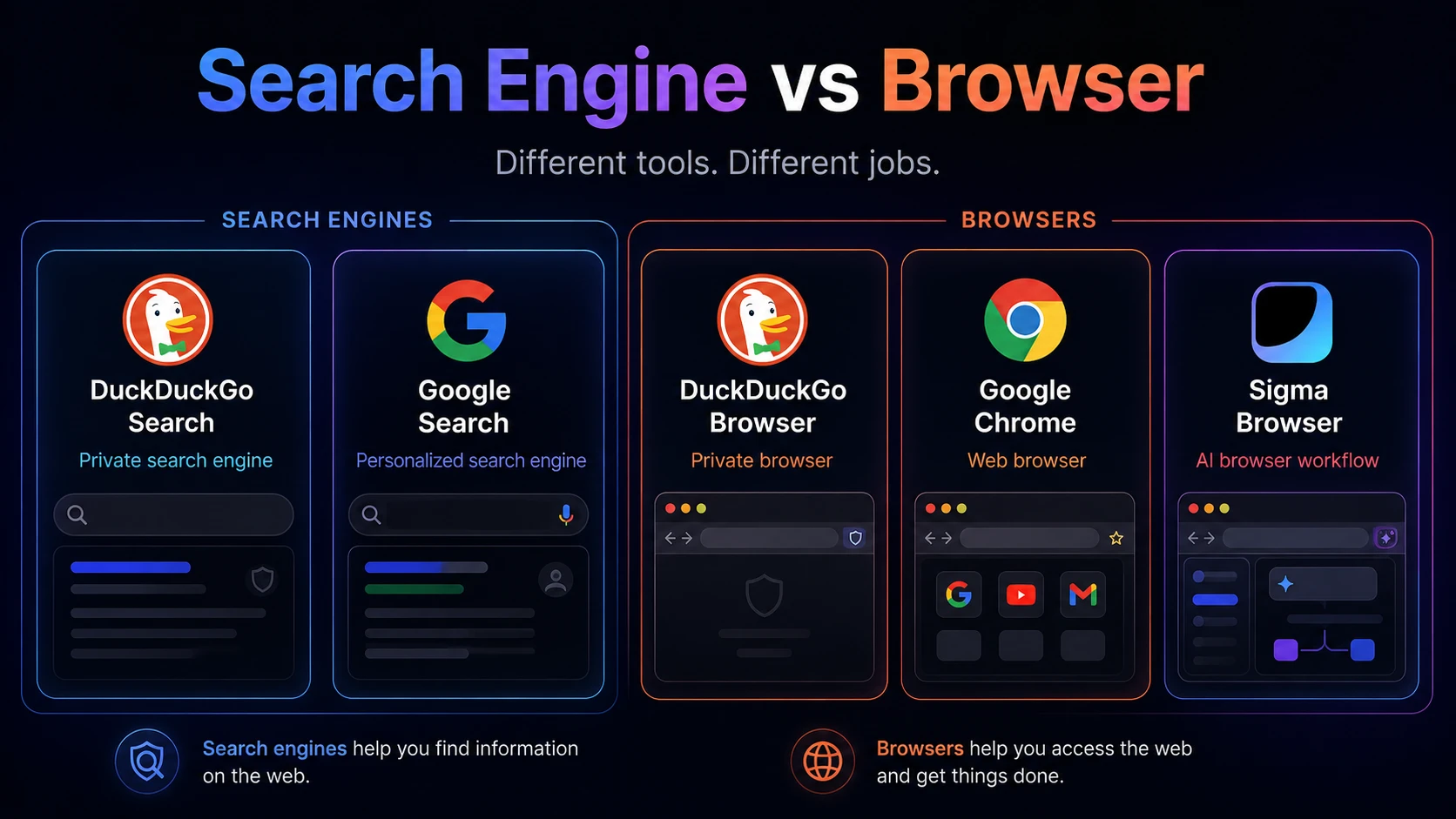
Another reason this topic gets messy is that people mix up search engines and browsers. Google is a company, a search engine, and an ecosystem. Chrome is Google’s browser. DuckDuckGo is a private search engine, but it also makes browsers and browser extensions. When someone says “DuckDuckGo vs Google Chrome,” they may be comparing a search engine to a browser without realizing it.
You can use DuckDuckGo inside Chrome. That gives you DuckDuckGo search privacy, but it does not make Chrome itself a private browser. You can also use Google Search inside other browsers, including privacy-focused browsers, though that brings Google’s search model back into the experience. The browser and the search engine are connected, but they are not the same product.
Why some people think DuckDuckGo is worse than Google
Search for “why DuckDuckGo is bad” and you will see the same complaint again and again: the results are not always as good as Google’s. That criticism is not imaginary. DuckDuckGo can feel weaker for very specific queries, local business searches, maps, fresh news, product research, video discovery, and technical troubleshooting. Some users also dislike that DuckDuckGo’s traditional links and images are largely sourced from Bing, because they were hoping for Google-level results without Google-level tracking.
But “worse” depends on what you are asking the search engine to do. DuckDuckGo is worse if you expect it to be Google with privacy mode turned on. It is better if you want a search engine that does not shape results around a long-running profile. Less personalization can feel like lower quality in one search and like a relief in another. A search for a restaurant near you may be better on Google. A sensitive health, finance, or personal question may feel better on DuckDuckGo because it is not tied to the same profile-driven experience.
This is why the smartest answer is often boring: use both. Set DuckDuckGo as the default for normal search, and keep Google for the moments when the result quality gap matters. That is not cheating. It is how many privacy-conscious users actually search the web.
What Reddit gets right about DuckDuckGo vs Google
Reddit discussions about DuckDuckGo vs Google are useful because they sound like real search behavior, not brand messaging. Many users say they want to love DuckDuckGo, but still fall back to Google for harder searches. Others use DuckDuckGo most of the time and type Google bangs or open Google only when a query fails. Some people accept weaker results as the cost of privacy. Others decide that search quality matters too much for a full switch.
That is the honest middle of the debate. DuckDuckGo is not only for people who hate Google, and Google is not only for people who do not care about privacy. Most users are balancing two needs: they want better privacy, but they also want answers that work. A good search setup respects both sides. DuckDuckGo for default private searching, Google for high-stakes or high-complexity searches, and a browser setup that does not force every task into one company’s ecosystem.
DuckDuckGo vs Google: which should you use?
Instead of asking which search engine is “better” in the abstract, match the tool to the search. DuckDuckGo and Google are built for different expectations, and the practical winner changes by task.
What about Bing, Brave Search, Perplexity, and Sigma?
DuckDuckGo and Google are not the only search options. Bing matters because DuckDuckGo largely sources traditional links and images from Bing. Brave Search matters because it is another privacy-focused search engine with its own independent index angle. Perplexity matters because many users now treat AI answer engines as search alternatives. The bigger search market is no longer only about blue links; it is about privacy, indexes, AI summaries, citations, source quality, and how much control users keep.
Sigma Browser belongs in this conversation only as a third option, not as a replacement for DuckDuckGo or Google Search. DuckDuckGo and Google are search engines first. Sigma is more relevant if the real job is researching, writing, comparing sources, summarizing pages, or using AI inside the browser. If your search workflow has turned into “open ten tabs, read sources, ask questions, compare answers, then write,” an AI browser with Deep Research, AI Chat, and page-aware workflows may fit better than switching search engines alone.
For a wider view, compare DuckDuckGo with Firefox, look at Chrome alternatives, or explore Brave alternatives if your real goal is moving away from Google’s browser ecosystem, not just changing your search engine.
Final verdict: should you switch from Google to DuckDuckGo?
Switch to DuckDuckGo if you want search to feel less personal, less tracked, and less tied to your Google account. DuckDuckGo is the better default for private everyday searches, sensitive topics, and people who want fewer personalized results. It is also the better choice if you want AI features to stay optional instead of becoming the center of the search page.
Stay with Google, or keep it nearby, if you need the strongest result quality. Google is still better for local search, maps, shopping, fresh news, videos, images, technical troubleshooting, and AI-powered search. The result quality gap is real enough that many users who prefer DuckDuckGo still use Google when a search has to be precise.
The best setup for many people is not a full switch. Use DuckDuckGo as your default search engine so ordinary searches are more private. Use Google when the job calls for the deepest results, better local context, or AI search. That gives you the main benefit of DuckDuckGo without pretending Google has no advantages. Private by default, Google when needed — that is the practical answer.
More articles
.webp)
.webp)

Download Sigma Browser
Questions & Answers
reach out to us on X at @Sigma_Browser
Get Sigma on Android


