Blog

/

April 25, 2026

Is There an AI With No Restrictions? How AI Limits Actually Work

In this article, we explore AI with no restrictions, explain how AI limits actually work, and break down the systems that control responses.

Nick Trenkler

Table of Contents

The idea of an AI with no restrictions sounds simple and appealing. This AI can answer anything, follow any instruction, and never refuse. But modern AI doesn’t work that way. They are built with filters, policies, and hidden mechanisms that influence how responses are generated. 

In this article, we’ll tell you about AI limitations and key mechanisms that control AI behavior, from training and filtering to platform-level restrictions. You’ll also learn what options exist for reducing these limits and how different types of AI systems compare in terms of freedom, privacy, and control.

What Does “Unrestricted AI” Actually Mean?

“Unrestricted AI” sounds simple: an AI that answers anything, without filters, refusals, or hidden rules. In reality, AI limitations are more complex. There are types of AI with no restrictions:

  • Partially restricted AI: The most common type. It appears flexible but still applies hidden moderation rules, especially in cloud-based tools.
  • Unfiltered AI: Generates responses with minimal moderation. It may still have technical limits, but it avoids heavy content filtering.
  • Uncensored AI: Designed to remove or bypass most safety layers, allowing direct, raw outputs without intervention.

Most mainstream AI chatbots systems like ChatGPT or Google Gemini fall into the first category of partially restricted AI. They use multiple layers of control, including several mechanisms:

  • Content moderation systems that block or rewrite certain outputs.
  • Safety training (RLHF) that teaches models what not to say.
  • Platform-level rules that filter responses before they reach the user.

This is why many tools feel “smart but cautious.” Users interacting with a controlled environment built around AI tools. So when people ask for “AI with no restrictions,” what they usually mean is:

  • fewer blocked prompts
  • more direct answers
  • greater control over outputs

But here’s the key thing: no AI is truly without limits. Many users specifically look for an AI chat with no restrictions. They expect a tool that can answer freely without refusals or hidden filters. Even the most open models are still shaped by their training data, architecture, and the environment they run in. The real difference lies in how visible and how strict those limits are.

Key Differences: Unrestricted AI vs Filtered AI

Aspect

Unrestricted AI

Filtered AI

Content filtering

Minimal or no filtering

Strong moderation and safety layers

Response style

Direct and unfiltered

Cautious, adjusted, or limited

Control

High user control

Controlled by provider policies

Prompt handling

Accepts broader inputs

May block or rewrite prompts

Output behavior

Raw, less restricted answers

Filtered, softened, or refused responses

Privacy

Often local or user-managed

Often cloud-based with data processing

Transparency

More visible limitations

Hidden or indirect restrictions

Responsibility

On the user

On the platform

This comparison also shows why the idea of an AI chat with no restrictions is more complex than it seems. Even systems that appear open still rely on underlying control mechanisms that shape how responses are generated.

Why People Use Free AI with No Restrictions

92% of Americans are concerned about online censorship, yet 81% also distrust how AI companies use their data. That showing the public simultaneously wants less restriction and more protection. (ExpressVPN Survey 2025 + Pew Research / IAPP)

Users no longer want to adapt to predefined limits. They are searching for a free AI with no restrictions. They want AI that gives them free responses and helps to explore ideas without constant filtering or refusals.

One of the main reasons is the need for flexibility. With fewer restrictions, AI becomes more useful for real tasks like research, writing, coding, and experimentation. Privacy also plays a role, especially for users who prefer not to send sensitive data to external servers. 

People choose unrestricted AI for several key reasons:

  • More direct and complete answers
  • Fewer blocked prompts and refusals
  • Greater control over outputs and behavior
  • Better support for complex or sensitive topics
  • More privacy, especially with local AI

Use our top of unfiltered AI chats to find useful tools for your needs. 

Three Types of Unrestricted AI

When people talk about “AI chatbot with no restrictions”, they often imagine a single type of system that can do anything without limits. Only 24% of GenAI projects include safeguards at the enterprise level, revealing how loosely the term "unrestricted" maps onto actual security practice. (SQ Magazine – AI Jailbreaking Statistics)

There isn’t one universal solution. Some tools give you more flexibility but still operate within controlled environments.This applies to any AI generator with no restrictions, whether it is used for text, code, or automation. The level of freedom depends not on the label, but on how the system is built and deployed.

Local AI Models (Fully Private)

Local AI models run directly on your device and don’t rely on external servers like cloud AI services and APIs. Cause that all prompts, responses, and data processing happen locally. They are not sent anywhere. Learn how to use local AI to increase your privacy.

There are local AI models like Qwen. Users can deploy them on personal machines using tools like local runtimes or lightweight frameworks. The key advantage of local AI is control. Users decide how the model behaves, what data it accesses, and whether any filtering is applied at all. 

Local AI is often confused with private AI, but they’re not the same. Read our article to learn more about private AI and how it differs from local AI.

Pros

Cons

Full control over behavior and outputs

Requires powerful hardware (GPU/CPU)

Strong privacy (data stays on your device)

Setup can be complex for non-technical users

Fewer built-in restrictions

Models may be less advanced than cloud AI

Works offline (no internet required)

Limited access to real-time data

No dependency on external services

Performance depends on your device

Customizable and flexible

Requires maintenance and updates

Sigma: Best Private Browser with Local AI

Sigma Browser is designed with a built-in AI that works directly inside your workflow. It can run AI models locally on your device. So your prompts, tabs, and interactions stay private and under your control. Sigma’s local AI processing allows it to work without relying on cloud infrastructure. It also reduces exposure to tracking, logging, and external data handling. 

Unlike traditional browsers that rely on extensions or external services, Sigma provides browsing, research, and AI tools in one environment. You can surf web pages, analyze content, generate text, translate information, or automate tasks without switching between different apps.

Private Browsers Comparison

Feature

Sigma Browser

Brave Browser

Tor Browser

Privacy protection

Built-in, always-on, minimal telemetry

Strong default blocking and anti-tracking

Maximum anonymity via multi-layer routing

AI integration

Native AI across tabs and workflows

Built-in AI assistant (Leo), limited scope

No AI features

AI processing

Runs locally on your device

Cloud-based AI processing

No AI

Data handling

Local processing, no external transmission required

Data may be processed via external services

Routed through Tor network

Tracking protection

Early-stage blocking + fingerprint reduction

Ad/tracker blocking + fingerprint randomization

Strong anti-tracking + identity obfuscation

Ease of use

Works out of the box with AI and privacy

Easy to use, Chromium-based

More complex setup and usage

Performance

Fast, no relay routing

Fast Chromium performance

Slower due to multi-node routing

Use case

Private AI workflows and everyday browsing

General private browsing

Maximum anonymity use cases

This comparison makes clear that Sigma takes a fundamentally different approach. While other browsers focus on blocking trackers or hiding identity, Sigma combines privacy with local AI execution. User’s data are protected not just during browsing, but also during interaction with AI. 

Sigma is the only option that brings together private browsing and fully local AI in one system. Other famous private browsers (like Brave or Tor) either rely on cloud-based AI or do not offer AI capabilities at all. This makes Sigma the most private AI automation tool with no restrictions. You can learn more in our top of most private browsers.

Cloud AI with Reduced Restrictions

Cloud AI tools run on remote servers and offer a more flexible experience compared to mainstream platforms. So they don’t rely on the user's device’s hardware. 

But these tools have limits, even when positioned as an AI generator with no restrictions. They still follow provider-defined policies, which may include invisible moderation layers, response shaping, usage restrictions, or throttling. So control is never fully in the user’s hands. This applies to both text-based tools and any AI image generator with no restrictions that operates through cloud infrastructure.

Besides, cloud AI handles data. Prompts and interactions are transmitted to remote servers. And there they may be logged, analyzed, or used to improve the service. The exact level of privacy depends on the provider, but full transparency is not always guaranteed.

Pros

Cons

More flexible responses compared to standard AI

Still subject to platform rules and moderation

Fewer refusals and broader prompt support

Hidden moderation layers may still apply

No setup required, works instantly

Data is processed externally

High performance without local hardware limits

Limited control over behavior and outputs

Cloud AI Models Comparison

Cloud AI models differ significantly in how they filter content, handle user data, and control responses. While some offer more flexible interactions, all of them rely on external infrastructure and provider-defined policies. The table below compares the most popular cloud AI models, highlighting how they differ in filtering, data handling, and overall level of control.

Model

Provider

Filtering Level

Data Processing

Transparency

Best For

ChatGPT

OpenAI

High moderation and safety layers

Cloud-based, external servers

Limited visibility into filters

General tasks, writing, productivity

Claude

Anthropic

High, safety-focused alignment

Cloud-based processing

Policy-driven responses

Analysis, long-form content

Google Gemini

Google

Moderate to high filtering

Cloud infrastructure

Integrated with ecosystem rules

Search, productivity, integrations

Grok

xAI

More permissive compared to others

Cloud-based, tied to platform data

Less restrictive but still controlled

Real-time insights, open-style responses

Experimental / Open-source AI

These types of AI models are often community-driven or research-focused, designed with minimal restrictions by default, and are often used as a foundation for an AI generator with no restrictions. They are usually open-source and allow anyone to inspect, modify, and run them independently. For example, Falcon was developed with a focus on accessibility and open research, while GPT-NeoX serves as a community-driven alternative to proprietary large language models.

Open-source AI offers a higher degree of freedom in how they generate responses. Users can adjust prompts, fine-tune behavior, or even remove certain limitations entirely, depending on how the model is configured. 

But open-source AI requires technical knowledge to set them up and use. Users also need to handle updates, compatibility issues, and hardware optimization on their own. Finally, not all open-source AI is used locally. If the same models are accessed through hosted services or third-party platforms, your data may still be transmitted and processed externally. That means they no longer function as a true AI with no restrictions in terms of privacy and control.

Pros

Cons

Minimal built-in limitations

Requires manual setup and maintenance

High level of customization

Can be complex for non-technical users

Greater control over model behavior

Responsibility for security and configuration

Open-source AI Comparison

Open-source AI models offer a different approach compared to cloud-based systems. They often used to create an AI image generator with no restrictions. But their level of restriction, performance, and privacy depends entirely on how they are set up and used in practice. The table below shows the most popular open-source AI models and how they differ in flexibility, deployment options, and level of control.

Model

Developer

Filtering Level

Deployment

Customization

Best For

LLaMA

Meta

Low to moderate, depends on setup

Local or self-hosted

High, widely fine-tuned

General tasks, custom AI systems

Mistral

Mistral AI

Low by default

Local or cloud deployment

High, flexible configurations

Efficient local AI, performance-focused tasks

Falcon

Technology Innovation Institute

Low, minimal built-in restrictions

Self-hosted or cloud

High, open architecture

Research, experimentation

GPT-NeoX

EleutherAI

Low, depends on implementation

Local or server-based

Very high, fully customizable

Developers, advanced AI setups

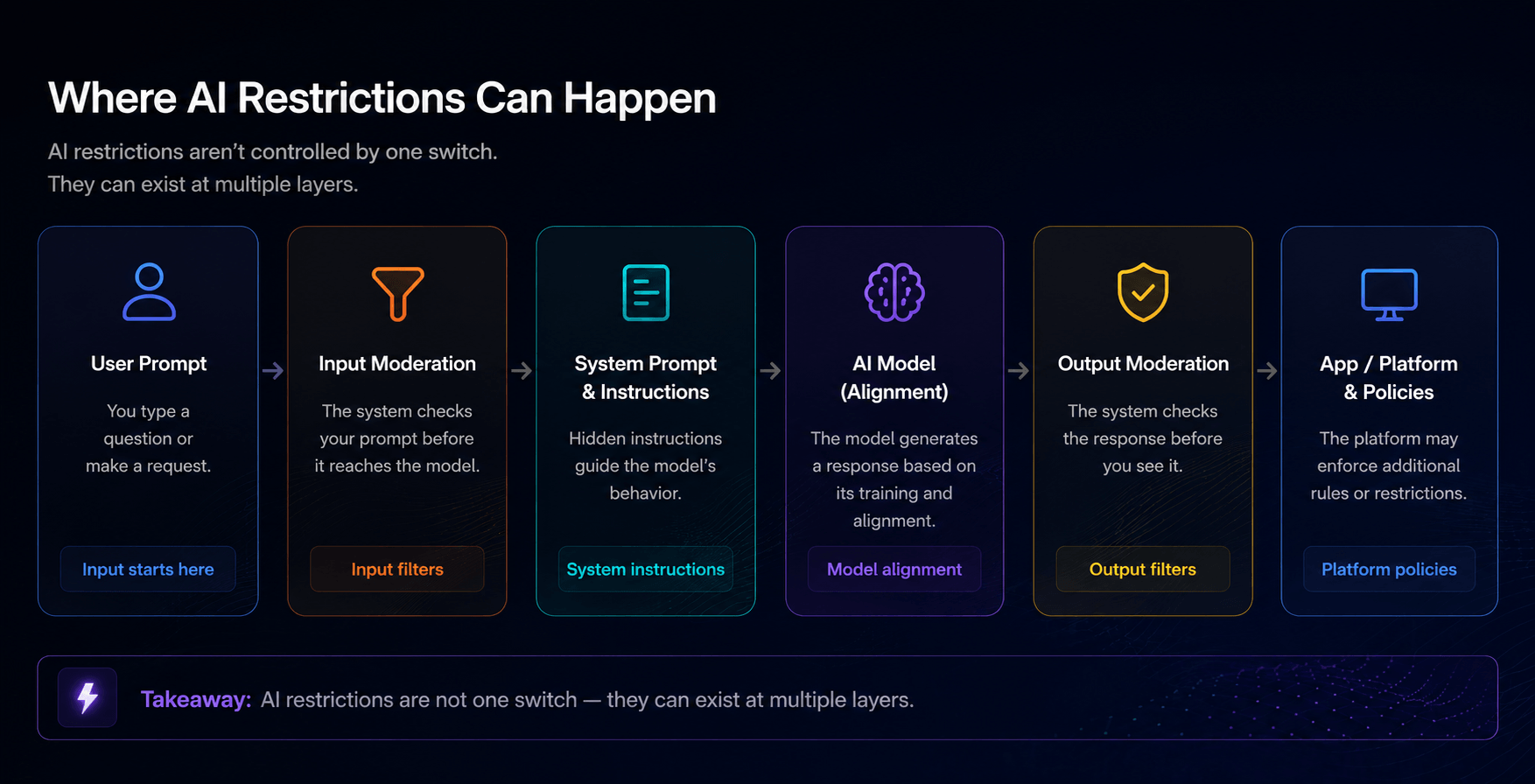
How AI Tools Filters, Moderates, and Limits Content

Users think that AI just generates answers based on input. But every modern AI generator operates inside a layered control structure designed to guide, restrict, and reshape its behavior. Here’s a short list of them in our table. 

Mechanism

Where It Works

What It Does

Impact on User

Training Alignment (RLHF)

Inside the model

Shapes behavior during training

AI avoids or softens certain topics automatically

Content Moderation Filters

Before & after generation

Blocks or edits inputs/outputs

Prompts may be refused or responses altered

Policy Enforcement

Platform level

Applies rules and restrictions

Limits what AI is allowed to say

Prompt Rewriting

Input layer

Modifies user prompts

Your request may be changed before processing

Response Shaping

Output layer

Adjusts tone and content

Answers may feel filtered or neutralized

Rate Limits & Quotas

System level

Controls usage frequency

Limits how often and how much you can use AI

Infrastructure Controls

API / cloud layer

Filters requests globally

Behavior can change without notice

Training-Level Alignment (RLHF and Fine-Tuning)

Even tools that are presented as an AI with no restrictions still apply moderation in practice. AI models are trained to follow preferences, avoid certain topics, and respond in a “safe” and acceptable way. This is typically achieved through reinforcement learning from human feedback (RLHF) and additional fine-tuning layers.

Human reviewers evaluate model outputs and rank them based on usefulness, safety, and tone. AI learns patterns of what is considered acceptable and what should be avoided. That reshapes how the model thinks. After an AI may hesitate, redirect, or generalize responses because those behaviors are embedded into its structure. Even without any external moderation.

That’s why many limitations are part of the model itself. Some topics consistently produce vague or cautious answers, even in systems that appear more open.

Content Moderation Filters (Pre- and Post-Processing)

Most AI generation tools apply real-time filtering systems that analyze both user input and model output. These moderation layers act as gatekeepers. It decides what the model is allowed to process and what the user can see.

So, a prompt is submitted. After it may first pass through an input filter that detects sensitive or restricted content. If it’s flagged, AI can block the request, modify it, or route it through a safer interpretation.

Also when the model generates a response, an output filter performs a similar check. If the result violates internal rules, it can be rewritten, truncated, or replaced with a refusal. 

Content moderation filters rely on classification models trained to detect patterns associated with different categories of content. Sometimes they allow AI to answer freely, other times they refuse similar requests. But in the end, we can say that there are no full AI generators with no restrictions.

Policy Enforcement Layers

AI is also governed by policy frameworks by different organizations. These policies outline what AI can say and how it should behave in ambiguous situations. For example, Grock doesn't write anything bad about Elon Musk.

Users sometimes see answers that feel overly cautious, generalized, or redirected. The model is not failing, but following a predefined rule set. These policies are also dynamic. Providers can update them at any time.

This explains why finding a truly free AI with no restrictions is difficult. Most tools, including AI chat and image generation systems, still rely on hidden layers of control. Whether you’re using an AI chatbot or an AI image generator with no restrictions, it is still governed by policy frameworks.

Prompt Rewriting and Response Shaping

Many AI tools operate in a way where the interaction you see isn’t a direct exchange between you and the model. Your prompt may be modified before it reaches the system. So the response would be adjusted before it is shown to you.

Prompt rewriting and response shaping may include:

  • Clarifies ambiguous inputs
  • Removes sensitive or restricted elements
  • Adds hidden instructions to guide the model’s behavior
  • Softens the tone of responses
  • Neutralizes or generalizes certain outputs
  • Simplifies answers to match platform expectations

Even in systems positioned as an AI generator with no restrictions, prompts can be modified or guided before reaching the model, and outputs can be adjusted before they are shown.

Rate Limits and Usage Controls

Not all restrictions are about content. AI tools also impose limits on how they are used. These controls regulate access, performance, and system load, but they also indirectly shape user behavior. This also applies to AI chats with no restrictions, where usage limits still affect how the tool can be used.

Common mechanisms include:

  • message or request limits over time
  • token or context size restrictions
  • throttling during peak usage

While these constraints are primarily technical, they affect how deeply and freely users can interact with the system. That includes any AI generator with no restrictions that depends on shared infrastructure.

Platform-Level Controls (APIs and Infrastructure)

If AI works through cloud or APIs, providers can enforce restrictions before a request even reaches the model. Even in tools presented as an AI generator with no restrictions. This includes:

  • Request validation that checks incoming prompts
  • Access control that limits who can use the system and how
  • System-wide rules that can block or modify interactions
  • Instant updates to controls without changing the model
  • Dynamic behavior that can change over time based on provider decisions

These controls operate outside the model itself and can significantly affect how the AI behaves.

How to Reduce AI Limitations in Practice

There is no way to remove all AI limitations, especially in cloud-based tools. But users can significantly reduce how often they meet with restrictions and reduce the effect on their workflow. 

One of the most effective strategies to get a free AI chatbot with no restrictions is choosing the right environment. Local and open-source models provide more control, while cloud tools vary in how strict their moderation systems are. By selecting tools that align with your needs, you can avoid many limitations from the start.

The table below shows the most practical ways to reduce AI limitations in real use and find AI chat with no restrictions. Each method differs in how it works, how much control it gives you, and what trade-offs come with it. 

Ways to Reduce AI Limitations

Method

How It Works

What You Gain

Pros

Cons

Use local or self-hosted AI

Run models directly on your device instead of cloud servers

Full control over behavior, no external moderation, higher privacy

High privacy and full control over outputs

Requires powerful hardware and technical setup

Choose less restrictive tools

Select AI systems with lighter filtering and fewer refusals

More flexible responses and fewer blocked prompts

Easy to use and available immediately

Still limited by provider rules and policies

Improve prompt design

Adjust wording, add context, and structure requests carefully

Better outputs without triggering restrictions

No tools required and works instantly

Does not remove deeper system limitations

Combine multiple AI tools

Use different AI systems for the same task

Access to less restricted answers and cross checked results

More flexibility and broader coverage

Can be time consuming and less convenient

Use open-source models

Modify and configure AI models independently

High customization and transparency

Maximum flexibility and transparency

Requires technical skills and ongoing maintenance

Customize model behavior

Adjust system prompts or configurations

More control over tone, style, and limitations

Fine tuned control over responses

Limited by base model capabilities

In our opinion, there is just no hope for users that are looking for an AI chat with no restrictions, if they aren’t ready to use local AI. This is the most effective way.

Benefits and Risks of AI with No Restrictions

AI with no restrictions offers more control over the responses. This level of freedom can be especially valuable for research, creative work, and complex problem-solving where rigid boundaries get in the way.

But once those restrictions are removed, the responsibility doesn’t disappear. It simply moves from the platform to users. 

Without built-in safeguards, the quality, safety, and appropriateness of outputs depend entirely on how the AI generator with no restrictions is used. That caused both new opportunities and new risks that should be clearly understood before relying on such systems.

Benefits vs Risks of Unrestricted AI

Benefits

Risks

Full control over outputs and behavior. You decide how the model responds without enforced tone, refusals, or predefined limits

Potential misuse or harmful outputs. Without safeguards the model can generate inappropriate, misleading, or risky content

Fewer limitations on prompts. It allows exploration of complex, sensitive, or unconventional topics without automatic blocking

Lack of safety filters. There are no built in mechanisms to prevent problematic or unsafe responses

Greater flexibility for real world tasks. It works well for research, writing, coding, automation, and edge case scenarios

Inconsistent quality of responses. Outputs may be less refined, accurate, or reliable without alignment layers

Stronger privacy especially with local AI. Data can stay on your device without being sent to external servers

User responsibility for data security. Misconfiguration or poor setup can expose sensitive information

High level of customization and fine tuning. You can modify behavior, prompts, and retrain models for specific needs

Requires technical knowledge. Setup, optimization, and maintenance can be complex

No dependency on centralized platforms. It reduces reliance on providers and changing policies

No guarantees of compliance. It may conflict with legal, ethical, or organizational requirements

More transparent behavior in open systems. There are fewer hidden filters or response manipulations

Harder to control unintended outputs. Without moderation layers unexpected results are more likely

FAQ and Final Insight

AI restrictions aren’t a single mechanism but a coordinated system of controls operating at multiple levels. Some are embedded into the model. Others are applied during interaction. And many are enforced by the platform itself. So the real difference between AI tools is not whether they impose limits, but how those limits are implemented, how transparent they are, and how much control the user ultimately has.

Here are also some of the most common questions people have when exploring AI with fewer restrictions and how it actually works in practice.

Can AI actually answer anything without limits?

Not completely. Every AI system has some form of limitation, whether it comes from training data, architecture, or the environment it runs in. However, some models are designed to operate with far fewer visible restrictions, which makes them feel much more open in practice.

Why does “uncensored AI” still refuse sometimes?

Because restrictions can exist on multiple levels, not just inside the model itself. Even if the model is relatively open, the platform, API, or infrastructure may still apply moderation rules. As a result, users may still encounter refusals or altered responses in certain situations.

Is local AI always unrestricted?

No, local AI is not automatically unrestricted. It depends on the specific model and how it has been configured or fine-tuned. Running AI locally gives you the ability to remove many limitations, but it still requires setup and control from the user.

Does unrestricted AI give better answers? 

Not necessarily. While it can provide more direct and less filtered responses, it may also produce less accurate or less refined outputs. Without alignment layers, the quality of responses depends more on the model and how it is used.

What’s the biggest advantage of using AI with no restrictions?

The main advantage is freedom and flexibility. Users can explore complex topics, test ideas, and work without constant interruptions from filters or refusals. This makes unrestricted AI especially useful for research, creative work, and technical tasks.

Why don’t all AI tools remove restrictions?

Because removing restrictions introduces significant risks for providers. Companies need to comply with regulations, prevent misuse, and maintain trust with users and partners. As a result, most mainstream AI tools choose controlled environments over full openness.

Oops! Something went wrong while submitting the form.