
Browser With On-Device AI: Best Local AI Browsers in 2026
A guide to on-device AI browsers, local models, privacy, offline use, and Sigma’s place in the category.

A browser with on-device AI runs at least part of its AI workload on your computer instead of relying only on remote servers. This guide compares the leading approaches in 2026, separates true local inference from cloud-based browser assistants, and explains where Sigma, Brave, Opera, Chrome, Edge, and Firefox fit.
What is a browser with on-device AI?
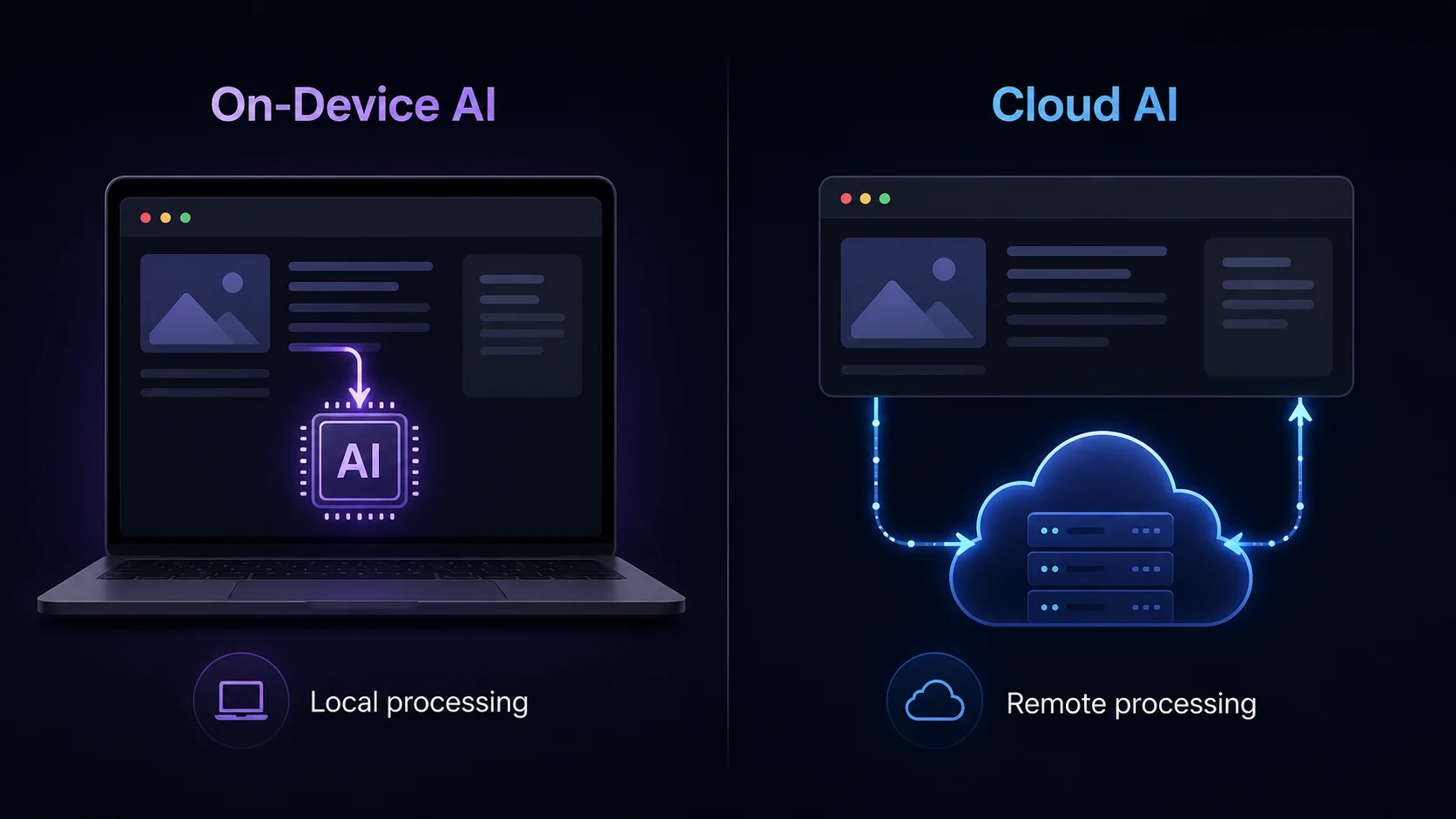
A browser with on-device AI runs at least part of its artificial intelligence workload on the user’s own computer or phone. The browser may download and manage a small language model, connect to a local model runtime, or use task-specific models for summarization, translation, writing, tab organization, and security. Unlike a cloud-only AI browser, it does not need to send every prompt or page to a remote model provider. Some products are fully local for selected tasks; others use a hybrid architecture that switches between local and cloud processing.
Key Takeaways
- On-device AI describes where inference happens. It does not automatically guarantee that every browser feature, network request, or agent action stays local.
- Local models are useful for sensitive and repeatable tasks such as page summaries, rewriting, translation, document review, and private brainstorming.
- Cloud models still lead on scale. They are often better for the largest context windows, advanced reasoning, live web data, and compute-heavy multimodal work.
- The most useful setup is often hybrid: local by default for private work, with deliberate cloud access when a task needs current information or a stronger model.
- Sigma is one of the most practical options in this comparison for users who want local models built into everyday browser workflows.
How On-Device AI Works Inside a Browser
Traditional AI assistants usually work through a remote API. You type a prompt, the app sends it to a data center, a model generates the answer, and the result travels back over the internet. A browser with on-device AI moves some or all of that inference loop onto your own hardware.
The model may be bundled with the browser, downloaded when you enable a feature, or installed through a local runtime. Chrome provides browser-managed models and built-in AI APIs for tasks such as writing, rewriting, translation, language detection, summarization, and prompting, although availability still depends on the API, browser version, compatible hardware, and rollout status. Microsoft Edge has expanded browser-provided on-device models and APIs for prompting, writing assistance, translation, language detection, and experimental speech recognition. Firefox uses downloadable local models for focused features such as PDF alt text and tab organization.
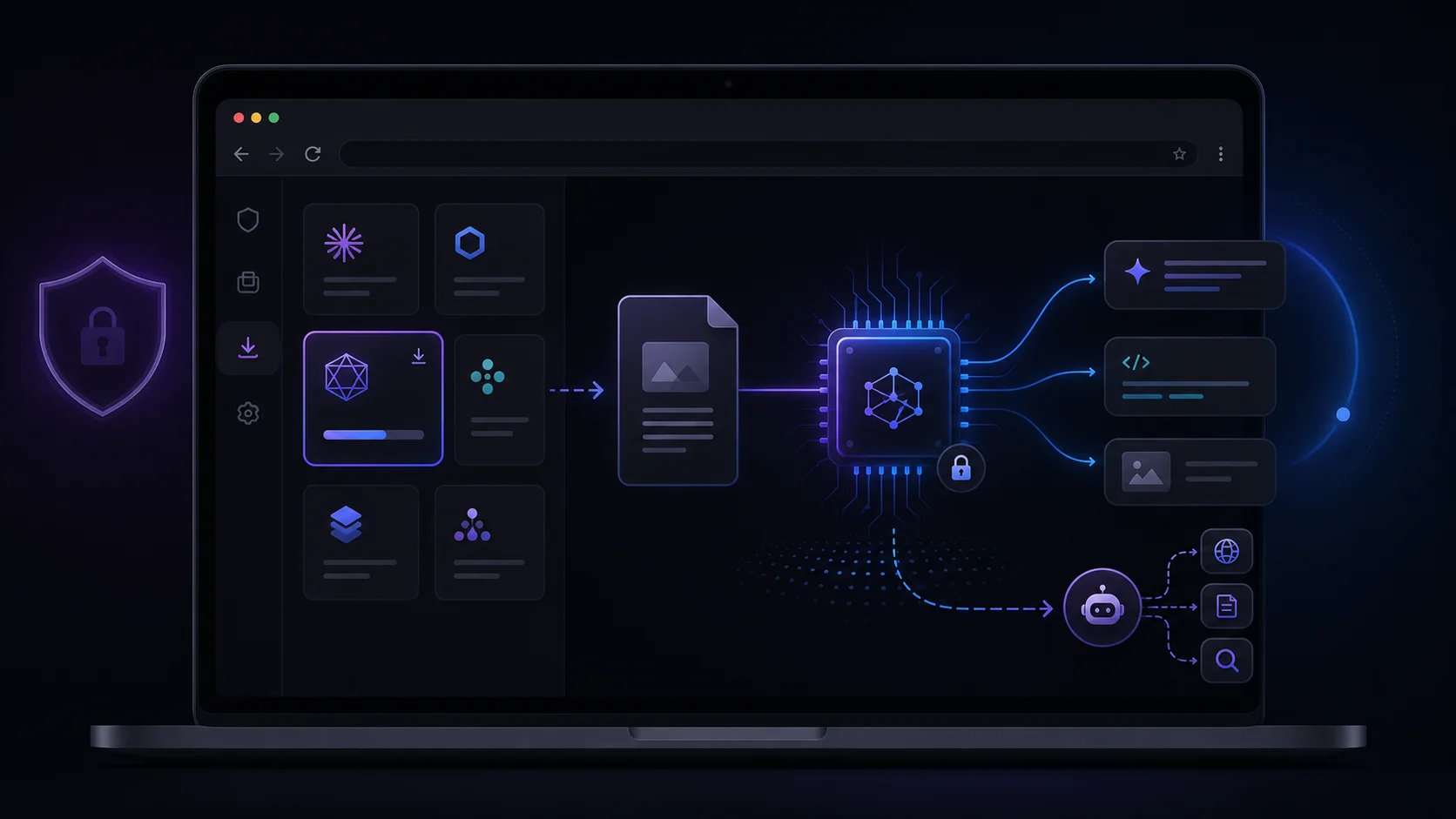
Other browsers expose local models more directly. Opera introduced experimental downloadable local LLMs in Opera One Developer, so users should confirm that the feature is still available in their current release channel. Brave Leo’s Bring Your Own Model feature can connect to a model served locally through software such as Ollama. Sigma Browser places supported local-model workflows inside Private Mode and connects them to page-aware tools and agent settings rather than limiting local AI to a developer API.
A Typical Local Processing Flow
- The browser downloads or connects to a supported local model.
- You open a page, select text, upload a file, or enter a prompt.
- The browser prepares the relevant context and passes it to the local model.
- Your CPU, GPU, or NPU performs inference on the device.
- The answer appears in the browser without a cloud model handling that local inference step.
The exact architecture matters. Some “local AI” features run entirely inside the browser through technologies such as WebGPU and WebAssembly. Others use a native process installed with the browser. BYOM setups may connect the browser interface to a separate local server such as Ollama or LM Studio. These approaches can all be on-device, but they differ in setup, permissions, storage, performance, and how much control the user gets.
On-Device AI vs. Cloud AI vs. Hybrid AI
The phrase AI browser now covers several very different products. Some place a cloud chatbot beside a webpage. Some use small local models for narrow features. Others let users download a full local LLM and use it for chat or browser tasks. A useful comparison starts with the processing path, not the marketing label.
A hybrid browser is not inherently less private than a local-only product. The deciding factor is transparency and control. The browser should make it clear which model is active, whether page content is being sent anywhere, what the agent can access, and whether cloud fallback is enabled. For a deeper breakdown, see Cloud AI vs. Local AI.
What Can an On-Device AI Browser Actually Do?
Summarize and Question Webpages
Page-aware AI can turn a long article, report, product page, or help document into a short summary. It can also answer targeted questions without requiring you to copy the entire page into another app. Sigma’s Chat With Page is designed around this workflow, keeping the conversation next to the content you are reading.
Write, Rewrite, and Translate Text
Small local models are well suited to bounded text tasks: fixing grammar, changing tone, shortening a draft, extracting action items, or translating a passage. Chrome and Edge expose browser-managed APIs for several of these tasks, while Firefox uses task-specific local models for selected browser features. The advantage is not that a small model beats every cloud model. It is that a useful edit can happen quickly and with less data movement.
Analyze Sensitive Material
Local processing can be valuable when the prompt contains unpublished writing, private notes, internal research, personal records, or confidential client material. It reduces exposure to a third-party inference provider. This is also where wording matters: “processed locally” is more precise than “completely private.” Browser logs, extensions, synced history, crash reports, or a connected online tool may still create other data paths.
Run Browser Agents
A local model can sometimes power an agent that reads pages, clicks, types, compares information, or works through a sequence of steps. In Sigma, the AI Agent supports OpenClaw and Hermes and can use local models in Private Mode. Agent workflows deserve stricter scrutiny than simple chat because the system may interact with websites, files, forms, or authenticated sessions. Local inference lowers one category of exposure; it does not remove prompt injection, unsafe actions, or permission risks.
Work Offline
Once a model is downloaded, supported tasks can continue without an internet connection. You can draft, rewrite, summarize stored content, or chat with a local model on a flight or in an unreliable network environment. Live web search, remote connectors, cloud model calls, and new model downloads still require connectivity. A genuinely useful offline AI browser should explain that boundary instead of treating “offline” as an all-or-nothing claim.
Why On-Device AI Matters for Privacy
A browser sees unusually sensitive context: search queries, open tabs, account sessions, documents, payments, travel plans, work dashboards, and the exact text a user is about to submit. Adding AI can make the browser more useful, but it also gives the model a privileged view of daily activity.
Running a model locally reduces the need to transmit raw prompts, selected text, page content, and generated answers to a model provider. It can also make privacy easier to verify. A user can disable the network, inspect browser requests, review downloaded models, and choose whether cloud integrations are active.
Important: “On-device” answers the question where the model runs. It does not answer every privacy question. A trustworthy browser should also explain what context is collected, what is stored, what is synced, which permissions an agent receives, and whether difficult requests can be routed to the cloud.
For a broader look at browser and AI data handling, read Are AI Conversations Private? and What Is Private AI?.
How We Compared On-Device AI Browsers
“On-device AI browser” can describe several very different products, so this comparison does not rank browsers simply by the number of AI features they advertise. Each browser was evaluated on five practical questions:
- Local execution: Can a supported AI task run on the user’s device rather than only through a cloud model?
- Setup: Does the browser manage the model itself, or does the user need a separate runtime such as Ollama?
- Browser context: Can the local workflow work with pages, selected text, tabs, files, or browser actions?
- Availability: Is the feature broadly available, limited to compatible devices, or still in a developer, preview, or experimental channel?
- Transparency: Does the product explain which model is active and when a task may use the network or a cloud service?
Browsers With On-Device AI in 2026
The market is not a list of interchangeable AI browsers. Sigma and Opera Developer have offered user-facing downloadable local-model experiences. Brave connects its browser assistant to a separately served local model. Chrome and Edge focus heavily on browser-managed models and web APIs, while Firefox uses on-device models for selected browser features. The right choice depends on whether you want a ready-to-use local workflow, a configurable BYOM setup, or APIs for building AI into websites and extensions.
Sigma: Local Models and AI Agents Built Into the Browser
Sigma is a strong fit for users who want a consumer-facing local AI workflow rather than a developer API or a separately configured model server. Its Private Browser experience includes an integrated local LLM, while Local AI Chat is designed for on-device prompts, writing, summaries, and analysis. Supported model choices and hardware requirements can change with product updates, so the browser’s current model selector should be treated as the source of truth.
Sigma also connects local-model use to browser context. Chat With Page handles page-aware questions and summaries, and the official AI Agent page states that users can choose OpenClaw or Hermes and select a local model in Private Mode. That combination is Sigma’s main advantage: local inference is presented as part of browsing, page analysis, and supported agent workflows instead of as a standalone technical setup.
This does not mean every Sigma feature is automatically offline or local. Web search, live research, cloud integrations, and actions on websites still use the network when the task requires it. The benefit is the ability to choose a supported local workflow for sensitive or repeatable work and switch to online capabilities deliberately.
For a broader tool comparison, see Best Local AI Tools for Personal Workflows.
Opera Developer: A Broad Experimental Local-Model Catalog
Opera was an early major browser to expose downloadable local models through Opera One Developer. The company documented an experimental catalog spanning many model families and stated that prompts sent to the selected local model remain on the machine. This makes Opera historically important to the category, but the release channel matters: the cited implementation was introduced through AI Feature Drops in Opera Developer, not as a promise that every stable Opera installation in 2026 includes the same catalog.
Brave: Best for Bring Your Own Model Control
Brave Leo can connect directly to a user-configured endpoint through Bring Your Own Model. For a local setup, Brave documents compatible serving software such as Ollama. This gives experienced users strong control over the model and endpoint, but it also means installing, downloading, and running a separate local service. BYOM is therefore best understood as a bridge between Leo and a local AI stack, not as a built-in model marketplace.
Chrome and Edge: Best for Browser-Managed AI APIs
Chrome’s built-in AI documentation describes browser-managed foundation and expert models, including Gemini Nano, for APIs such as prompting, writing, rewriting, translation, language detection, summarization, and proofreading. Microsoft’s Edge developer update similarly covers on-device prompting, writing assistance, translation, language detection, and experimental speech recognition.
This approach can reduce duplicate model downloads across websites and extensions, but it is primarily a platform capability. Users should not assume that every listed API is generally available on every device or that Chrome and Edge provide the same consumer-facing local-model chat experience as Sigma, Opera Developer, or a Brave BYOM setup.
Firefox: Best for Focused On-Device Features and Model Controls
Mozilla documents on-device AI models in Firefox for selected browser features and extensions. Examples include generating alt text for images added to PDFs and grouping related tabs. Firefox also lets users review downloaded models, see what they are used for, and remove them. Its approach is narrower than a general local-LLM assistant, but the visible model-management controls are a meaningful strength.
How to Use On-Device AI in Sigma Browser
- Download Sigma Browser for a supported platform and complete the installation.
- Open Private Mode. Use the current model selector to confirm which local-model workflows are available in your installed version.
- Review the available models. Compare the size or memory guidance shown by the browser before downloading.
- Download and activate a model. Smaller models are usually a better first choice on an everyday laptop.
- Start with a bounded task. Ask for a page summary, rewrite a paragraph, extract key points, or analyze a document.
- Add an agent only when needed. In Agent mode, select OpenClaw or Hermes and choose a local model in Private Mode for a more private setup.
Local AI is easiest to evaluate with a task that has a clear answer. Compare the local output with your usual cloud assistant on the same summary, rewrite, or extraction request. This quickly shows whether the model is fast enough, accurate enough, and appropriate for your hardware.
Hardware Requirements and Performance
There is no universal RAM requirement for an on-device AI browser. Performance depends on the model size, quantization, context length, operating system, available memory, and whether inference uses the CPU, GPU, or NPU. The browser itself also needs memory for tabs, extensions, media, and page rendering.
As a practical rule, start smaller than you think you need. A compact quantized model may be faster and more useful for everyday summaries than a larger model that causes the system to swap memory or slows the browser. Keep enough free storage for model files and enough unused RAM for normal browsing. Opera’s early local-model documentation warned that individual downloads could occupy several gigabytes and that response speed would depend heavily on the user’s hardware.
Some browser-managed models download when a supported feature is first used, while other browsers ask the user to choose and download a model manually. Firefox exposes a page for reviewing and removing downloaded on-device models, and Chrome documents how its browser-managed models are downloaded, updated, and purged. A trustworthy product should make model size, download status, purpose, and deletion controls easy to find.
For more background on model sizes, quantization, and local inference, read What Local LLMs Really Are and How They Work.
How to Tell Whether an AI Browser Is Really Local
Marketing copy often blends together “built into the browser,” “private,” “native,” and “on-device.” These are not synonyms. Use this checklist before trusting a browser with sensitive content:
- Model location: Is the model actually stored and executed on your device?
- Network behavior: Does the feature still work after the model is downloaded and the internet is disabled?
- Cloud fallback: Can the browser silently send difficult requests to a remote model, or must you enable that explicitly?
- Page access: Does the browser send the full page, selected text, a screenshot, or only a short extracted context?
- Local storage: Are prompts, answers, embeddings, files, or agent memory saved on disk?
- Sync: Can AI history or browser context be synced to an account?
- Agent permissions: Can the agent click, submit forms, access files, or use logged-in sessions?
- Model provenance: Who published the model, how is it updated, and can you remove it?
- Transparency: Is there a visible indicator showing which model and processing mode are active?
Advanced users can inspect the browser’s network panel while running a task. This does not prove that every component is private, but it can reveal obvious remote requests. You can also test a supported local feature in airplane mode after the model is fully downloaded.
Limitations of On-Device AI Browsers
Local Models Can Be Less Capable
Consumer hardware usually runs smaller or more aggressively quantized models than a cloud provider can serve. The local model may be excellent at rewriting, extracting facts, and summarizing moderate text, yet struggle with difficult reasoning, very long documents, advanced codebases, or multi-step planning.
Current Information Still Comes From the Web
A model stored on your laptop does not automatically know today’s news, product prices, flight schedules, or a webpage it has not been given. Live research requires internet access, browser retrieval, or a connected search service. Sigma’s Deep Research is useful when the task needs fresh sources, while a local model is better suited to private processing and analysis.
Model Downloads Use Storage and Bandwidth
Local AI shifts part of the infrastructure cost from the provider to the user. Models can be large, first-run setup may take time, and updates may trigger new downloads. Users should be able to see and remove models they no longer need.
Local Does Not Remove Agent Risk
An agent can make a harmful decision locally just as easily as in the cloud. It can misunderstand a page, follow a malicious instruction hidden in website content, type into the wrong field, or expose information through an action. Keep confirmation steps for purchases, messages, uploads, account changes, and anything involving sensitive data. Read The AI Agent Security Crisis for a deeper look at these risks.
Privacy Still Depends on the Whole Browser
A local model may protect prompts from a model provider while the rest of the browser still communicates with websites, analytics services, extension developers, sync servers, or operating-system services. Treat local inference as one privacy layer, not a magic shield.
Who Should Use a Browser With On-Device AI?
The clearest fit is a person who spends much of the day in a browser and wants a private first option for routine AI work. Someone who only needs the strongest possible reasoning model may prefer a cloud assistant. Someone who already manages local servers and APIs may prefer a modular setup with Ollama or LM Studio. The browser category becomes valuable when local AI is connected directly to pages, tabs, files, and web actions.
The Future Is Local-First, Not Local-Only
On-device AI is becoming part of the browser platform rather than a niche feature for enthusiasts. Chrome and Edge are exposing local AI through web APIs. Firefox is adding model management and user controls. Opera and Sigma have explored downloadable model catalogs. Brave lets users bring a local model into its assistant. At the same time, cloud browser assistants continue to grow more capable at multi-tab reasoning, live search, multimodal work, and automation.
The likely end state is not a winner-takes-all contest between local and cloud AI. It is a routing layer. Sensitive edits, summaries, classification, and repeated tasks can stay on the device. Fresh research and demanding reasoning can go to a cloud model when the user chooses. The best browser will not merely claim to be “AI-powered.” It will make that routing visible, understandable, and controllable.
Final Verdict
A browser with on-device AI is useful when local processing is connected to real browsing tasks rather than presented as a technical demo. The essential features are clear model controls, visible processing modes, realistic offline claims, page-aware workflows, and honest boundaries around cloud access.
Sigma is a strong integrated option in this comparison for users who want supported local models, page-aware tools, and local-model agent settings in one browser without first building a separate local stack. Brave is the better choice for BYOM enthusiasts who already use Ollama or another compatible server. Opera Developer is the most experimental model-catalog option, while Chrome and Edge are strongest as developer platforms for browser-managed AI APIs. Firefox is the clearest fit for focused local features with visible model controls.
Local AI is already practical for private summaries, rewriting, document review, translation, and repeatable text tasks. Cloud AI remains valuable for live research, the largest models, advanced reasoning, and compute-heavy multimodal work. The strongest browser setup in 2026 is therefore not “local only,” but local-first with clear, deliberate access to online capabilities when a task genuinely needs them.
More articles


Download Sigma Browser
Questions & Answers
reach out to us on X at @Sigma_Browser
Get Sigma on Android


