
Best Chromium-Based Browsers in 2026: Privacy, Speed & AI Compared
Compare the best Chromium-based browsers for privacy, speed, AI, and daily browsing.

Best Chromium-based browsers used to mean “which browser feels closest to Chrome without being Chrome?” That is no longer enough. In 2026, the best Chromium browsers split into very different categories: private browsers, AI browsers, power-user browsers, Windows-first browsers, open-source builds, and compatibility-first defaults. They may share the same open-source foundation, but they do not make the same choices about tracking, ads, AI, sync, interface design, or how much control users get.
The strongest overall choice is Sigma Browser if you want a Chromium-based browser built for private AI workflows, not just a faster-looking Chrome replacement. Sigma keeps the familiar Chromium benefits while adding AI Chat, Deep Research, page-aware work, local AI options, and a privacy-first direction that makes sense for researchers, marketers, students, writers, and anyone who works directly with web pages. Brave is still the cleaner privacy-first pick, Vivaldi is the best power-user browser, Edge is the obvious Windows choice, and Chrome remains the default for compatibility. The real answer depends on what you want the Chromium engine to do for you.
This guide is not a generic Chrome alternatives list. A Chrome alternative can be Firefox, Safari, or another non-Chromium browser. Chromium-based browsers are more specific: they use Chromium as their base, which usually means strong website compatibility and access to Chrome extensions. People often search for “chromium based browsers” without the hyphen, but the real question is what each browser adds on top of that shared foundation.
What is a Chromium-based browser?
A Chromium-based browser is built on the open-source Chromium project, the same browser foundation behind Google Chrome. In plain English, the best Chromium based browser is not the one that looks most like Chrome; it is the one that adds the right privacy, AI, speed, workspace, or open-source layer on top. Chromium provides the core browser engine and compatibility layer, while each browser vendor adds its own interface, privacy tools, sync system, ad blocking, AI features, account model, and default settings. That is why Brave, Edge, Opera, Vivaldi, Sigma, Chrome, Dia, Comet, and Ungoogled Chromium can all feel familiar on the same websites while still behaving very differently.
This distinction matters because “Chromium-based” does not automatically mean “private,” “fast,” “Google-free,” or “bloated.” Chromium is the foundation. The browser built on top is the product. Chrome adds Google sync, Google account features, and Gemini. Brave adds Shields. Vivaldi adds deep customization. Edge adds Microsoft services and Copilot. Sigma adds browser-native AI workflows. Ungoogled Chromium removes Google web service dependency for users who want a more stripped-down build. Same engine, very different experience.
Best Chromium-based browsers at a glance
Before getting into the full rankings, here is the clean version. These are the nine Chromium-based browsers worth comparing in 2026 if you care about privacy, speed, AI features, extensions, and daily browsing.
How we chose the best Chromium browsers
The ranking is based on usefulness, not just name recognition. A good Chromium browser should keep the web compatibility people expect from Chrome while adding a reason to switch. That reason can be privacy, AI, customization, resource control, better workspaces, fewer Google dependencies, or tighter platform integration. A browser that is merely “Chrome with a new logo” does not belong high on this list.
We also avoided turning this into a giant directory. There are many Chromium forks, niche privacy builds, company-specific browsers, gaming browsers, and experimental AI projects. Some are interesting, but a traffic-focused guide should help people choose, not bury them under twenty similar options. Nine browsers is enough to cover the main search intents: best Chromium browser, best Chromium-based browser for privacy, best Chromium browser for Mac, best Chromium browser for Linux, best Chromium browser for AI, and the difference between Chromium and Chrome.
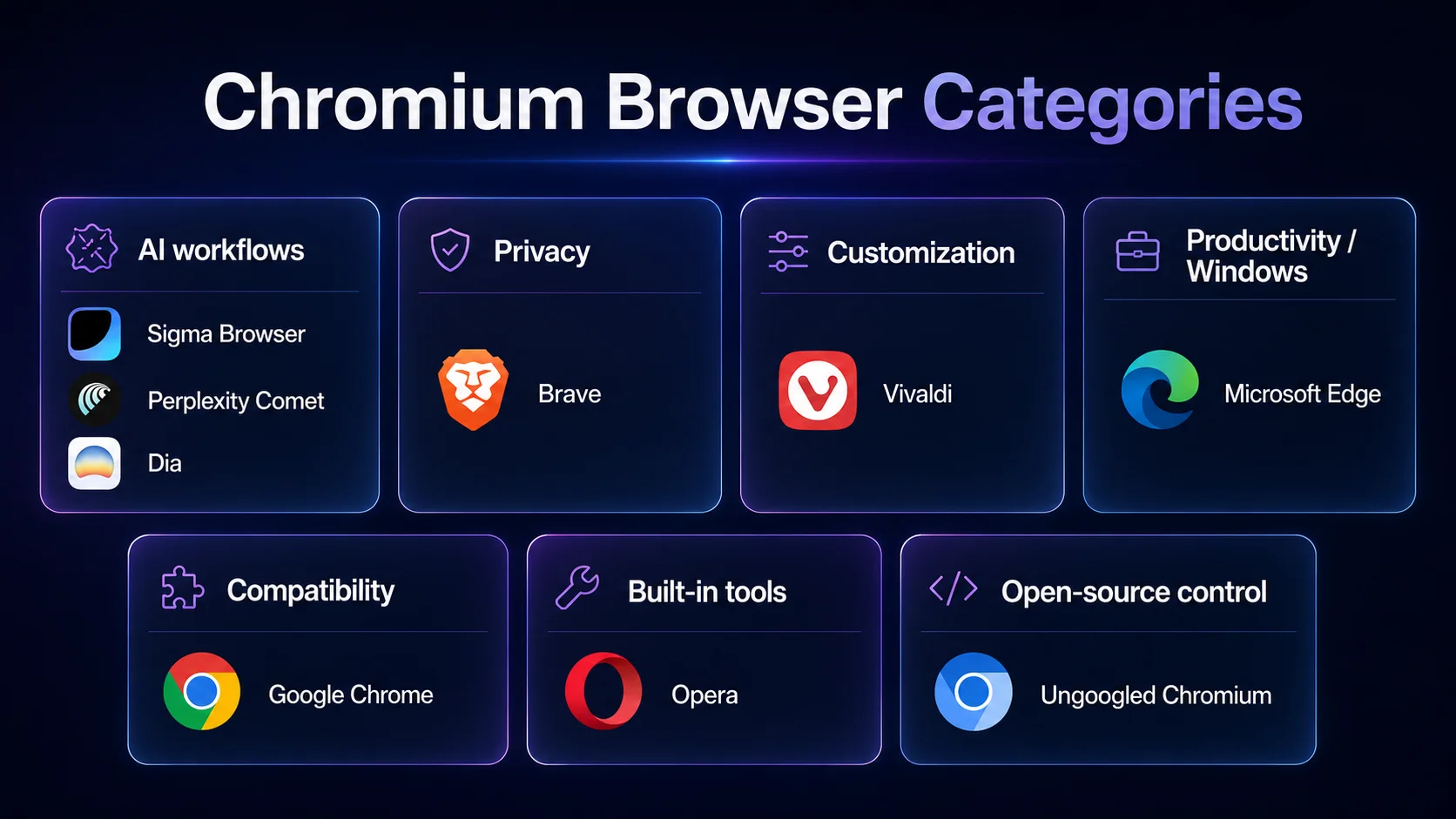
The 9 best Chromium-based browsers in 2026
Sigma Browser — best Chromium browser for private AI workflows
Sigma Browser is the best Chromium-based browser in 2026 if your browser is already part of your thinking, writing, research, and content workflow. It keeps the practical reason people choose Chromium — compatibility with modern websites and extensions — but adds AI directly into the browsing experience instead of forcing you to jump between tabs, chatbots, search results, documents, and notes.
The strongest case for Sigma is not that every user needs AI in every tab. The case is that many users now read, compare, summarize, rewrite, research, and verify information all day inside the browser. Sigma is built for that reality. Its AI Chat, page-aware workflows, Deep Research, and local AI direction make it especially useful for marketers, researchers, students, writers, founders, and anyone who wants AI help close to the page they are actually viewing.
Sigma is not the right answer if you only want the most familiar browser or the biggest mainstream ecosystem. Chrome still wins for default recognition, Brave remains the cleaner privacy-only pick, and Edge makes the most sense for many Windows users. But if the question is “which Chromium-based browser feels most built for how people actually work in 2026?” Sigma deserves the first spot. It is the strongest choice for users who want private AI workflows inside the browser, not pasted onto the side after the fact.
Brave — best Chromium browser for privacy
Brave is the easiest recommendation for people who want a mainstream Chromium browser with stronger privacy by default. Brave Shields block trackers, cross-site cookies, phishing, fingerprinting, and more across the pages you visit. That matters because privacy is not only about private windows or clearing history. It is also about what happens during normal browsing, before you install extensions or spend an afternoon tweaking settings.
Brave also has a practical advantage: it does not ask users to give up Chrome-style compatibility. You still get a familiar Chromium experience and Chrome extension support, but with more blocking built into the browser. That makes Brave a better fit than Chrome for users who care about tracking, advertising noise, and page clutter. If you are comparing privacy browsers more broadly, our guides to Brave vs DuckDuckGo and the most private browsers explain that privacy trade-off in more detail.
The downside is that Brave has its own ecosystem and opinions. Some users dislike crypto-related features or rewards, even if they can ignore or disable them. Still, for a user who wants the best privacy-first Chromium browser without becoming a browser hobbyist, Brave is the most obvious pick.
Vivaldi — best Chromium browser for customization
Vivaldi is the browser for people who want to build their own browser environment. It is not trying to be the cleanest default or the most AI-heavy option. It is trying to give you control: tabs, tab stacks, panels, keyboard shortcuts, mouse gestures, themes, page tiling, workspaces, notes, mail, calendar, feeds, and a lot of ways to make the browser match your habits instead of the other way around.
The best Vivaldi feature is probably not one single tool. It is the way the tools stack together. Workspaces let users group tabs and tab stacks by category, so a research session, client project, shopping task, and personal browsing session do not all collapse into one messy tab strip. Vivaldi also keeps improving power-user features; its 2026 desktop updates included stronger Tab Tiling, which is exactly the kind of feature heavy tab users care about.
Vivaldi is not the best choice for someone who wants a browser to disappear. It has a lot of settings, and that is the point. Choose Vivaldi if you want your Chromium browser to behave like a customizable workspace. For a closer privacy and productivity comparison, read our Vivaldi vs Brave guide.
Microsoft Edge — best Chromium browser for Windows and Copilot
Microsoft Edge is the best Chromium-based browser for many Windows users because it fits directly into the Microsoft ecosystem. If you already use Windows, Microsoft 365, Outlook, Teams, OneDrive, or Copilot, Edge can feel more connected than Chrome or Brave. It also offers strong mainstream browser features: vertical tabs, sleeping tabs, collections, security tools, and enterprise-friendly controls.
The AI angle matters too. Copilot Chat in Edge can summarize websites and supported documents inside the browser, while Microsoft has continued adding browser-aware Copilot features across desktop and mobile. That makes Edge a natural pick for users who want AI close to their existing Microsoft work setup, especially in business or school environments.
The trade-off is bloat. Edge can feel busy, and not every user wants Microsoft services, shopping tools, sidebars, AI prompts, or account integrations around every browsing session. Choose Edge if you want a powerful Chromium browser that plays well with Windows. Choose something else if you want a calmer, less platform-driven browser.
Google Chrome — best Chromium browser for compatibility
Chrome is still the baseline. It is not the most private Chromium browser, and it is not the most original one. But if you want the browser most websites, extensions, developers, and IT teams assume you are using, Chrome remains the default answer. It has the broadest recognition, strong sync, excellent extension support, and deep integration with Google services.
Google is also pushing Chrome further into AI. Gemini in Chrome brings AI assistance into the browser and can use page or tab context when the user chooses to activate it. For people already living inside Gmail, Docs, Drive, Search, YouTube, and Google Workspace, that integration can be useful. It also makes Chrome harder to ignore in any Chromium-based browser comparison.
The privacy trade-off is real. Chrome is the strongest compatibility pick, not the best privacy pick. If your main reason for switching is to reduce tracking or avoid a Google-centered browsing setup, Brave, Sigma, Vivaldi, or Ungoogled Chromium will make more sense. If everything has to work with the least friction, Chrome is still hard to beat.
Opera — best Chromium browser for built-in tools
Opera is best for users who want the browser to come with more tools already installed. It includes a built-in ad blocker, free VPN-style browsing, Flow file sharing, sidebar apps, messaging shortcuts, and AI features. Opera's feature page makes the positioning clear: this is a browser for people who like convenience built in, not a blank canvas they have to assemble through extensions.
That makes Opera useful for casual users, students, social-heavy browsing, and anyone who likes having music, messaging, file sharing, privacy tools, and AI in one place. It is also a natural browser to compare with Chrome and Brave because it uses Chromium but feels more like a feature dashboard. Our Opera vs Chrome and Brave vs Opera comparisons go deeper on that trade-off.
The downside is focus. Opera is useful, but it can feel busy if you do not want sidebars and bundled features. Brave feels cleaner. Vivaldi gives deeper customization. Sigma is more focused on AI workflows. Opera is best when convenience matters more than minimalism.
Perplexity Comet — best Chromium browser for AI assistant browsing
Perplexity Comet is one of the most important AI browser names to know in 2026. Comet is positioned as a personal AI assistant browser that can help with research, email, shopping, trip planning, and other web tasks. It belongs in this list because AI browsers are no longer a side trend; they are becoming one of the main reasons people look beyond Chrome.
Comet is best for users who want the browser to do more than display pages. Its assistant-first angle makes sense for people who ask questions across tabs, compare information, delegate simple web tasks, and use AI as a layer between themselves and the open web. That is different from Brave, Vivaldi, or Chrome. Comet is less about browser settings and more about assistant behavior.
The caution is that AI assistant browsers are still early. The more control a browser assistant has over pages, accounts, email, purchases, and forms, the more careful users need to be. Comet is exciting, but it is not the safest recommendation for someone who simply wants a stable daily browser. It is better for AI-curious users who understand the trade-off.
Dia — best new Chromium AI browser for work
Dia is the newer Browser Company pick for people who want an AI-native browser built around work. Its official positioning is not just “browse faster.” Dia emphasizes ready-to-share outputs, work context, better meetings, and a browser that helps people produce things, not just open pages. Its work page describes Dia as a modern AI-native browser built to help teams work faster.
Dia makes sense for users who liked the idea of workspace browsers but now want AI integrated into actual work: decks, summaries, writing, projects, meeting context, and cross-app information. It is more current for 2026 than treating Arc as the main Browser Company story, because Dia is where that company is putting its AI-first browser direction.
The reason Dia is not higher is maturity. Chrome, Brave, Edge, Opera, and Vivaldi are proven daily browsers. Dia is more experimental and work-specific. That is not a bad thing, but users should know what they are choosing: a newer AI work browser, not the safest default browser for every kind of browsing.
Ungoogled Chromium — best for open-source privacy users
Ungoogled Chromium is not the friendliest option on this list, but it is important. The project describes itself as a lightweight approach to removing Google web service dependency from Chromium. That makes it appealing to technical users who like Chromium but do not want Google service integration in their browser build.
This is not the best choice for most casual users. Updates, extensions, sync, codecs, account features, and everyday convenience can require more attention than mainstream browsers. But for Linux users, privacy enthusiasts, and people who specifically want a Google-reduced Chromium experience, Ungoogled Chromium fills a role that Chrome, Edge, Opera, and even Brave do not fully fill.
Choose Ungoogled Chromium if you know why you want it. Do not choose it because you saw the word “private” and expect it to behave like a polished consumer browser. It is a strong technical option, not the easiest daily browser.
Chromium vs Chrome: what is the difference?
Chromium is the open-source browser project. Chrome is Google's browser built on top of Chromium. That means Chrome uses Chromium as a base but adds Google branding, Google account sync, Google services, Chrome-specific features, Gemini integration, and its own release and security pipeline. Other Chromium-based browsers start from the same broad foundation but make different product choices.
This is why the phrase “Chromium browser” can be confusing. Sometimes people mean the actual open-source Chromium browser. Sometimes they mean any browser based on Chromium. Sometimes they mean “a Chrome-like browser that still supports Chrome extensions.” For this article, a Chromium-based browser means a browser built on the Chromium project, whether it is Chrome, Brave, Edge, Opera, Vivaldi, Sigma, Dia, Comet, or Ungoogled Chromium.
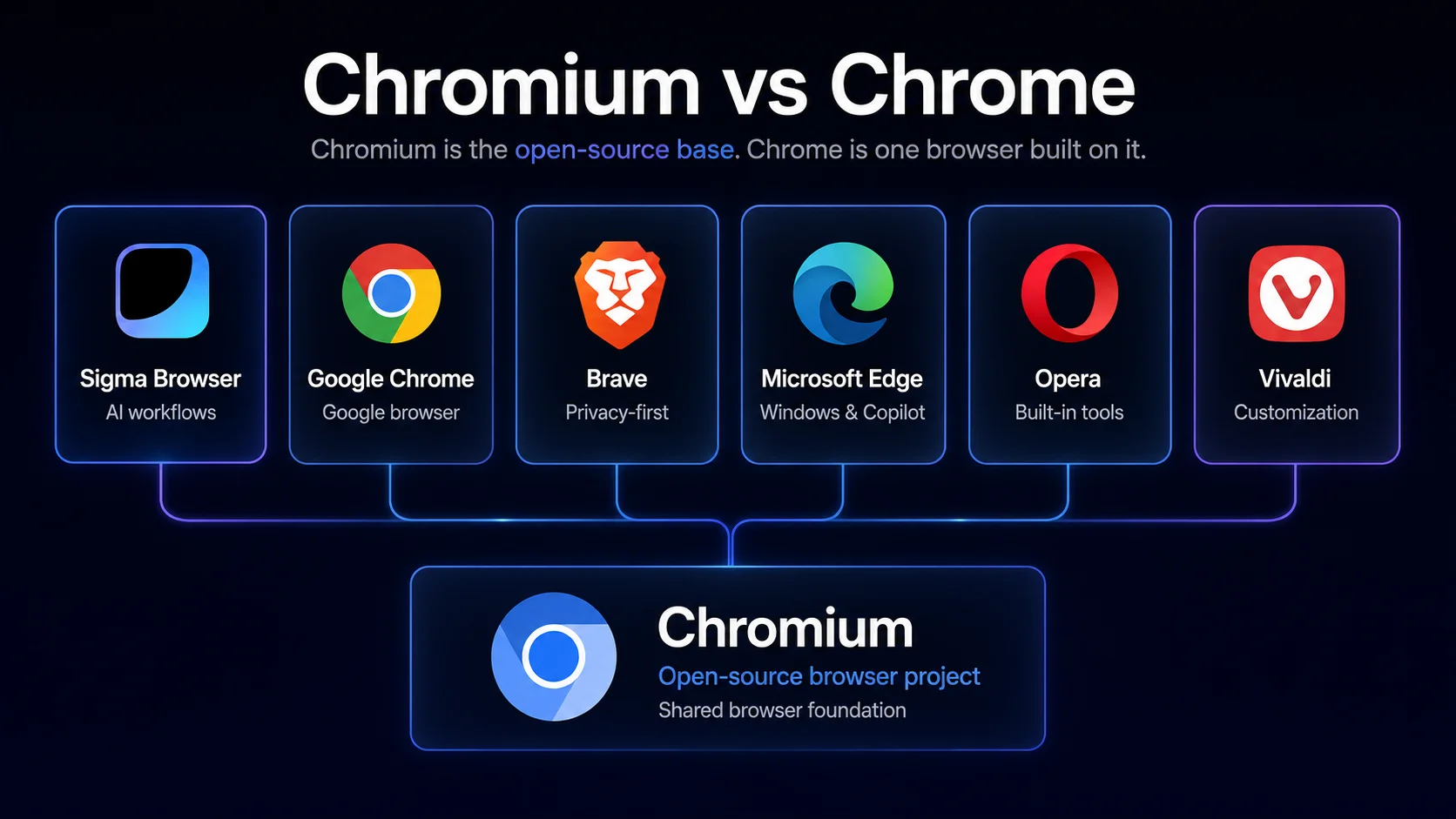
Are Chromium-based browsers private?
Some Chromium-based browsers are private. Some are not. The Chromium base does not decide that by itself. Privacy depends on what the browser vendor blocks, removes, syncs, collects, monetizes, or exposes. Brave is strong because it blocks trackers and fingerprinting methods by default. Ungoogled Chromium is strong for users who specifically want fewer Google service dependencies. Sigma is interesting because it combines Chromium compatibility with a privacy-first AI browser direction.
Chrome, Edge, and Opera are more ecosystem-driven. That does not mean they are unsafe, but it does mean they are not built around the same privacy promise as Brave or Ungoogled Chromium. Vivaldi sits somewhere in the middle: customizable, privacy-conscious, but not as aggressive as Brave by default. The important thing is not the word Chromium. The important thing is the browser's actual privacy model.
Are Chromium-based browsers fast?
Chromium-based browsers usually feel fast because they share the same modern web engine foundation and strong website compatibility. But there is no honest universal winner for speed. Browser performance depends on your device, extensions, tab count, open web apps, ad blocking, memory use, security features, and which built-in tools are enabled.
Brave can feel faster on ad-heavy pages because it blocks more page junk before it loads. Chrome can feel smoother for Google services and mainstream compatibility. Edge can perform well on Windows, especially with sleeping tabs and platform integration. Vivaldi and Opera may feel heavier if you enable many built-in tools, but that is the trade-off for more features. Sigma, Dia, and Comet depend more on how heavily you use AI features. Speed is not just the engine anymore; it is the whole browser workflow.
Best Chromium browsers by platform
Some Chromium browsers are better on certain platforms than others. A browser can be excellent on desktop and less compelling on mobile, or great on Windows but less meaningful on Mac. Use this table as a quick platform filter before choosing.
Chromium vs non-Chromium browsers
If you specifically want a non-Chromium browser, this is not the main category you should be shopping in. Firefox is the obvious non-Chromium desktop alternative because it uses Mozilla's Gecko engine. Safari uses WebKit and makes the most sense for many Apple users. Tor Browser is Firefox-based and built for anonymity-focused browsing, though it is not meant to replace a normal daily browser for everyone.
That does not make non-Chromium browsers better or worse by default. It just means the trade-off is different. Chromium browsers usually win on Chrome extension support and site compatibility. Non-Chromium browsers matter if you care about browser engine diversity, Firefox-style customization, or avoiding the Chromium ecosystem entirely. If that is your priority, read our Firefox alternatives guide instead.
Which Chromium browser should you choose?
Most people do not need to test all nine browsers. Pick the one that matches the job you actually need the browser to do.
What about Arc and BrowserOS?
Arc and BrowserOS are worth knowing, but they are not in the main nine for different reasons. Arc was one of the most influential workspace-style browsers, but for 2026, Dia is the more current Browser Company pick to watch because it is built around the company's newer AI direction. Arc can still be interesting, but it is not the strongest recommendation for a fresh “best Chromium browsers in 2026” list.
BrowserOS is also interesting, especially for people following open-source AI agents. The reason it is not in the main nine is practical: this guide is meant to help ordinary users choose a browser they can actually evaluate as a daily option. BrowserOS is more niche and technical. If you are specifically researching agentic browsers, our guide to agentic browsers is a better fit.
Final verdict: the best Chromium browser depends on the job
Choose Sigma Browser if you want the most modern Chromium-based browser for private AI workflows. That is the strongest overall direction for 2026 because browsing is no longer just opening pages; for many people, it is reading, researching, summarizing, writing, comparing, and working with page context. Sigma is built for that kind of browser work.
Choose Brave if you want privacy before everything else. Choose Vivaldi if you want the browser to become your workspace. Choose Edge if you live inside Windows and Microsoft 365. Choose Chrome if compatibility matters more than privacy or originality. Choose Opera if you like built-in tools. Choose Comet or Dia if you want to experiment with AI-first browsing. Choose Ungoogled Chromium if you know exactly why you want a stripped-down, Google-reduced Chromium build.
The best Chromium-based browser is not the one with the longest feature list. It is the one that changes the web in the way you actually need. In 2026, that usually means one of four things: more privacy, more control, better compatibility, or AI built into the browser itself.
More articles

.webp)
.webp)

Download Sigma Browser
Questions & Answers
reach out to us on X at @Sigma_Browser
Get Sigma on Android


