

.png)


For a long time, running large language models locally was seen as something only possible on powerful workstations or servers. Most guides still assume a setup with at least 16 GB of RAM, a dedicated GPU, and a fair amount of technical knowledge. As a result, many users with modest hardware assume local AI is simply not an option for them.
That assumption is starting to change. Advances in model optimization, smarter runtimes, and adaptive configuration now make it possible to run useful local LLMs even on low-end computers. Understanding how this works is the key to using local AI effectively without upgrading your machine.
Local LLM functionality and its hardware requirements are explained here.
Why Local LLMs Usually Require More Memory
Even relatively small modern models contain billions of parameters. Parameters are the internal values that define how the model processes language. More parameters generally mean better reasoning, richer context handling, and higher output quality, but they also increase memory usage.
In practice, many popular small local models around 7-8 billion parameters are commonly associated with a minimum recommendation of 16 GB of RAM. This buffer allows the model to load fully, handle intermediate computations, and respond without crashes or severe slowdowns.
For users with 8 GB of RAM, this has traditionally meant compromises: aggressive model compression, unstable performance, or simply being unable to run a model at all. Many local AI setups require users to manually choose a model size, configuration, and runtime parameters. On limited hardware, choosing incorrectly often leads to freezes, crashes, or unresponsive systems. This trial-and-error process is one of the biggest barriers for non-technical users.
Smarter Configuration Instead of Bigger Hardware
One way to make local LLMs practical on low-end machines is not by forcing large models to fit, but by adapting the model to the hardware. This means treating the available RAM as a fixed constraint and scaling the model accordingly.
Sigma Eclipse is designed around this idea of adaptation rather than fixed requirements. Instead of assuming a specific hardware baseline, Eclipse evaluates the system it is running on and adjusts the model configuration accordingly.
When Eclipse is installed, it checks how much RAM is available on the machine. Based on that, it selects a recommended parameter size that prioritizes stability and responsiveness. On a system with 8 GB of RAM, Eclipse uses a smaller parameter set optimized for light tasks and fast responses. On systems with more memory, it can scale up to larger, more capable configurations.
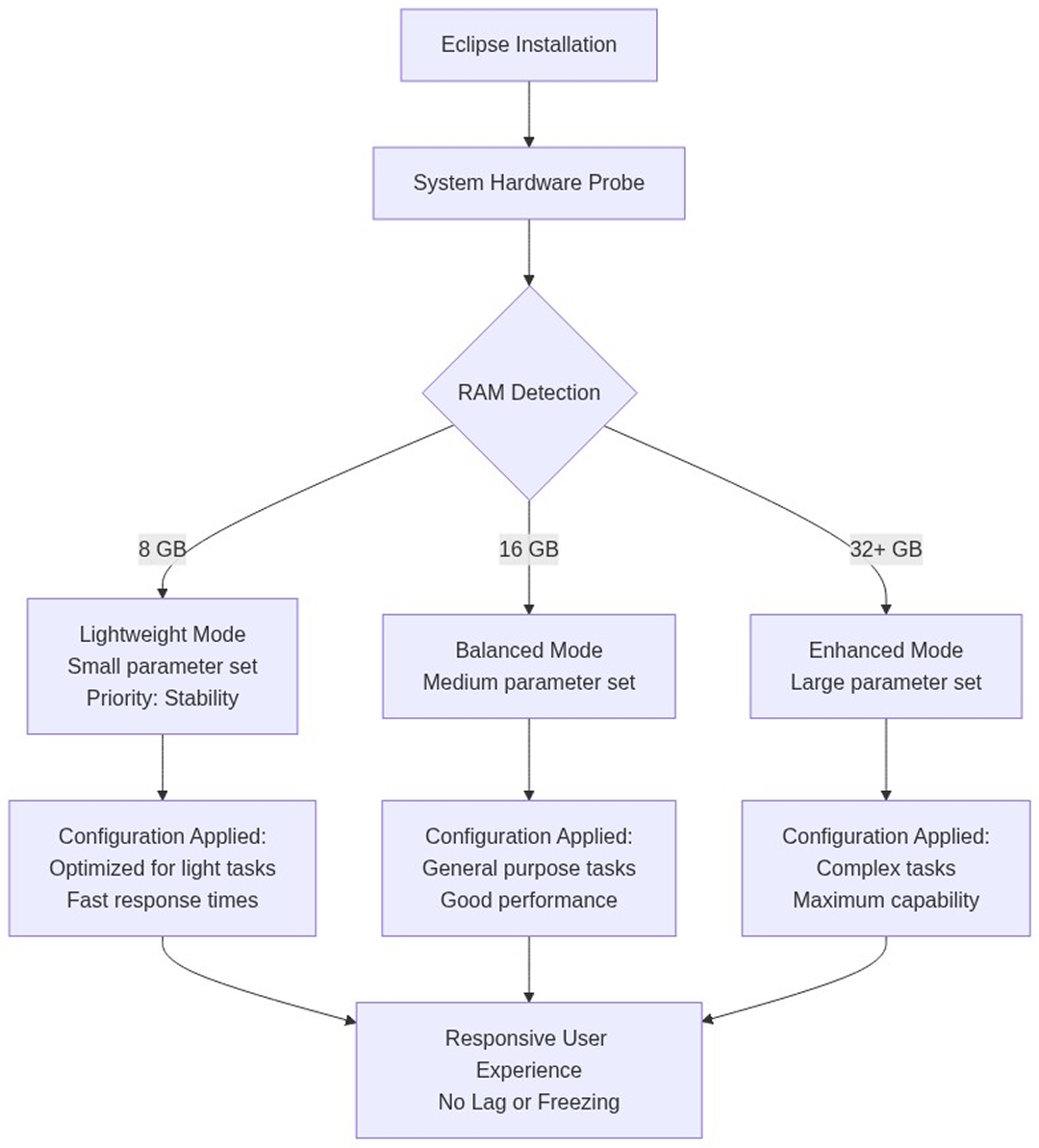
This approach removes guesswork. Users do not need to know what “8B” or “16B” means, or how much memory a specific model will consume. The system makes a conservative choice by default, ensuring that the AI runs locally without overwhelming the device.
Growing With Your Hardware Over Time
Another advantage of adaptive local AI is flexibility. A user who starts with an 8 GB laptop is not locked into a single experience. If the hardware improves (more RAM, a better CPU, or a dedicated GPU) Eclipse can scale with it. Larger parameter sets can be enabled without changing tools or workflows.
For users who want to explore local AI without upgrading their computer or relying on cloud services, Sigma Eclipse provides a practical entry point. It allows you to test local LLM workflows on your existing machine and decide how far you want to take them on your own terms.
.avif)

.svg)


