
Zen Browser vs Firefox in 2026: Which Browser Should You Choose?
Compare Zen Browser vs Firefox for privacy, speed, customization, workspaces, and everyday reliability.

Firefox is the browser people recommend when someone wants to leave Chrome without giving up stability. It is open source, mature, available on desktop and mobile, and supported by Mozilla’s long privacy and customization story.
Zen Browser answers a different frustration: Firefox is powerful, but its default interface still feels like a classic browser. Zen keeps the Firefox-based foundation but reshapes the experience around vertical tabs, Workspaces, Compact Mode, Split View, and a calmer desktop workflow.
Firefox is better for most users who want proven privacy, broad compatibility, mobile sync, add-ons, themes, and everyday reliability. Zen Browser is better for users who already like Firefox’s foundation but want a more modern, workspace-focused interface with vertical tabs, Split View, Compact Mode, and less built-in telemetry. In privacy, Firefox wins on mature tracking protections such as Enhanced Tracking Protection and Total Cookie Protection, while Zen wins for users who care most about removing Mozilla telemetry. In customization, Firefox wins through its larger add-on and theme ecosystem, while Zen wins through built-in workspace organization. If you need one dependable browser across desktop, mobile, extensions, and streaming, choose Firefox. If your main problem is tab clutter and desktop workflow organization, choose Zen.
That is the useful way to read Zen Browser vs Firefox in 2026. This is not a fight between unrelated browsers. It is a choice between the stable original and a modern Firefox-based remix built for people who want their browser to behave more like a workspace.
Disclosure: Sigma Browser is our product. This article focuses on Zen Browser vs Firefox as the main comparison. Sigma is mentioned only as a third option when the user’s real need is AI-assisted research, writing, page summaries, or browser-based workflow automation.
What is the difference between Zen Browser and Firefox?
Firefox is a free, open-source browser from Mozilla. It is available on desktop and mobile, includes privacy features such as Enhanced Tracking Protection and Total Cookie Protection, and supports a large ecosystem of add-ons, themes, sync, profiles, and developer tools.
Zen Browser is a free, open-source browser built on Firefox technology, but redesigned around a more modern productivity interface. Its official site highlights Workspaces, Compact Mode, Glance, and Split View, with a focus on organizing tabs and reducing browser clutter.
The real difference: Firefox is the mature privacy browser. Zen is the modern Firefox-based browser for people who want more built-in workspace customization.
Zen Browser vs Firefox at a glance
Zen and Firefox share a foundation, but they solve different problems. Firefox is a stable all-purpose browser with strong privacy defaults. Zen is a workspace-focused browser for people who want a more opinionated interface.
TL;DR
Choose Firefox if you want mature privacy protection, broad reliability, mobile apps, sync, add-ons, themes, and fewer compatibility issues.
Choose Zen Browser if you want a more modern Firefox-based browser with Workspaces, vertical tabs, Split View, Compact Mode, and stronger built-in UI organization.
Choose Sigma or another AI browser only if your main productivity need is AI research, writing, page summaries, or browser-based workflow automation.
Privacy: Zen’s low-telemetry approach vs Firefox’s mature protections
Firefox and Zen share a Firefox-based privacy foundation, but they differ in maturity and philosophy. Firefox uses Enhanced Tracking Protection, which blocks known trackers by default, and Total Cookie Protection, which isolates cookies by site so third parties cannot follow you as easily across pages. These protections are documented by Mozilla, tested across a much larger user base, and updated through Firefox’s regular release cycle. Zen takes a different angle: its privacy policy says the browser does not collect telemetry or crash reports and removed Mozilla telemetry. That lower-telemetry stance is genuinely appealing, but less telemetry is not the same thing as stronger tracking protection. Firefox wins for proven mainstream privacy defenses. Zen wins if you want a Firefox-based browser with minimal phone-home behavior.
The practical privacy choice depends on what bothers you more. If your main concern is cross-site tracking, Firefox has the stronger documented protection stack. If your main concern is browser telemetry and background reporting, Zen makes a clearer promise about what it does not send back.
Privacy verdict: Firefox is the safer mainstream privacy choice. Zen is better if your priority is a Firefox-based browser with a lower-telemetry stance.
Customization: Firefox add-ons vs Zen’s workspace-first design
Firefox is more customizable as an ecosystem, while Zen is more customized as a workspace. Firefox lets users reshape the browser through add-ons, themes, toolbar controls, privacy settings, search settings, and advanced configuration. It is the better choice if customization means adding specific tools, changing browser behavior, or relying on a mature extension ecosystem. Zen is different because its customization is built into the browsing model itself. The browser highlights Workspaces, Compact Mode, Glance, and Split View, and its documentation lets users customize Workspaces with names, icons, and default container tabs. That means Zen is better if customization means changing how tabs, projects, and browser space are organized every day. Firefox gives you more parts to build with. Zen gives you a more opinionated productivity layout out of the box.
That distinction matters because both browsers can be “customizable” in search results, but they do not customize the same layer of the experience. Firefox customizes features around the browser. Zen customizes the workspace inside the browser.
Customization verdict: Firefox wins ecosystem customization. Zen wins built-in workspace and interface customization.

Speed and RAM usage: which browser is faster?
Zen Browser is not automatically faster than Firefox, and Firefox is not automatically lighter than Zen. Because Zen is built on Firefox technology, the difference is less about a completely separate browser engine and more about configuration, interface, extensions, active pages, hardware, and workflow. Zen may feel faster for tab-heavy users because Workspaces, vertical tabs, Compact Mode, and Split View make messy browsing easier to control. That is workflow speed: you spend less time hunting for the right tab or rearranging windows. Firefox is usually the more predictable browser because it is older, more widely tested, and optimized for a broader range of users and devices. For RAM usage, there is no honest universal winner. The best test is to run both browsers for a week with the same tabs, extensions, and daily tasks.
That is why performance claims need caution. Benchmarks can be useful, but they rarely capture the actual reason someone likes Zen or stays with Firefox. Zen can make work feel cleaner. Firefox can feel steadier. Those are different kinds of performance.
Performance verdict: there is no universal winner. Firefox is more predictable; Zen can feel faster when its workspace design matches your workflow.
Workspaces, tabs, and focus
Zen is better than Firefox for users whose main browser problem is tab clutter. Firefox can become a strong work browser through pinned tabs, container tabs, profiles, extensions, and toolbar customization, but it still begins with a classic browser model. Zen starts with organization as the default. Workspaces separate projects, vertical tabs make large tab sets easier to scan, Compact Mode hides browser chrome, and Split View lets users place multiple pages beside each other. That makes Zen stronger for writers comparing sources, students collecting research, marketers checking dashboards, developers reading documentation while testing, and anyone whose tabs represent unfinished work. Firefox is better if you want a familiar browser you can customize gradually. Zen is better if you want the browser to push you toward a cleaner workspace from the first day.
In other words, Firefox asks you to build a productivity system. Zen ships with more of that system already visible in the interface.
Workspace verdict: Zen wins if your browser problem is tab clutter. Firefox wins if you prefer a familiar browser you can customize gradually.
Extensions and add-ons
Firefox has the advantage here because it is the original, mainstream browser in this ecosystem. Zen can use Firefox add-ons, but Firefox is still the safer compatibility bet.
That matters for people who depend on very specific tools: password managers, privacy add-ons, screenshot tools, SEO extensions, accessibility tools, developer helpers, download managers, or writing utilities.
If an add-on is built for Firefox, it is most likely tested against Firefox first. Zen may work well with many of the same add-ons, but users should expect occasional edge cases because Zen changes the browser interface and is a smaller project.
This does not make Zen weak. It simply means Firefox is more reliable for extension-heavy workflows. If extensions are your main form of customization, Firefox is the safer choice. If browser layout is your main form of customization, Zen is more interesting.
Extension verdict: Firefox wins for add-on confidence. Zen is still strong enough if your key Firefox add-ons work.
Containers and account separation
Account separation is one of the most useful privacy and productivity features because it lets you keep work, personal, client, and side-project browsing apart.
Firefox users can use container tabs and related tools to separate accounts and site data. This is useful when you need multiple logins, separate client accounts, or cleaner browsing boundaries without opening entirely different browsers.
Zen builds container thinking into its Workspaces. Zen’s Workspaces documentation says you can set default container tabs for a workspace, which helps keep accounts or projects isolated inside that workspace. That is a very practical improvement for people who work across multiple identities or projects.
Firefox has more mature tooling. Zen has a smoother workspace metaphor. The better choice depends on how much you want account separation to be part of the browser’s main UI.
Container verdict: Firefox is more mature; Zen makes account separation feel more connected to workspace organization.
Mobile, sync, DRM, and everyday reliability
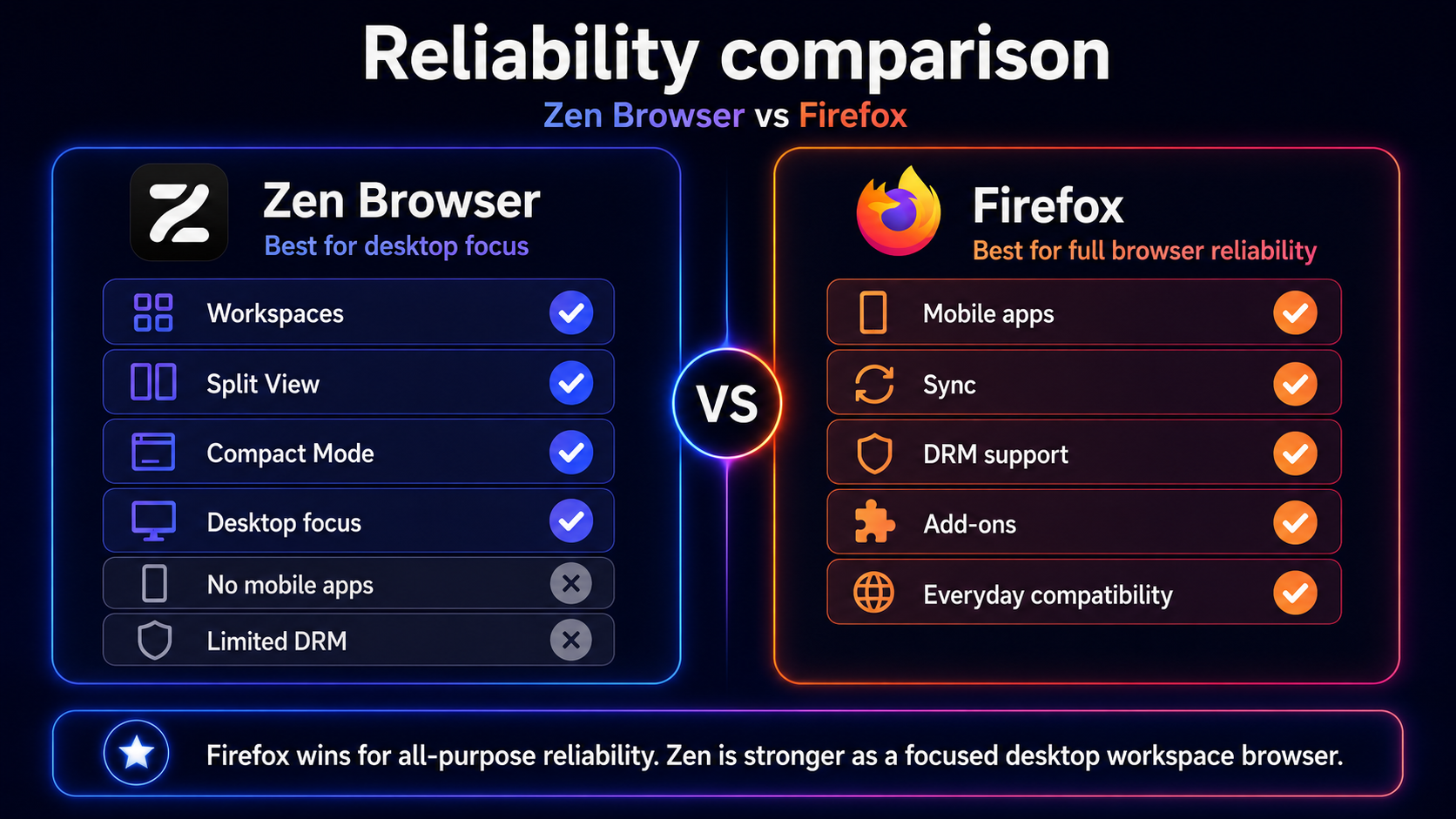
Firefox is the better choice if you need one browser for desktop, mobile, sync, streaming, and everyday compatibility. Firefox runs on Windows, macOS, Linux, iOS, and Android, has a mature sync ecosystem, and is supported by extensive Mozilla documentation. Zen is primarily a desktop browser. Its FAQ says the team does not currently have the time or resources to build Android or iOS versions, and that Zen’s vertical-tab design does not translate smoothly to mobile. Zen also has a DRM limitation: its FAQ says the browser does not yet have a Widevine license, which affects protected media playback on services such as Netflix, Spotify, Disney+, HBO Max, Amazon Prime Video, Apple Music, and Google Play Movies & TV. For a focused work browser, Zen can still be excellent. For a single all-purpose browser, Firefox is safer.
This is the point where the comparison becomes less about taste and more about practical risk. Zen can be the better desktop workspace, but Firefox is the better full browser system.
Reliability verdict: Firefox wins. Zen is more experimental and desktop-focused.
The real difference: two customization models
Open Firefox with thirty tabs. You can fix the mess, but you usually fix it by adding something: a tab manager, a container setup, a theme, a toolbar change, a profile, or a workflow rule you have to remember.
Open Zen with the same thirty tabs, and the browser pushes you toward a different solution. Put this project in one Workspace. Move that account into another. Split two tabs side by side. Hide the browser chrome. Treat the browser less like a pile of tabs and more like a set of rooms.
That is the real difference between Zen and Firefox. Firefox is a customizable browser. Zen is a browser designed around a more customized workspace from the start.
Neither model is universally better. Firefox is better if you want control, support, compatibility, and mature privacy tools. Zen is better if you are tired of building your own productivity system out of add-ons and want the browser’s interface to do more of that work by default.
Where Zen Browser beats Firefox
Zen is the better choice when the interface matters as much as the engine.
- Built-in Workspaces. Zen makes project separation a core part of the browser experience.
- Vertical tabs by design. Zen is better for users who prefer a sidebar tab layout.
- Compact Mode. Zen can reduce visual clutter and give pages more screen space.
- Split View. Zen supports side-by-side browsing for research, writing, dashboards, and comparison tasks.
- Modern UI direction. Zen feels more current than a default Firefox install.
- Lower-telemetry positioning. Zen appeals to users who want a Firefox-based browser with less built-in data collection.
If you are researching Zen Browser alternatives, this is the core reason Zen keeps showing up: it gives Firefox-based browsing a more modern productivity layer.
Where Firefox beats Zen Browser
Firefox is the better choice when reliability matters more than novelty.
- Mature privacy protection. Enhanced Tracking Protection and Total Cookie Protection are well-documented and built into Firefox.
- Better everyday compatibility. Firefox is more widely tested and better supported.
- Mobile apps. Firefox works across desktop, iOS, and Android.
- Sync ecosystem. Firefox is better if you want a full cross-device browser setup.
- DRM support. Firefox is more practical for streaming and media playback.
- Add-on confidence. Firefox is the safest choice for extension-heavy workflows.
- Documentation and support. Firefox has much deeper official help resources.
That is why Firefox remains one of the strongest private browser choices for normal users. Zen is exciting, but Firefox is easier to recommend without caveats.
When neither Zen nor Firefox is the best fit
Zen and Firefox both make sense for privacy and customization. They are less direct if your real need is AI-assisted work.
If your browser workflow includes summarizing pages, comparing sources, writing from page context, doing research across many tabs, or asking an AI assistant to help inside the browser, you may want a different category. That is where AI browsers come in.
Sigma Browser is one example. It is built around AI Chat, Deep Research, page context, and browser-based AI workflows. That does not make it the winner of a Zen vs Firefox privacy comparison. It simply means that if your priority is AI productivity rather than classic privacy/customization, neither Zen nor Firefox is the most direct answer.
Third-option verdict: use Zen or Firefox for privacy and customization. Consider Sigma or another AI browser only when the workflow itself depends on AI research and writing.
Decision matrix: Zen Browser vs Firefox
Zen Browser vs Firefox: final verdict
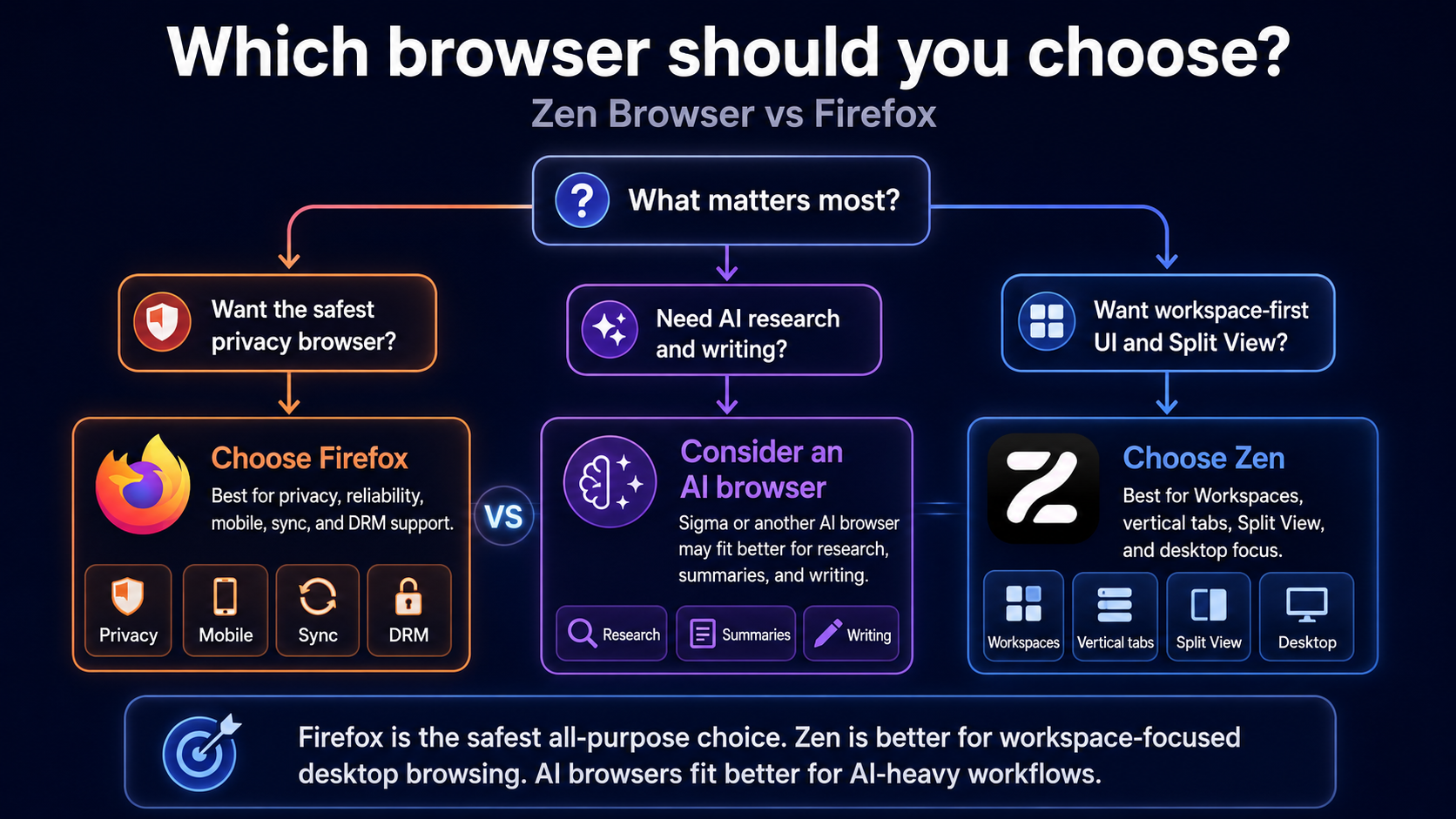
Firefox is the better pick for most people because it is the more complete browser: mature privacy protections, reliable add-ons, themes, sync, mobile apps, DRM support, documentation, and fewer compatibility surprises. Zen Browser is the better pick for a narrower but important group: desktop users who already like Firefox’s foundation but want a browser that feels more modern, more organized, and more workspace-driven out of the box. The deciding question is not simply “which browser is better?” It is what you want customization to mean. If customization means extensions, themes, settings, sync, and long-term stability, Firefox wins. If customization means Workspaces, vertical tabs, Split View, Compact Mode, and a cleaner tab-heavy workflow, Zen is the more interesting browser.
The safest recommendation is still Firefox. It is the browser you can suggest to almost anyone without explaining many caveats. Zen needs a more specific user: someone who works mostly on desktop, does not mind a newer browser, and wants the interface itself to reduce clutter.
So the real verdict is not a total replacement story. Firefox is the dependable privacy browser. Zen is the focused desktop workspace browser. If you are still comparing broader options, start with Firefox alternatives, Chrome alternatives, or Brave alternatives depending on whether your priority is privacy, speed, productivity, or AI workflows.
More articles




Download Sigma Browser
Questions & Answers
reach out to us on X at @Sigma_Browser
Get Sigma on Android


