
Zen Browser vs Arc: Which Browser Is Better for Productivity in 2026?
Compare Zen Browser and Arc for productivity, features, compatibility, and long-term use.

Arc changed what a productivity browser could look like. For a while, it made Chrome feel old: vertical tabs, Spaces, split view, pinned tabs, Boosts, and a calmer interface for people who live in their browser all day.
Then the story changed. In May 2025, The Browser Company said it had stopped actively building new Arc features and was focusing on Dia instead. Arc did not disappear. It still works, still downloads, and still receives security and Chromium updates. But the browser that once felt like the future became a stable product with a quieter roadmap.
That is why Zen Browser vs Arc is such a useful comparison in 2026. Zen takes many of the same productivity ideas — vertical tabs, workspaces, split view, compact UI — and rebuilds them on a Firefox-based, open-source foundation. Arc is still more polished in some places. Zen is still rougher in others. But Zen is the one that feels like it is still moving.
This article compares Zen Browser and Arc Browser specifically for productivity: tab organization, workspaces, split view, extension support, AI features, mobile use, DRM streaming, active development, and which browser makes more sense for different kinds of work.
Disclosure: Sigma Browser is our product. This article focuses on Zen Browser vs Arc Browser as the main comparison. Sigma is mentioned only as a third option where neither Zen nor Arc fully handles AI-assisted research, writing, and browser-based work automation.
What is the difference between Zen Browser and Arc Browser?
Zen Browser is a free, open-source browser built around a calmer, more organized desktop workflow. Its official site highlights productivity features like Workspaces, Compact Mode, Glance, and Split View, with a Firefox-based foundation and support for Windows, macOS, and Linux.
Arc Browser is a productivity browser from The Browser Company, now owned by Atlassian. Arc popularized Spaces, vertical tabs, split view, Boosts, and a design-first workflow. In 2025, The Browser Company said it had stopped actively building new Arc features while continuing maintenance and security updates.
Both are free. The real difference in 2026 is momentum: Zen is the active Arc-like alternative, while Arc is still polished but no longer feature-led.
Zen Browser vs Arc at a glance
Both browsers are built for people who dislike chaotic tab bars. The difference is that Arc is the polished original idea, while Zen is the open-source, actively moving alternative.
TL;DR
Choose Zen if you want an actively developed, open-source, Firefox-based productivity browser with Workspaces, Split View, and Compact Mode.
Choose Arc if you need Chrome extensions, mobile apps, DRM streaming, and the most polished version of the workspace-browser idea.
Choose Sigma or another AI browser if productivity means AI research, page summaries, writing, cross-tab context, and browser-based task automation.
What happened to Arc Browser?
Arc used to be the browser people recommended when someone asked for a browser that did not feel like Chrome with a new coat of paint. It had a point of view: keep tabs in a sidebar, separate work into Spaces, let users pin important pages, and make the browser feel more like a workspace than a window.
That made Arc especially attractive to designers, founders, writers, students, developers, and people who spend their workday jumping between docs, dashboards, chat apps, and research tabs.
The problem is not that Arc stopped working. The problem is that the product story changed. In the Letter to Arc members, The Browser Company said it had stopped actively building new features for Arc while continuing regular Chromium upgrades, security fixes, and maintenance. The Verge also reported that The Browser Company had ceased active development of new Arc features while shifting focus to Dia.
Then Atlassian acquired The Browser Company in a deal reported by Reuters as a $610 million cash acquisition. That does not make Arc useless. But it does make the 2026 productivity question different: do you want the browser that defined the category, or the browser still trying to move it forward?
Bottom line: Arc still works, but it is no longer the browser with the strongest feature momentum.

Why Zen became the natural Arc alternative
Zen did not win attention by being a normal Firefox fork. It won attention because it understood what people liked about Arc: fewer visible distractions, better tab organization, side-by-side browsing, and a browser that treats work as a set of contexts rather than one endless tab strip.
The official Zen site highlights Workspaces for separating projects, Compact Mode for hiding browser chrome, Glance for quick page previews, and Split View for viewing two tabs side by side. Those are exactly the kinds of features that make a productivity browser feel different from a standard browser.
Zen also has a different trust story. It is open source and Firefox-based, which matters to users who want a non-Chromium browser or who prefer a browser that can be inspected and modified by the community. For users researching Firefox alternatives, Zen is one of the more modern options because it adds workspace-style organization without leaving the Firefox ecosystem.
That does not make Zen automatically better than Arc. Arc still has the smoother feel in many workflows, and Chrome extension support matters more than some people want to admit. But Zen is the most obvious answer if you liked Arc’s productivity ideas and want something still actively evolving.
Productivity workflow: tabs, spaces, and workspaces
The heart of this comparison is not raw speed. It is whether the browser helps you stay organized when you have too many things open.
Arc’s Spaces are still one of the cleanest browser organization systems. You can separate work, personal browsing, side projects, clients, or classes into different environments. Pinned tabs stay close. The sidebar makes it easier to scan your work than a crowded horizontal tab bar.
Zen’s Workspaces solve the same problem from a Firefox-based angle. Instead of one messy browser state, you can separate contexts and keep different sets of tabs away from each other. For people moving from Arc, this is the feature that makes Zen feel familiar fastest.
Bottom line: Arc is more polished, but Zen gives former Arc users the closest active replacement for workspace-style browsing.
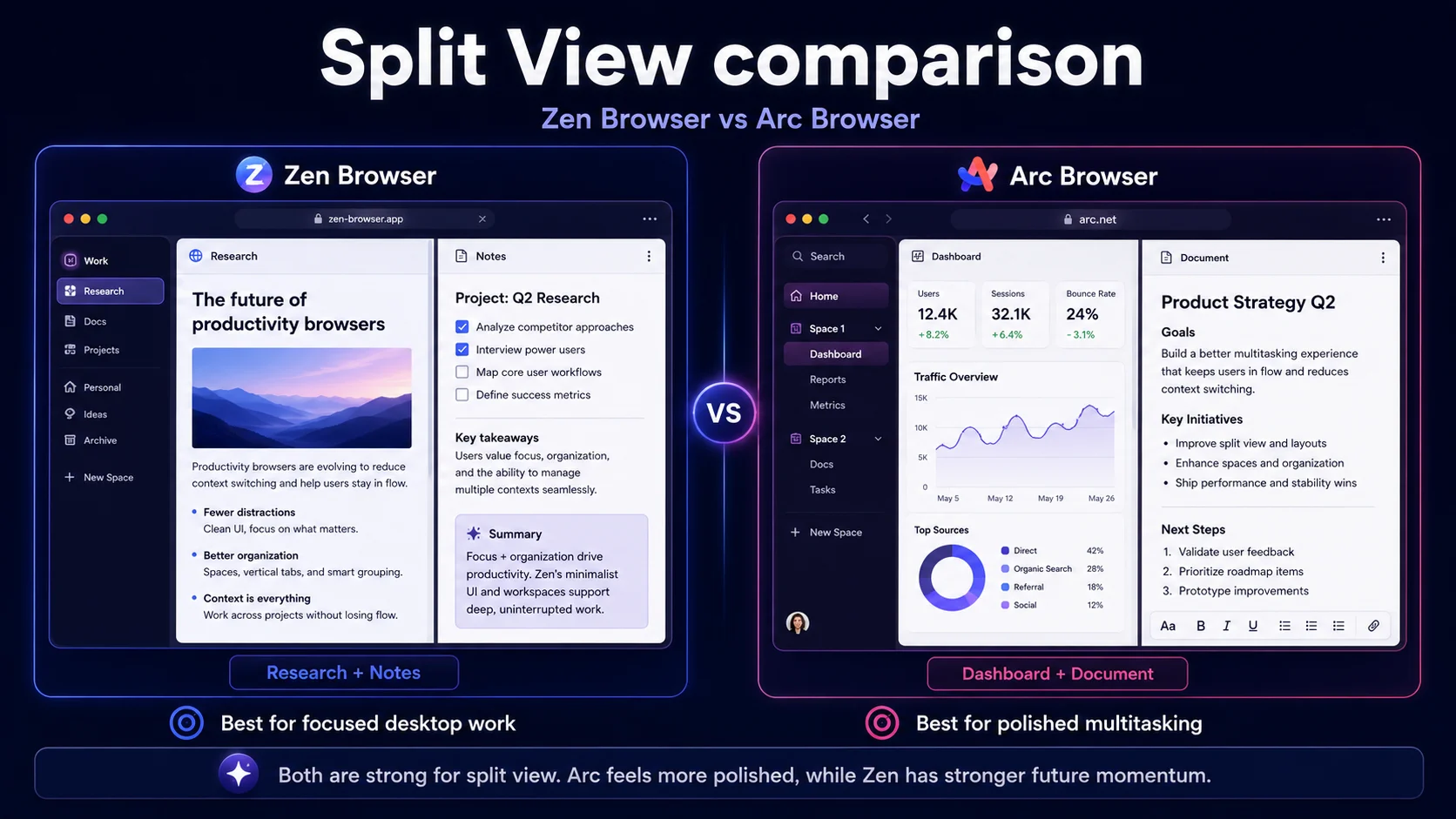
Split View: which browser is better for multitasking?
Split view is one of the most productivity-specific browser features because it changes how you work with information. Instead of switching between tabs, you can put two pages beside each other.
Arc has an official Split View feature on macOS and Windows. Arc describes it as a way to view and interact with multiple tabs simultaneously in one window, with horizontal and vertical split options.
Zen also highlights Split View as one of its core features. The difference is less about whether the feature exists and more about the browser around it. Arc feels more like a finished design product. Zen feels more like a flexible workbench.
For writing, research, coding tutorials, documentation, dashboards, and comparison shopping, both browsers can improve productivity compared with a standard browser. If you want polish, Arc still has the edge. If you want active development and open-source direction, Zen is the better long-term bet.
Bottom line: Split View is strong in both. Arc wins on polish; Zen wins if you care more about future development.
Extensions: Firefox add-ons vs Chrome Web Store
Extensions can decide the whole comparison. A productivity browser is only productive if it works with the tools you already use.
Arc is Chromium-based, so it works with Chrome Web Store extensions. That is a big advantage for people who rely on specific Chrome-only tools: SEO extensions, analytics helpers, web design utilities, password managers, writing tools, screenshot tools, productivity extensions, and developer add-ons.
Zen uses the Firefox extension ecosystem. For many people, that is enough. The major categories are covered: password managers, privacy add-ons, note tools, and developer helpers. But if your job depends on a specific Chrome-only extension, Zen can become inconvenient fast.
This is where Arc remains hard to replace. Even if Arc is no longer getting new features, its Chromium base and Chrome extension compatibility still make it more practical for many work setups. That is also why users comparing Chrome alternatives often stay inside the Chromium ecosystem rather than moving to Firefox-based browsers.
Bottom line: Arc wins if your productivity depends on Chrome extensions. Zen is fine if Firefox add-ons cover your workflow.
AI productivity: Arc Max, Zen, and the third option
For productivity in 2026, AI matters. The browser is no longer just where you open web pages. It is where you summarize research, compare sources, draft text, ask questions, and move between tools.
Arc has Arc Max. The official Arc Max page positions it as AI features built into the browser to help users do less while browsing. For everyday browsing help, that is useful.
Zen does not have the same native AI layer. It is a productivity browser in the classic sense: tabs, workspaces, split view, compact UI, and customization. If your productivity problem is tab chaos, Zen helps. If your productivity problem is research synthesis, writing, summarization, or automation, Zen is less direct.
This is where Sigma fits as a third option rather than a winner of the Zen vs Arc comparison. If you want a browser for AI workflows, AI browsers make more sense than either Zen or Arc. Sigma Browser, for example, is built around AI-assisted browsing, Deep Research, page context, writing support, and agent-style work. That is a different productivity model: not just organizing tabs, but using AI inside the browser to help with the work those tabs represent.
Bottom line: Arc has more native AI than Zen, but neither is the strongest choice if AI research and browser automation are the main goal.
The killer productivity gap: Zen still has a DRM problem
Here is the kind of thing that only sounds minor until it interrupts your day.
You install Zen. You set up your Workspaces. You move your research tabs, dashboards, docs, and side projects into a cleaner layout. It feels good. Then, later, you open Netflix, Spotify, Disney+, HBO Max, Amazon Prime Video, Apple Music, or Google Play Movies & TV in the same browser. The page loads. The account is there. But playback fails.
That is not a random bug. Zen’s official FAQ says the browser currently lacks DRM support because it does not yet have a Widevine license. The FAQ lists several affected services, including Netflix, Spotify, Disney+, HBO Max, Amazon Prime Video, Apple Music, and Google Play Movies & TV.
For some productivity users, this does not matter. If your browser is strictly for work and you use separate apps for music or streaming, Zen is fine. But many people use one browser for everything: work during the day, music in the background, videos during breaks, streaming at night. For those users, Zen cannot be the only browser yet.
Arc does not have this issue in the same way because it is Chromium-based and works like a normal mainstream browser for DRM-protected media.
Bottom line: Zen can be a strong work browser, but Arc is still more practical if you want one browser for productivity and media.

Mobile and sync: Arc still has an edge
Productivity does not end on desktop. For many users, the browser also needs to follow them to a phone.
Arc has Arc Search on mobile. Arc’s help center says Arc Search is available on iOS 16 or later and Android 10 or later. It is not the same product as the desktop Arc experience, but it gives Arc users a mobile path.
Zen does not currently have a dedicated mobile version. Its FAQ says the team does not have the time or resources to develop and maintain Android or iOS versions, and that the vertical-tab design does not translate smoothly to mobile.
Zen users can still lean on the wider Firefox ecosystem for sync and mobile browsing, but it is not the same as Arc offering its own mobile browser. If cross-device continuity matters, Arc is still more convenient.
Bottom line: Arc wins mobile. Zen is stronger as a desktop productivity browser than as a full cross-device browser system.
Active development and long-term productivity
A productivity browser is not just about what it can do today. It is also about whether the product is still adapting to the way people work.
Zen has the stronger 2026 momentum. Its official release notes show ongoing updates, including changes related to Workspaces, Compact Mode, native platform feel, pinned and essential tabs, and shortcut behavior. For users choosing a browser to build habits around, active iteration matters.
Arc has the stronger historical product design. It proved that people wanted a browser with workspaces, sidebars, split view, and a more personal interface. But now that the company’s active focus has shifted to Dia, Arc’s future is less about new productivity features and more about maintenance.
That matters because productivity tools are habit tools. If a browser shapes how you work every day, you want confidence that it will keep improving, fix workflow gaps, and respond to user needs.
Bottom line: Zen wins long-term momentum. Arc wins historical polish.
Where Zen Browser beats Arc
Zen is not just “Arc but Firefox.” It has real advantages for the right user.
- Active development. Zen is still moving, while Arc is mainly maintained.
- Open-source direction. Zen is better for users who want transparency and community-driven development.
- Firefox-based foundation. Zen is a better fit for users who want a non-Chromium productivity browser.
- Linux support. Zen is available for Linux, while Arc never became a serious Linux option.
- Arc-like organization without Arc’s product uncertainty. Workspaces, Split View, and Compact Mode give former Arc users a familiar workflow.
- More control for tinkerers. Zen makes sense for users who like customizing and tuning their browser.
For users already looking at Zen Browser alternatives, the key question is not whether Zen is interesting. It is whether its current gaps — especially DRM, mobile, and Chrome extensions — affect your actual workday.
Where Arc Browser beats Zen
Arc still has a strong case, even in 2026.
- Better polish. Arc still feels more finished in many everyday interactions.
- Chrome Web Store extensions. This is the biggest practical productivity advantage for many work users.
- Mobile presence. Arc Search gives Arc a mobile path on iOS and Android.
- DRM support. Arc is more practical as a one-browser setup for work and media.
- Arc Max. Arc has native AI features, even if the broader product focus has shifted.
- Workspace design maturity. Arc pioneered the workflow that Zen is now adapting.
That is why the answer is not “delete Arc immediately.” If Arc already fits your workflow and you do not care about new features, staying with Arc can still be reasonable. The stronger reason to move is future confidence, not immediate failure.
Should Arc users migrate to Zen?
If you are happy in Arc and your workflow depends on Chrome extensions, mobile browsing, and media playback, you do not need to rush. Arc is still usable.
If you are worried about Arc’s development future, want an open-source browser, use Linux, or want a Firefox-based alternative with familiar workspace ideas, Zen is the better next stop.
The practical migration path is simple:
- Install Zen alongside Arc. Do not replace your main browser on day one.
- Recreate your Arc Spaces as Zen Workspaces. Start with work, personal, research, and side projects.
- Move bookmarks first. Bookmarks are easier to migrate than habits.
- Check your extensions. Find Firefox add-on equivalents before you depend on Zen for work.
- Test Split View with real tasks. Use it for writing, research, dashboards, and documentation.
- Keep Arc or another Chromium browser for DRM and Chrome-only extensions. This avoids the most common frustration.
For many people, the best 2026 setup is not one browser. It is Zen for focused desktop work and Arc, Chrome, or another Chromium browser for the few things Zen still cannot handle.
Decision matrix: Zen Browser vs Arc for productivity
Zen Browser vs Arc: final verdict
Zen Browser is the better productivity browser for users who want momentum. It is actively developed, open source, Firefox-based, and built around the same kind of workspace browsing that made Arc popular. It is especially compelling for users who want an Arc-like browser on Linux or who want to leave the Chromium ecosystem.
Arc Browser is still better for users who want polish and compatibility. It has Chrome extensions, mobile apps, DRM support, and the most refined version of the workspace-browser idea. If Arc already fits your workflow and you do not need new features, staying with Arc is not unreasonable.
The honest 2026 answer is this: choose Zen if you are moving forward from Arc; choose Arc if you still depend on the things Zen cannot replace yet.
If your definition of productivity has shifted from “organize my tabs” to “help me research, summarize, write, and act across the web,” neither Zen nor Arc is the full answer. That is where an AI-first workflow browser makes more sense. For that angle, compare the best browsers with AI features or look at AI research tools built for deeper work.
More articles



Download Sigma Browser
Questions & Answers
reach out to us on X at @Sigma_Browser
Get Sigma on Android


