
Zen Browser vs Brave: Chromium Trade-Offs, Privacy & Speed in 2026
Compare Zen Browser vs Brave for privacy, speed, Chromium, RAM usage, and daily browsing.

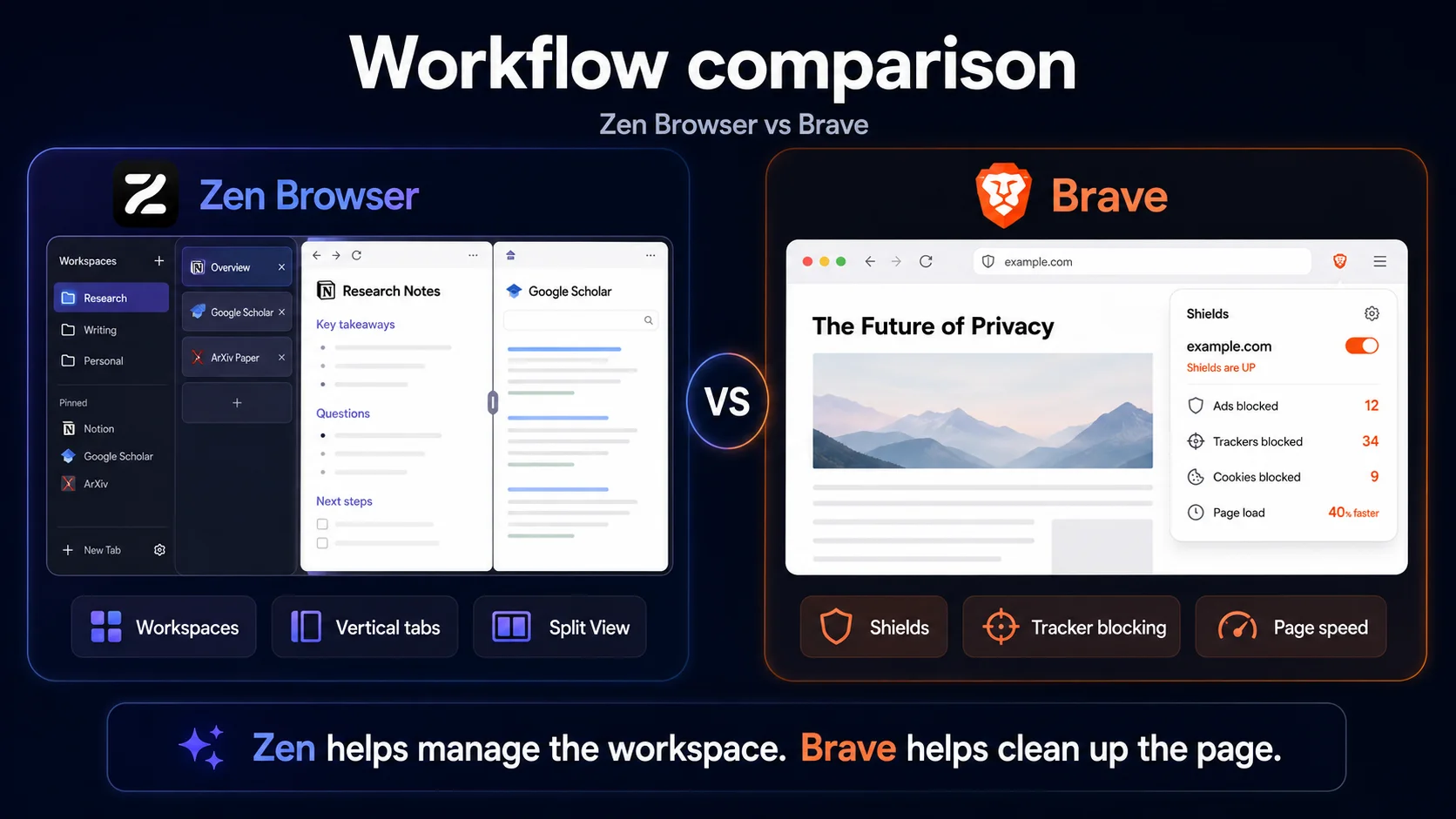
Zen Browser and Brave both attract people who are tired of default Chrome. But they do not solve the same irritation. Brave is for users who want the web itself to feel cleaner: fewer ads, fewer trackers, stronger default blocking, and better compatibility with Chrome extensions. Zen is for users who want the browser workspace to feel cleaner: fewer messy tabs, more control over projects, a calmer interface, and a Firefox-based path away from Chromium.
That is the real trade-off behind Zen Browser vs Brave. Brave removes friction before a page loads. Zen removes friction after you have too many pages open.
Brave is the better browser if privacy and performance mean strong protection out of the box. Brave Shields block ads, trackers, fingerprinting attempts, and unwanted third-party tracking behavior before many page elements load, while Brave’s Chromium base gives it excellent extension compatibility and mainstream site support. Zen Browser is the better browser if your main problem is not ads but browser clutter. It is Firefox-based, open source, and built around Workspaces, vertical tabs, Compact Mode, Glance, and Split View, which makes it better for organizing research, projects, dashboards, and tab-heavy work. Brave usually wins for page speed because blocking ads and trackers can make pages lighter from the start. Zen wins for workflow speed because it makes the session easier to manage once many tabs are open. Choose Brave for default privacy and speed. Choose Zen for non-Chromium browsing and workspace control.
This comparison looks at privacy, performance, RAM usage, extensions, workspaces, mobile support, Brave’s ecosystem, Zen’s project maturity, and which browser makes more sense for daily use in 2026.
Disclosure: Sigma Browser is our product. This article focuses on Zen Browser vs Brave as the main comparison. Sigma is mentioned only as a third option when the user’s real need is AI-assisted research, writing, page summaries, or browser-based workflow automation.
What is the difference between Zen Browser and Brave?
Brave Browser is a free, open-source, Chromium-based browser built around default privacy protection. Brave Shields block ads, trackers, fingerprinting attempts, and unwanted third-party tracking behavior, while Brave’s Chromium foundation gives users Chrome extension compatibility and broad website support.
Zen Browser is a free, open-source, Firefox-based browser built around a calmer desktop workflow. It focuses on Workspaces, Compact Mode, Glance, Split View, vertical tabs, and a more organized interface for people who want their browser to behave more like a workspace.
The simple difference: Brave is a privacy and performance browser first. Zen is a workspace and non-Chromium browser first.
Zen Browser vs Brave at a glance
Most Zen vs Brave comparisons become too simple: Brave is private and fast, Zen is pretty and organized. That is not wrong, but it misses the deeper issue. Brave and Zen optimize different parts of the browsing experience.
Fast verdict
Brave is the safer default recommendation. It has stronger built-in blocking, Chrome extension support, mobile apps, and better mainstream compatibility.
Zen is the better specialist browser. It is more compelling if you want a non-Chromium desktop browser with Workspaces, vertical tabs, Split View, and interface control.
The deciding question is where you feel friction: on the web page itself, choose Brave; inside your messy browser workspace, choose Zen.
The real choice is protection vs control
Brave and Zen are both privacy-friendly alternatives to default Chrome, but they come from different instincts. Brave assumes the modern web is too noisy, too tracked, and too heavy. It solves that by blocking more at the page level. Zen assumes the modern browser workspace is too chaotic. It solves that by giving the user a cleaner structure for tabs, projects, and side-by-side work.
That is why the Chromium trade-off matters. Brave is built on the same open-source Chromium web core that powers Chrome, Edge, Opera, Vivaldi, and many other browsers; Brave also explains its Chromium-based approach in its Chrome comparison materials. That gives Brave broad extension support and predictable compatibility, but it also keeps users inside the Chromium ecosystem. Zen moves in the other direction: it uses Firefox technology, which makes it more attractive to users who care about browser-engine diversity or simply want a modern browser that is not another Chromium variant.
Neither philosophy is automatically better. Brave is more practical for most people because it blocks more annoyances by default and works with more sites and extensions. Zen is more interesting for people whose browser choice is partly about escaping Chromium and partly about rebuilding their workspace around tabs, contexts, and focus.

Privacy: Brave protects more before you configure anything
Brave is stronger than Zen for users who want privacy protections already switched on. Brave’s official Shields documentation describes built-in protection that blocks ads, trackers, fingerprinting attempts, and unwanted third-party tracking behavior. Brave also randomizes fingerprinting signals so sites have a harder time recognizing the same browser across sessions. That is the key privacy advantage: Brave does not ask the average user to build a privacy setup from extensions and settings before they get meaningful protection. It starts by making the web less trackable and less loaded with third-party junk.
Zen’s privacy appeal is real, but it is a different kind of privacy story. Zen’s privacy policy says the browser does not collect telemetry or crash reports and has stripped out Mozilla telemetry from Firefox. That matters to users who do not want their browser sending usage data back to Mozilla or another browser vendor. But low telemetry is not the same thing as Brave-style default blocking. Brave is stronger at blocking the web’s tracking surface before pages load. Zen is stronger if your priority is a Firefox-based browser that removes Mozilla phone-home behavior and gives you more control over the desktop browser experience.
Privacy verdict: Brave wins for out-of-the-box blocking. Zen wins if your priority is low telemetry and a non-Chromium foundation.
Performance: Brave removes page weight, Zen removes workspace weight
Performance is where most comparisons get sloppy. A benchmark can tell you something, but it does not fully explain why a browser feels fast during real work. Brave and Zen can both feel fast, but they feel fast for different reasons.
Brave has the clearer page-performance argument. Ads, trackers, cookie scripts, and fingerprinting scripts add work to many pages. When Brave blocks those elements before they load, pages often become lighter, cleaner, and faster to use. Brave also has Memory Saver and Energy Saver options in its settings, which help manage inactive tabs and device resources. For users asking about zen browser vs brave ram usage, Brave has a more obvious performance toolkit because it combines Chromium optimization with built-in blocking and explicit saver features.
Zen’s speed advantage is more about workflow. A tab-heavy browser session can slow you down even when pages technically load quickly. Workspaces reduce context switching. Vertical tabs make long tab lists easier to scan. Split View keeps research and writing in one window. Compact Mode gives pages more room. If you measure performance by page loading alone, Brave usually has the stronger case. If you measure performance by how quickly you can move through a messy research or work session, Zen can feel faster.
Chromium trade-offs: compatibility versus independence
Brave’s Chromium base is both its practical advantage and the reason some users look elsewhere. On the advantage side, Chromium gives Brave excellent support for modern websites, Chrome Web Store extensions, familiar developer behavior, and fewer random compatibility surprises. If you depend on Chrome-only extensions for SEO, analytics, design QA, screenshots, password management, or developer work, Brave is much easier to adopt than Zen.
The trade-off is philosophical and strategic. Some users do not want every browser choice to lead back to Chromium. Even when Brave removes privacy-hostile parts from Chromium and adds its own protections, it still depends on the same web engine family that dominates the browser market. Zen is more attractive if part of your browser choice is about keeping a Firefox-based option alive in your daily workflow.
This is not a purity contest. Brave is not Chrome with a new logo; it adds privacy protections on top of Chromium and removes features that Brave says could hurt performance or privacy. Zen is not automatically more private just because it avoids Chromium. The trade-off is more specific: Brave gives you compatibility and strong defaults, while Zen gives you a non-Chromium workspace that feels less tied to the Chrome ecosystem.
Chromium verdict: Brave wins compatibility. Zen wins if avoiding Chromium is part of the point.
Extensions: Chrome Web Store vs Firefox add-ons
Extensions are not a side detail. For many users, they are the reason a browser works for their job at all.
Brave wins here for most people because it supports Chrome Web Store extensions. That makes it easier to move from Chrome or Edge without giving up tools you already use. SEO extensions, web design checkers, developer helpers, writing tools, automation extensions, and many workplace add-ons are built and tested with Chromium browsers first.
Zen uses the Firefox extension ecosystem. That is enough for many common needs, including password managers, privacy tools, note tools, and developer add-ons. But if your workflow depends on a specific Chrome-only extension, Zen becomes harder to recommend as the main browser.
This matters especially for users comparing Brave alternatives. A browser can be more interesting than Brave, but if it breaks a core extension workflow, it may not be a better daily browser.
Extension verdict: Brave wins for extension compatibility. Zen is fine if Firefox add-ons cover your actual workflow.
Workspaces, Split View, and daily flow
Zen earns its place in the comparison once the question shifts from blocking trackers to organizing work. Brave can be fast and private, but it still behaves mostly like a familiar Chromium browser. Zen is more willing to change the shape of the browser session.
Zen’s official site highlights Workspaces, Compact Mode, Glance, and Split View. Workspaces keep projects separate, Compact Mode hides browser chrome when you want more room, Glance lets users preview pages without fully switching context, and Split View lets users place tabs side by side. Zen’s Workspaces documentation also supports default container tabs, which can help keep accounts or projects isolated inside one workspace.
That gives Zen an advantage for people who work inside the browser all day. A writer can keep source material beside a draft. A marketer can separate analytics, content, outreach, and competitor research. A developer can keep documentation next to a test page. A student can keep lecture notes, articles, and references away from personal browsing. Brave can do many of these tasks with tabs and extensions, but Zen makes the structure part of the main experience.
Workflow verdict: Zen wins if your browser is a workspace, not just a place to load pages.
The Brave trade-off: privacy browser or Brave ecosystem?
Brave is a strong privacy browser, but it is also an ecosystem. Brave Search, Brave Leo, Brave Rewards, Brave VPN, Wallet, and privacy reports all sit around the core browser experience. Some users like that. It gives them a private search option, built-in AI, rewards features, and more tools without installing extra services.
Other users find it too much. Brave Rewards is opt-in, but the presence of crypto, wallet, and promotional surfaces can make Brave feel less minimal than users expect from a privacy browser. For someone who wants privacy without a browser ecosystem, Brave may feel busier than Firefox, LibreWolf, or Zen.
This does not erase Brave’s strengths. It just explains why some privacy-conscious users still look for a Zen Browser alternative or a non-Chromium setup. Brave is better when you want default protection plus mainstream convenience. Zen is better when you want the browser itself to feel quieter and more workspace-focused.
The Zen trade-off: beautiful workflow, smaller project
Zen’s biggest strength is also its biggest risk: it is a newer, smaller browser trying to redesign a lot of the experience at once. That makes it more exciting than a standard browser, but it also means more caveats.
Zen is mainly a desktop browser. It does not have the same mobile coverage as Brave. Its FAQ also notes DRM limitations related to Widevine, which can affect services such as Netflix, Spotify, Disney+, HBO Max, Amazon Prime Video, Apple Music, and Google Play Movies & TV. That may not matter if Zen is your focused work browser, but it matters if you want one browser for everything.
Brave is less adventurous as an interface, but it is more practical as an everyday default. It has desktop and mobile apps, Chrome extension support, built-in blocking, and fewer compatibility risks. Zen is the better browser to try if you are bored with the shape of mainstream browsers. Brave is the better browser to recommend if someone wants privacy and speed without thinking too much.
When neither browser is the best fit
Zen and Brave both make sense if your browser problem is privacy, speed, or workspace control. They are less direct if your real problem is AI-assisted work.
If you spend your day summarizing pages, comparing sources, drafting content, asking questions about open tabs, or using AI to move through web research, a classic privacy browser is not always enough. That is where AI browsers become more relevant.
Sigma Browser is one example of that third category. It is built around AI Chat, Deep Research, page context, and browser-based AI workflows. That does not make it the winner of a Zen vs Brave privacy comparison. It simply means the decision changes if your main workflow is not “block trackers” or “organize tabs,” but “use AI inside the browser to research, write, and act faster.”
Decision matrix: Zen Browser vs Brave
Zen Browser vs Brave: final verdict
The easiest way to choose between Zen and Brave is to ask what you are trying to clean up. If you want to clean up the web page, Brave is better. Its Shields block ads, trackers, fingerprinting attempts, and unwanted third-party tracking behavior by default. It is Chromium-based, which means strong compatibility, Chrome extension support, and fewer surprises on mainstream sites. It also has desktop and mobile apps, Memory Saver, Energy Saver, and a more complete everyday browser setup.
If you want to clean up the browser workspace, Zen is better. Zen does not beat Brave by being a stronger default blocker or a faster Chromium replacement. It wins by changing how browsing feels after the fifth, tenth, or thirtieth tab. Workspaces, vertical tabs, Compact Mode, Glance, Split View, and a Firefox-based foundation make Zen the better choice for users who want a focused, non-Chromium desktop browser organized around projects rather than pages.
So the honest verdict is not “Zen is better” or “Brave is better.” Brave is the better privacy and speed browser for most people. Zen is the better workspace browser for people who want control, focus, and a real alternative to Chromium. If you are still comparing options, start with Brave alternatives, Zen Browser alternatives, or Firefox alternatives depending on whether you care most about privacy, workflow, engine choice, or AI productivity.
More articles



Download Sigma Browser
Questions & Answers
reach out to us on X at @Sigma_Browser
Get Sigma on Android


